Windows Vista Forums
Vista Forums Home Join Vista Forums Windows 7 Forum Vista Tutorials Tags
Welcome to Windows Vista Forums. Our forum is dedicated to helping you find solutions with any problems, errors or issues you are experiencing with Windows Vista. The Vista forum also covers news and updates and has an extensive Windows Vista tutorial section that covers a wide range of tips and tricks.

Go Back   Vista Forums > Vista Forums > Drivers

Vista - Driver Updates

Reply
 
Old 05-26-2009   #1 (permalink)


Vista Home premium 32bit, SP2


Driver Updates

I hope this is not a dumb question but is there a way to check to see if your drivers are all up to date at once? Ok I've read some post and I'm leaving them alone. No problems.

My System SpecsSystem Spec
Old 05-26-2009   #2 (permalink)


Windows 7 7600.16385 64bit


Re: Driver Updates

My System SpecsSystem Spec
Old 05-26-2009   #3 (permalink)


Vista Home premium 32bit, SP2


Re: Driver Updates

Thanks Kavita
My System SpecsSystem Spec
Old 05-26-2009   #4 (permalink)


Windows 7 7600.16385 64bit


Re: Driver Updates

You are Welcome venom762.
My System SpecsSystem Spec
Old 05-27-2009   #5 (permalink)


Vista x64 + Windows 7 x64 (Ultimate)


Re: Driver Updates

While those are fine to let you know what driver is not up to date, be advised that when it comes to your Video & sound drivers, it preferred to update those manually, otherwise, you run the risk of corrupt drivers or errors.

Instead of paying for that, just learn what type of board, video & sound card you have, write it down somewhere you won't forget (like a notepad text in your desktop) and make it a habit to check each manufacturer each month to see if they have updated drivers... that's what I do

Oh and... Windows Update usually tells you what hardware needs updating
My System SpecsSystem Spec
Old 05-27-2009   #6 (permalink)


Vista home premium 64 bit


Re: Driver Updates

If it is not broken dont ix it comes to mind.
The said like AstaLaVista has said some drivers are worth a check.
Sound and Graphics are normally updated often.
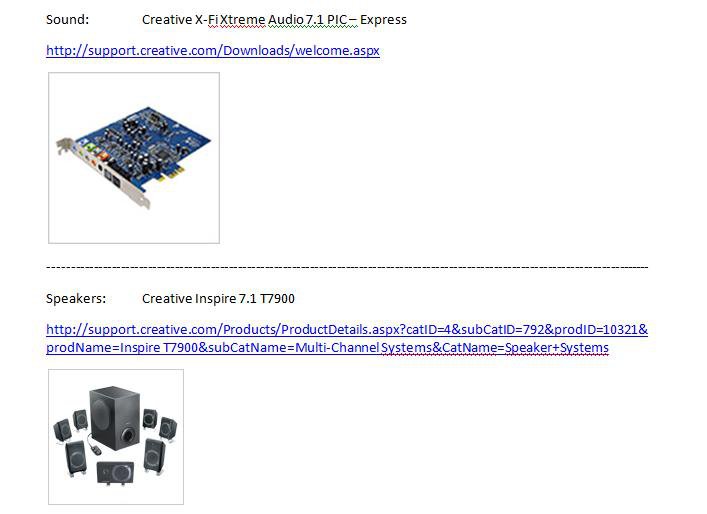
If you do use notpad next to your driver you can put a hyperlink that takes you directy to the page needed.

This is an example extract from mine;

untitled.jpg
My System SpecsSystem Spec
Reply

Thread Tools


Similar Threads
Thread Forum
driver updates ? Vista performance & maintenance
Driver Updates. Drivers
driver updates and SP! Vista General
asio driver , driver updates for M-Audio Delta rpc1 card Vista music pictures video


Vista Forums is an independent web site and has not been authorized,
sponsored, or otherwise approved by Microsoft Corporation.
"Windows Vista", the Start Orb, and related materials are trademarks of Microsoft Corp.
© Designer Media Ltd

1 2 3 4 5 6 7 8 9 10 11 12 13 14 15 16 17 18 19 20 21 22 23 24 25 26 27 28 29 30 31 32 33 34 35 36 37 38 39 40 41 42 43 44 45 46