Windows Vista Forums
Vista Forums Home Join Vista Forums Donate Vista Tutorials Tags

Welcome to Vista Forums we are your forum to discuss Windows Vista x64 and x86 systems. Whether you need help or just want to post an idea you have on Vista, this is the forum for you.
Register at Vista forums...the world biggest Windows Vista resource Join Vista Forums Now

Go Back   Vista Forums > Vista Forums > General Discussion

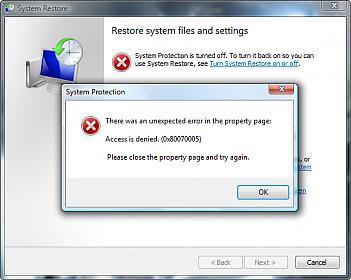
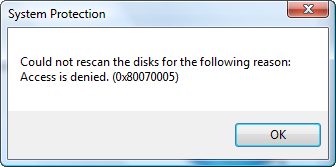
Vista System Restore 0x80070005 Error

Reply
 
Thread Tools Display Modes
Old 05-16-2008   #11 (permalink)
sidney1st's Avatar
Member


  sidney1st is offline

Re: Vista System Restore 0x80070005 Error

Yep clean.
Can somebody confirm that Home Premium has the capability of a complete backup/restore of the system?
I remember that when Vista was launch, the HP version had the backup/restore function on for files and folders, but off for a complete backup/restore function.
Old 05-16-2008   #12 (permalink)
Bowen's Avatar
Member


  Bowen is offline

Re: Vista System Restore 0x80070005 Error

I found out definitively what the problem was and I didn't even have to format AGAIN! It was Outpost Firewall! I had just reinstalled it either just before I sent the log file or just after....I think it was before. Anyway, I went to install Motorolla Phone Tools 4.5 and I got that annoying message saying it couldn't find the path or maybe I didn't have authorization. I went back thinking the two things I just installed and one of them was Snagit and the other was Outpost Firewall Pro. Anyway I thought uh oh, let me look at system restore again because these issues seemed to be interlinked.

The funny thing is I was just praising them in an email how much I liked them. As soon as I uninstalled Outpost my system restore problems went away immediately! So you guys were right...it wasn't SP1 afterall. However, SP1 does cause problems in some games still like BF2 and BF2142.
Old 05-16-2008   #13 (permalink)
Bare Foot Kid's Avatar
Technophile Wannabe


  Bare Foot Kid is offline

Re: Vista System Restore 0x80070005 Error

Hello Bowen,

Thanks for letting us know you got it sorted out!


Later Ted
Old 05-16-2008   #14 (permalink)
Bowen's Avatar
Member


  Bowen is offline

Re: Vista System Restore 0x80070005 Error

Sure thing and you can tell post this as fact too because I also had Outpost on my laptop and it too has Vista (x86 though) and it had the 32-bit version of Outpost Firewall Pro on it. As soon as I uninstalled it, System Restore came right back and I even solved another problem. I was having a hard time installing some software and patches and at random times Windows would say it couldn't find the path, and/or I didn't have the proper authorization. That too was fixed as soon as as I got rid of Outpost! So stay away from Outpost Firewall Pro. It may be fine for XP, but not for Vista.....x86 or x64!
Old 05-16-2008   #15 (permalink)
Bare Foot Kid's Avatar
Technophile Wannabe


  Bare Foot Kid is offline

Re: Vista System Restore 0x80070005 Error

Hello again,

You may want to look at this!

Free Software List for Vista


Later Ted
Old 05-16-2008   #16 (permalink)
acdcfan's Avatar
Member


  acdcfan is offline

Re: Vista System Restore 0x80070005 Error

Quote:
Bowen
View Post
Well as it turns out the problem was Service Pack 1. Vista SP1 isn't ready for public use.
Hi Bowen
Care to back above statement? It has been offered by Microsoft through WU.
Some people have downloaded it directly of their web site instead of waiting for their WU to recommended it.
As far as I read through other forums if there was software clash with SP1, WU would not recommend until issue has been resolved bu I am not sure how may users are/were awar5e of this.
I have installed SP1 on my computer back in March and did not have any problems.... Maybe because I don't use system restore and never attempted to do it I wouldn't know
Old 05-17-2008   #17 (permalink)
Bowen's Avatar
Member


  Bowen is offline

Re: Vista System Restore 0x80070005 Error

Quote:
acdcfan
View Post
Hi Bowen
Care to back above statement? It has been offered by Microsoft through WU.
Some people have downloaded it directly of their web site instead of waiting for their WU to recommended it.
As far as I read through other forums if there was software clash with SP1, WU would not recommend until issue has been resolved bu I am not sure how may users are/were awar5e of this.
I have installed SP1 on my computer back in March and did not have any problems.... Maybe because I don't use system restore and never attempted to do it I wouldn't know
Yes, I was mistaken...I believe I said that, but I'll say it again. That said, I don't have SP1 on my desktop this time around as I believe it's giving me a problem with BF2 and BF2142. I say that I believe it's SP1 because when I had it installed, the games were acting....that is crashing like they were before the hotfixes. They cras from memory errors exactly like they did before the hotfixes MS released. I would have thought that SP1 would have included these hotfixes too.

While I can't say for sure it's SP1 with the game issue, it does seem like it with this particular problem. It's like the patches were uninstalled or something and SP1 didn't update them. I don't know....it doesn't make sense. I do know some people claim to have problems with SP1 though.

Aside from those issues that I thought were causing the problems (the install problems, certain game issues and system restore) SP1 was fine. It doesn't automatically come up to d/l though. I had to manually download it, but it was from MS and it wasn't a beta or an RC.....it was the final release. At another forum someone told me that SP1 doesn't show up in the update window if you have hardware that might conflict with SP1. I can tell you right now that the only problem I've had from any hardware is something that you might have heard of.....Creative's X-Fi card. Geez, they're nothing but trouble! Anyway I'd be willing to bet that if I uninstalled that card, SP1 would pop up. Still, I'll wait until Creative gets their crap together and I won't be buying another Creative card again!
Old 05-27-2008   #18 (permalink)
acdcfan's Avatar
Member


  acdcfan is offline

Re: Vista System Restore 0x80070005 Error

Quote:
Bowen
View Post
you might have heard of.....Creative's X-Fi card. Geez, they're nothing but trouble! Anyway I'd be willing to bet that if I uninstalled that card, SP1 would pop up. Still, I'll wait until Creative gets their crap together and I won't be buying another Creative card again!
Oh boy I have heard of Creative and drivers that don't work on Vista, driver updates nonexistent so that you are forced to buy new product........ and countless threads and complaints about Creative like this one below
Quite interesting reading
Message to Daniel_K - Sound Blaster - Creative Labs
Maybe I am getting this thread into wrong direction but intentionally

Sorry Mods
Old 05-27-2008   #19 (permalink)
Bowen's Avatar
Member


  Bowen is offline

Re: Vista System Restore 0x80070005 Error

Quote:
acdcfan
View Post
Oh boy I have heard of Creative and drivers that don't work on Vista, driver updates nonexistent so that you are forced to buy new product........ and countless threads and complaints about Creative like this one below
Quite interesting reading
Message to Daniel_K - Sound Blaster - Creative Labs
Maybe I am getting this thread into wrong direction but intentionally

Sorry Mods
Can you tell me where to get these drivers at by Daniel K for Vista x64? I'd very much like to try them. It's OK for putting the thread in another direction since I've already fixed my problem. Thanks acdcfan!
Old 05-28-2008   #20 (permalink)
acdcfan's Avatar
Member


  acdcfan is offline

Re: Vista System Restore 0x80070005 Error

Quote:
Bowen
View Post
Quote:
acdcfan
View Post
Oh boy I have heard of Creative and drivers that don't work on Vista, driver updates nonexistent so that you are forced to buy new product........ and countless threads and complaints about Creative like this one below
Quite interesting reading
Message to Daniel_K - Sound Blaster - Creative Labs
Maybe I am getting this thread into wrong direction but intentionally

Sorry Mods
Can you tell me where to get these drivers at by Daniel K for Vista x64? I'd very much like to try them.Thanks acdcfan!
I think that certain drivers can be found on torrent sites but official link has been removed due to threat of a law suit by Creative
Reply

Thread Tools
Display Modes


Similar Threads
Thread Thread Starter Forum Replies Last Post
error code 0x80070005 with create restore point shaggy Vista General 1 10-25-2007 12:28 PM
Vista System Restore Syntax error 0x800700B Lanfear Vista hardware & devices 4 10-14-2007 12:33 PM
Vista backup error (0x80070005) Steve A. Vista account administration 0 09-26-2007 07:57 PM
Create restore point gives error 0x80070005 access denied. jgentile Vista General 1 07-21-2007 05:24 PM
System restore error on Vista home premium Sara Vista General 10 06-05-2007 12:45 PM


Vistax64.com is an independent web site and has not been authorized,
sponsored, or otherwise approved by Microsoft Corporation.
"Windows Vista", the Start Orb, and related materials are trademarks of Microsoft Corp.
© Designer Media 2005-2008

1 2 3 4 5 6 7 8 9 10 11 12 13 14 15 16 17 18 19 20 21 22 23 24 25 26 27 28 29 30 31 32 33 34 35 36 37 38 39 40 41 42 43 44 45 46 47 48 49 50