
Hi, can anyone help me with my vista? I'm missing a 100GB out of 150GB of my hard disk. I deleted all previous restore points backups, but no memory freed! Any idea? Thanks!

You are using an out of date browser. It may not display this or other websites correctly.
You should upgrade or use an alternative browser.
You should upgrade or use an alternative browser.
Missing disk space
- Thread starter BGman
- Start date


Hi,
Download WinDirStat from here: WinDirStat - Free software downloads and reviews - CNET Download.com
Run the programme. This programme will give you a very detailed outlook on your Hard drive and show you what areas consume the most space. If you find that one particular area of your hard drive is taking up alot of space, enter the file and keep following through until you find the source of the disk consumption.
Report back once you've done it and let me know if there is one particular area that stands out.
Download WinDirStat from here: WinDirStat - Free software downloads and reviews - CNET Download.com
Run the programme. This programme will give you a very detailed outlook on your Hard drive and show you what areas consume the most space. If you find that one particular area of your hard drive is taking up alot of space, enter the file and keep following through until you find the source of the disk consumption.
Report back once you've done it and let me know if there is one particular area that stands out.
My Computer
Hi, thanks for your interest in my problem.
I run the programme you gave me. It described the usage of my hard drive very precisely. The bad thing is that it ascribed only 55.2 GB as a size of the disk, whereas when I right-click properties on the C: it tells me 143 GB (which I believe is the real capacity of the hard drive) . The programme just didn't detect the rest of the disk, which I believe is hidden in undeleted backups from system restore point. I turned off this function of the vista but the backups didn't eraesed, but went in the hidden system part of the Windows, I believe... :huh:
I run the programme you gave me. It described the usage of my hard drive very precisely. The bad thing is that it ascribed only 55.2 GB as a size of the disk, whereas when I right-click properties on the C: it tells me 143 GB (which I believe is the real capacity of the hard drive) . The programme just didn't detect the rest of the disk, which I believe is hidden in undeleted backups from system restore point. I turned off this function of the vista but the backups didn't eraesed, but went in the hidden system part of the Windows, I believe... :huh:
My Computer


Hello BGMan...
How many partitions do you have on your system? Do you have C: and D: as well?
Does Windows Vista "see" your disk with 143GB total space?
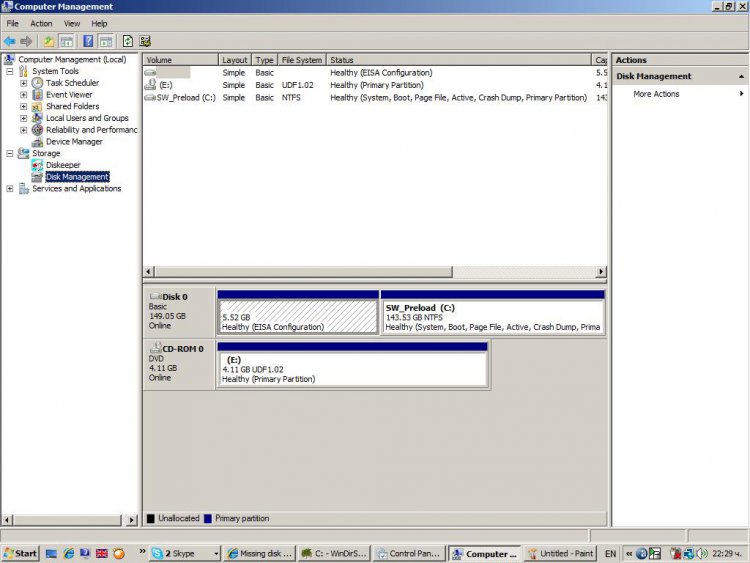
Can you post a screenshot of your Disk Management?
You will find it under Control Panel - Administrative Tools - Computer Management - Disk Management
How many partitions do you have on your system? Do you have C: and D: as well?
Does Windows Vista "see" your disk with 143GB total space?
Can you post a screenshot of your Disk Management?
You will find it under Control Panel - Administrative Tools - Computer Management - Disk Management
My Computer
System One
-
- Manufacturer/Model
- Limneos
- CPU
- Intel Core2Duo E4500 2.2GHz
- Motherboard
- Asus P5LD2-X/1333
- Memory
- 2GB 800Mhz Kingston DDR2
- Graphics Card(s)
- Nvidia 8500GT
Can you post a screenshot of your Disk Management?
I attached the screenshot. Everything seems normal. I don't have any partitions.
Attachments
My Computer
Sorry, I was bothering you. I saw the external link below. It was my lenovo ThinkVantage function Rescue and Recovery that made backups of the system. Interestning thou, where lenovo hid them from Windows?!