
![]() |
![]() | ![]() | ![]() | ![]() | ![]() | ![]() | ![]() |
| Welcome to Windows Vista Forums. Our forum is dedicated to helping you find solutions with any problems, errors or issues you are experiencing with Windows Vista. The Vista forum also covers news and updates and has an extensive Windows Vista tutorial section that covers a wide range of tips and tricks. |
| |||||||
![]() |
| |
| | #1 (permalink) |
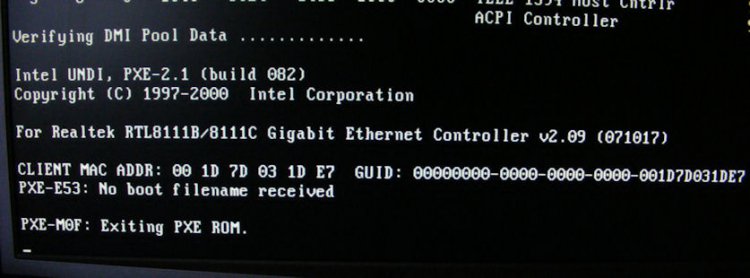
| Vista ult 32 bit, Win 7 Pro 32 bit, Win 7 Pro 64 bit | Boot screen problem.? This appears when booting, it shows in Updates as Optional and successful, yet it doesn't show in installed Updates, so can't delete it, So how do I get rid if it, it slows down booting .??????????????? |
My System Specs![]() |
| | #2 (permalink) |
| Vista ult 32 bit, Win 7 Pro 32 bit, Win 7 Pro 64 bit | Re: Boot screen problem.? Have I beaten everyone.? |
My System Specs![]() |
| | #3 (permalink) |
| Vista ult 32 bit, Win 7 Pro 32 bit, Win 7 Pro 64 bit | Re: Boot screen problem.? 26 Viewed so far, no clues. |
My System Specs![]() |
| | #4 (permalink) |
| Vista Ultimate SP2 x64 : Seven Ultimate x64 | Re: Boot screen problem.? That looks like a BIOS booting screen... And it only appeared after a Windows Update? You could try rolling back the realtek ethernet driver in device manager. Have you been into the BIOS, changed any start up boot order? It looks like it's trying to boot of a network address. If you're not networked, you could always disable the Ethernet ROM in your BIOS or check that it's not the first boot priority. (It may not be right, but at least it's an answer ) |
My System Specs![]() |
| | #5 (permalink) |
| Vista ult 32 bit, Win 7 Pro 32 bit, Win 7 Pro 64 bit | Re: Boot screen problem.? Thanks for the reply, tried rolling back driver, no difference, Bootup start only from CDROM back to HDD. Its a thought, I'll try the Ethernet Rom action.! |
My System Specs![]() |
| | #6 (permalink) |
| Windows 7 x64 | Re: Boot screen problem.? Is that the network card you use to connect to the Internet? If not you could just try disabling it in BIOS. |
My System Specs![]() |
| | #7 (permalink) |
| Vista ult 32 bit, Win 7 Pro 32 bit, Win 7 Pro 64 bit | Re: Boot screen problem.? Don't use a network card, use a Netgear Router. As to Ethernet Rom, nothing of that name, only "Onboard Lan Boot Rom." What would be the result of Disabling that.? |
My System Specs![]() |
| | #8 (permalink) |
| Vista Ultimate SP2 x64 : Seven Ultimate x64 | Re: Boot screen problem.? |
My System Specs![]() |
| | #9 (permalink) |
| Vista ult 32 bit, Win 7 Pro 32 bit, Win 7 Pro 64 bit | Re: Boot screen problem.? But would the computer still reboot without it ?. |
My System Specs![]() |
| | #10 (permalink) |
| Windows 7 Ultimate x64/Vista Ultimate x64/XP Pro x86/Fedora 12 X64 | Re: Boot screen problem.? yes it would |
My System Specs![]() |
![]() |
| Thread Tools | |
| |
Similar Threads | ||||
| Thread | Forum | |||
| black screen after boot screen | General Discussion | |||
| password protection, log on screen, hibernate & screen saver problem | General Discussion | |||
| boot-password shown at boot login screen | Vista account administration | |||
| Dual Boot Problem - Misplaced Boot Sector | Vista General | |||
| Dual Boot Problem - Misplaced boot sector | Vista General | |||