
Windows Vista Forums
Vista Forums Home Join Vista Forums Windows 7 Forum Vista Tutorials Tags
Welcome to Windows Vista Forums. Our forum is dedicated to helping you find solutions with any problems, errors or issues you are experiencing with Windows Vista. The Vista forum also covers news and updates and has an extensive Windows Vista tutorial section that covers a wide range of tips and tricks.

Go Back   Vista Forums > Vista Forums > Graphic cards

Vista - BSOD Help.

Reply
 
Old 02-21-2009   #1 (permalink)


Windows (TM) Vista Home Premium


I was writing a detailed description of what was happening with my BSOD, then sure enough one happend again... ANYWAYS...
Im attaching .xml files taken from 3Dmark with full system specs and I wil also include the .dmp files from the last few crashed. Any help would be fantastic! Also when it does bluescreen is at random, like writing on a forum to help solve the problem >_<
systeminfo.xml is the one with my system stats I think.

Just figured out I have to zip files...

PS I have replaced the harddrive since I first got the computer thinking that the HD was problem, it wasn't. Also I have cleaned this thing inside and out and even added anothing fan, thinking it was a heat problem, its not. My system ATM is running at 35c to 40c and my graphics card cpu is 39c to 43c.

Attached Files
File Type: zip systeminfo.zip (78.7 KB, 6 views)

Last edited by roy69; 02-22-2009 at 09:54 AM..
My System SpecsSystem Spec
Old 02-22-2009   #2 (permalink)


Vista home premium 64 bit


Re: BSOD Help.

What does the bluescreen actually say?
My System SpecsSystem Spec
Old 02-22-2009   #3 (permalink)


Windows (TM) Vista Home Premium


Re: BSOD Help.

One was Clock interrupt and other was video related. Next time it happens I will have a camera or I will write it down.
My System SpecsSystem Spec
Old 02-23-2009   #4 (permalink)


Vista home premium 64 bit


Re: BSOD Help.

Run a memory check.
Ruc SFC to check the integraty of your system.
Check your error logs to see if there is any underlying errors that may be causing the problems,
Click on Start
Right click on My computer and choose Manage.
This will allow you to see various logs.
Also check Performance and reliability scores.
My System SpecsSystem Spec
Old 02-23-2009   #5 (permalink)


Windows (TM) Vista Home Premium


Re: BSOD Help.

I ran memcheck the other day, 6 passes, no errors.
Windows Resource Protection did not find any integrity violations.

What logs do I look under to find underlying errors?


Also Tnx for the help so far

ALSO just had a bluescreen... It said
"A clock interrupt was not received on a secondary processor"

Last edited by jonesscott; 02-23-2009 at 08:07 AM.. Reason: Updated BSOD
My System SpecsSystem Spec
Old 02-23-2009   #6 (permalink)


Vista Home Premium x64


Re: BSOD Help.

Quote  Quote: Originally Posted by jonesscott View Post
I ran memcheck the other day, 6 passes, no errors.
My Windows score is 5.4
Windows Resource Protection did not find any integrity violations.

What logs do I look under to find underlying errors?


Also Tnx for the help so far
c:\windows\memory.dmp
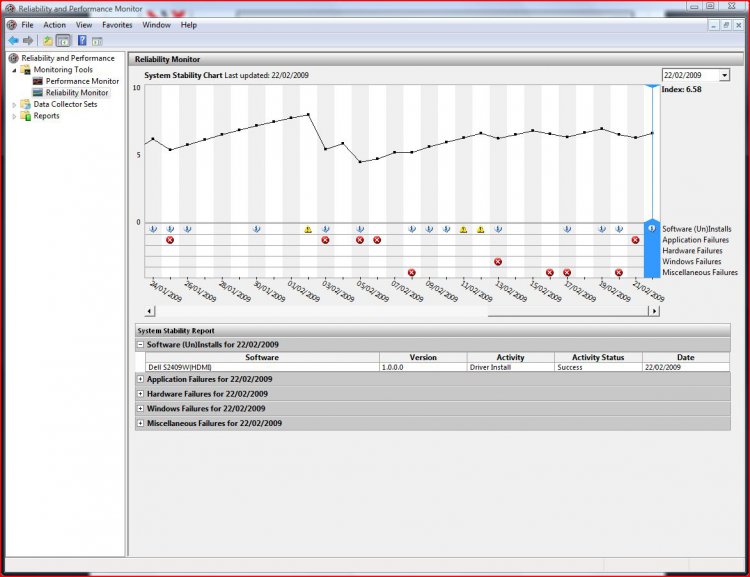
decoding the dmp file isnt the easiest of things to do, you need to view it in command prompt and type a series of commands to view it you can also have a look at reliability monitor. type perfmon into the start menu and on the monitor, click on reliability monitor in the list on the left as roy69 has already said
Attached Thumbnails
reliability-mon.jpg  

Last edited by MrNeeds; 02-23-2009 at 08:02 AM..
My System SpecsSystem Spec
Old 02-23-2009   #7 (permalink)


Windows (TM) Vista Home Premium


Re: BSOD Help.

Yeah I really don't know how to read this so I just uploaded an image. Seems to be alot of error's though.
My System SpecsSystem Spec
Old 02-23-2009   #8 (permalink)


Windows (TM) Vista Home Premium


Re: BSOD Help.

Well after reviewing my error codes, I think its Bug Check 0x101: CLOCK_WATCHDOG_TIMEOUT which its telling me my processor's bad? QQ
I might as well buy a new board and a better processor.
My System SpecsSystem Spec
Old 02-23-2009   #9 (permalink)


Vista Home Premium x64


Re: BSOD Help.

its not a dodgy processor, its just a processor overheat, you need to clean your heatsink and fan for the processor.
My System SpecsSystem Spec
Old 02-23-2009   #10 (permalink)


Windows (TM) Vista Home Premium


Re: BSOD Help.

I already did, took the cpu fan out and everything with a can of air duster, as we speak I am decoding a dvd and my CPU temp Core #0 is idling around 40c to 43c and Core #1 is 43c to 45c and I am using Core Temp 0.99
My System SpecsSystem Spec
Reply

Thread Tools


Similar Threads
Thread Forum
BSOD - Debugging a BSOD in Vista Tutorials
Bsod General Discussion
BSOD????? Vista performance & maintenance
BSOD Vista hardware & devices
Vista BSOD, am unable to shutdown without BSOD, logoff OK Vista General


Vista Forums is an independent web site and has not been authorized,
sponsored, or otherwise approved by Microsoft Corporation.
"Windows Vista", the Start Orb, and related materials are trademarks of Microsoft Corp.
© Designer Media Ltd

1 2 3 4 5 6 7 8 9 10 11 12 13 14 15 16 17 18 19 20 21 22 23 24 25 26 27 28 29 30 31 32 33 34 35 36 37 38 39 40 41 42 43 44 45 46