Windows Vista Forums
Vista Forums Home Join Vista Forums Windows 7 Forum Vista Tutorials Tags
Welcome to Windows Vista Forums. Our forum is dedicated to helping you find solutions with any problems, errors or issues you are experiencing with Windows Vista. The Vista forum also covers news and updates and has an extensive Windows Vista tutorial section that covers a wide range of tips and tricks.

Go Back   Vista Forums > Vista Forums > Graphic cards

Vista - RivaTuner problem

Reply
 
Old 09-27-2009   #1 (permalink)


Vista Ultimate x64 SP2


RivaTuner problem

Hello, My dad got my brother a video card ( 9800gt ) and i told him to get rivatuner to change the fan speed. He did this and was playing his games for about a day, when he called me over and showed me his problem. He will bring up rt and change the speed but it goes back down to like 36% in a second. He has tried reinstalling and the problem was still there.

Any help?

My System SpecsSystem Spec
Old 09-28-2009   #2 (permalink)


Vista Home Premium 64bit SP2


Re: RivaTuner problem

tell me exactly how he is using riva tuner to manage his fan speeds what version of riva tuner (linky) it is and what driver version (be thorough , dont skip over anything for example has he created any fan profiles?) and ill tell you what hes doing wrong...........
My System SpecsSystem Spec
Old 09-28-2009   #3 (permalink)


Vista Ultimate x64 SP2


Re: RivaTuner problem

Hello, there is a window he can go to and he can change is clock speeds, etc. and fan speeds. I told him just to change the fan speed and I believe he made two profiles, one he named games which is 70%, and one is normal (50%). He will then open up the window and click the profile he wants.

Sorry if this isn't exact enough, but he isn't home right now, so I am doing this off the top of my head.
My System SpecsSystem Spec
Old 09-29-2009   #4 (permalink)


Vista Home Premium 64bit SP2


Re: RivaTuner problem

no mate tats fine but i need to know the version of riva tuner hes using and his current GPU driver version , Im asking becaus there is an incompatibility in the older version of riva with the newer drivers

have a lok over this too it includes setting up fan profiles and temp controlled fan speed events

RivaTuner generic guide - Guru3D.com Forums
My System SpecsSystem Spec
Old 10-07-2009   #5 (permalink)


Vista Ultimate x64 SP2


Re: RivaTuner problem

Sorry it's been so long, but I have been busy with school.

Anyway, his driver version is 190.82, and his rivatuner is 2.24
My System SpecsSystem Spec
Old 10-07-2009   #6 (permalink)


Windows Vista Enterprise x64 SP2


Re: RivaTuner problem

Quote  Quote: Originally Posted by evilhugbear View Post
Sorry it's been so long, but I have been busy with school.

Anyway, his driver version is 190.82, and his rivatuner is 2.24
You have the latest rivatuner and close to the newest driver (191.07).
NVIDIA DRIVERS 191.07 WHQL

You may want to go ahead and install that.

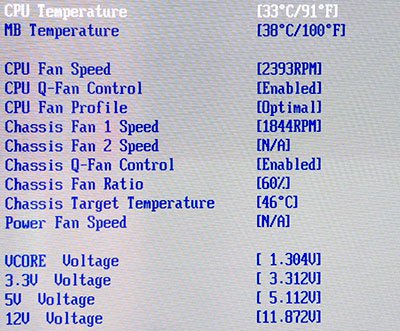
Does your bios also control fan speed?
My System SpecsSystem Spec
Old 10-07-2009   #7 (permalink)


Vista Ultimate x64 SP2


Re: RivaTuner problem

I updated everything and the problem still occurs.

I don't know if the bios controls it. How do I check?
My System SpecsSystem Spec
Old 10-08-2009   #8 (permalink)


Vista Home Premium 64bit SP2


Re: RivaTuner problem

its the version of riva tuner mate , it doesnt support those drivers , he has brought out an incrmental update 2.24c here (thats why i asked waht drivers and what version)

RivaTuner v2.24c download from Guru3D.com

the dev has been working on MSI afterburner ................

Introducing MSI Afterburner Overclock Software - Guru3D.com Forums

a utility designed aroun riva tuner (worth getting before msi lock it out to their cards only) thats why he aint had time to update riva tuner recently

he could also run his current version of riva tuner in driver emulation mode but its a pain in tha ass

did you look through the guide i linked you too in my last post?
My System SpecsSystem Spec
Old 10-08-2009   #9 (permalink)


Vista Ultimate x64 SP2


Re: RivaTuner problem

He updated it to 2.24c and the problem is still there.
My System SpecsSystem Spec
Old 10-08-2009   #10 (permalink)


Windows Vista Enterprise x64 SP2


Re: RivaTuner problem

Quote  Quote: Originally Posted by evilhugbear View Post
I updated everything and the problem still occurs.

I don't know if the bios controls it. How do I check?
Please enter your bios. Boot your computer and press DEL (or whatever your screen says to enter bios).

You will see a screen such as indicated below. You may want to change your settings to allow your RivaTuner to control fan.
Attached Thumbnails
q-fan.jpg  
My System SpecsSystem Spec
Reply

Thread Tools


Similar Threads
Thread Forum
RivaTuner Software
RivaTuner v2.24 Update Software
RivaTuner 2.23 Software
New RivaTuner Overclocking & Cooling
RivaTuner question Graphic cards


Vista Forums is an independent web site and has not been authorized,
sponsored, or otherwise approved by Microsoft Corporation.
"Windows Vista", the Start Orb, and related materials are trademarks of Microsoft Corp.
© Designer Media Ltd

1 2 3 4 5 6 7 8 9 10 11 12 13 14 15 16 17 18 19 20 21 22 23 24 25 26 27 28 29 30 31 32 33 34 35 36 37 38 39 40 41 42 43 44 45 46