![]() |
![]() | ![]() | ![]() | ![]() | ![]() | ![]() | ![]() |
| Welcome to Windows Vista Forums. Our forum is dedicated to helping you find solutions with any problems, errors or issues you are experiencing with Windows Vista. The Vista forum also covers news and updates and has an extensive Windows Vista tutorial section that covers a wide range of tips and tricks. |
| |||||||
![]() |
| |
| | #1 (permalink) |
| Windows 7 x64 (7229) | Microsoft 6to4 adapter The Microsoft 6to4 adapter showed in the device manager that it was not working properly. If you look at yours it may show the same. I think I disabled it trying to update it. This was before I found this short sweet article from Microsoft. Does anyone know if I will experience problems in the future when this new technology gets more prevalent? If so, how do I get it back. I followed the instructions that a vista pro gave me to fix this problem and it shows in the reliability monitor that it was installed...but it is not showing int he device manager. Would it be installed but not show on the device manager? Thanks for any thoughts. Here is the article http://support.microsoft.com/kb/932520/ |
My System Specs![]() |
| | #2 (permalink) |
| Windows 7 x64 (7229) | Re: Microsoft 6to4 adapter Just learned something from Brink's wonderful tutorial on showing hidden devices. I anyone else ever has this problem...just go to the device manager/view/show hidden devices. The Microsoft 6to4 adapter will be there if you have it installed. Now I have another question. I followed a pro's advice to install this after deleting it. He was right but it was hidden. He was at my home and didn't know this. We did it one more time and now when I press "show hidden devices" it shows 2 Microsoft 6to4 adapters. I assume I'm alright to leave both there? Does anyone know this? |
My System Specs![]() |
| | #3 (permalink) |
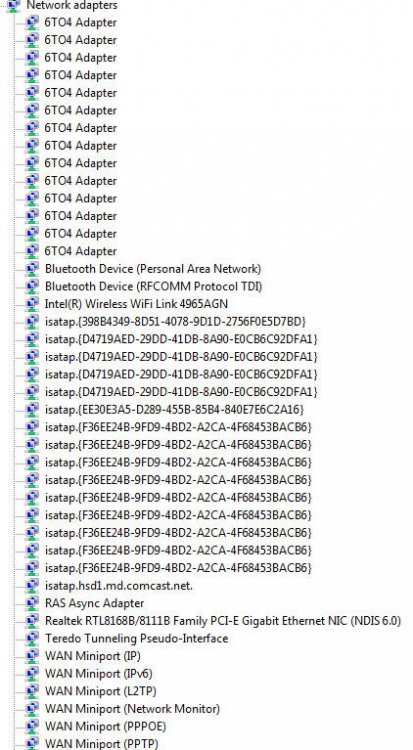
| Vista Home Premium 32 bit now with SP2! | Re: Microsoft 6to4 adapter When I look for network adapters, device manager shows just 4. But when I click show hidden devices, it shows EIGHT Microsoft 6to4 adapters, plus a whole load of WAN miniport, and strings of long numbers I don't understand. None of these is affecting me so I assume Vista is just doing it's thing.. We'll see how this all works when I go to setup my wireless network.. ![]() Peppurr |
My System Specs![]() |
| | #4 (permalink) |
| Windows 7 x64 (7229) | Re: Microsoft 6to4 adapter Mine shows a bunch of stuff too. Just adapters though. However the 6to4 adapters are listed as Microsoft 6to4 adapter and Microsoft 6to4 adapter#2. They are duplicates because I downloaded it twice. If you go to properties, everything is the same except the #2 on the second one. I don't know what that other stuff is....unless you did the same thing as me eight times. Good luck. Nobody seems to know about this subject. (nobody responded i mean, I'm sure a lot of people on this forum know all about it) |
My System Specs![]() |
| | #5 (permalink) |
| Vista Ultimate x64 | Re: Microsoft 6to4 adapter I have a few myself....Any explanations would be welcomed. |
My System Specs![]() |
| | #6 (permalink) |
| Windows 7 x64 (7229) | Re: Microsoft 6to4 adapter I am running Home Premium x64 and mine looks nothing like that. I have a total of 13 when showing hidden devices. It looks like you have over double the items I have. It may depend on the version of Windows and your network set-up. Just a thought. |
My System Specs![]() |
| | #7 (permalink) |
| Vista Ultimate x64 | Re: Microsoft 6to4 adapter x64 Ultimate here and I connect to different networks almost on a daily basis. |
My System Specs![]() |
![]() |
| Thread Tools | |
| |
Similar Threads | ||||
| Thread | Forum | |||
| microsoft 6to4 adapter | Drivers | |||
| Microsoft 6to4 adapter problem and other problems | Vista installation & setup | |||
| Microsoft 6to4 Adapter #2 | Vista networking & sharing | |||
| USB to CAT 5; Microsoft 6to4 Adapter ---PLEASE HELP!!! | Network & Sharing | |||
| Microsoft 6to4 adapter | Vista hardware & devices | |||