Windows Vista Forums

Overclock 101
  1. #1
    sahitanand's Avatar

    Member
    Join Date : Dec 2007
    India
    Posts : 92
    vista Ultimate X64 SP1
    Local Time: 03:53 AM
    india

    Overclock 101

    k My signature gives you all my system Specs.
    i was wondering if anyone here has a similar setup and overclocked their system. and hoped they gave me the settings they used.
    so if anybody out there overclocked their system with similar specs (all stock)
    just lemme know what voltages or timings and everything.


    thanx

      My System SpecsSystem Spec

  2. #2


    Plays with his WEI
    Join Date : Dec 2007
    Nooooo Joizeee
    Posts : 194
    Vista Ultimate x64 SP1
    Local Time: 06:23 PM
    usa us new jersey


    Re: Overclock 101

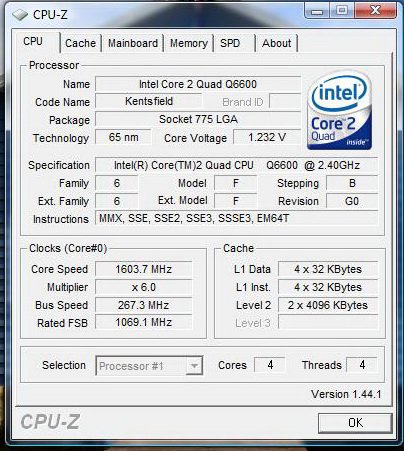
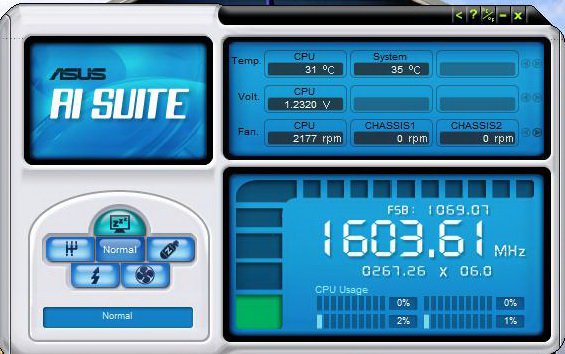
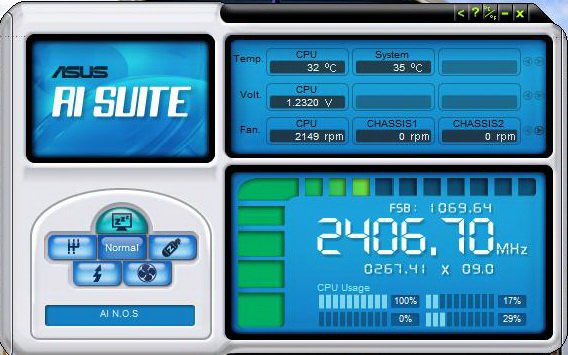
    Photobucket is blocked from work.... Post up if these don't work. They're from the last time I beat up on my comp...


      My System SpecsSystem Spec

  3. #3


    Plays with his WEI
    Join Date : Dec 2007
    Nooooo Joizeee
    Posts : 194
    Vista Ultimate x64 SP1
    Local Time: 06:23 PM
    usa us new jersey


    Re: Overclock 101

    The biggest hurdle people seem to trip up on is that on Intel chipsets the Front Side Buss and Memory speeds are linked. So when you increase the FSB, you are *also* forcing your RAM to run faster. Now... A Q6600 will take a 30% overclock on air cooling, no problem. Memory??? Do Not Count On It. Not At All. So before you start, set the memory divider (ratio of memory speed to FSB - it has different names in different Bios') so your RAM is UNDERclocked. This way when you increase the FSB to overclock your processor, you'll have headroom.

    Important detail: Front Side Buss speeds are 4 operations per base clock. This means your 1066 stock speed is actually 266 x 4. Memory speeds are on multiples of 2 - So DDR2 800 is actually 400 x 2. As long as you take this into consideration and don't overclock your RAM, you won't go too far wrong.

    In your case, you have DDR2 800 RAM. So as long as your motherboard will allow it, you could increase your Front Side Buss from 1066 to 1600 (400 x 4), run your memory on a 1:1 ratio with the FSB (400 x 2 = 800) and not break any rules. So far so good....

    The third piece of information is that your processor has a multiplier as well. In the case of a Q6600, that is 9. Intel "Extreme" processors (the US $1,200 ones) have an "unlocked" multiplier - this means you can increase it. A Q66 does not let you do that, but you can DEcrease it, if you want. Now: Remember the baseline speed for a 1066 FSB is 266 Mhz. 266 x 9 = 2,394, and so now you know why your processor is running at 2.4Ghz. SO!! 400 x 9 is 3.6Ghz - Doable with good aftermarket componentry, but aggressive for air cooling. And I certainly wouldn't recommend it on the stock Intel Heat Sink/Fan. (more on this next paragraph) So, you have two choices - go with a lower Front Side Buss: 333 x 4 = 1333, 333 x 9 = 2997 (3Ghz), and 333 x 2 = DDR2 667 Memory at 1:1. Or lower the multiplier on the processor in order to run your Front Side Buss and memory harder while not pushing your processor as much: 400 x 4 = 1600 FSB, 400 x 8 = 3.2Ghz, and 400 x 2 = DDR2 800 at 1:1.

    Regarding heat: As you push your components harder, they will generate more heat. Also, increases in voltages needed for more aggressive overclocks will increase heat output nearly exponentially. This is why some of the very serious overclocking people will use liquid and even some exotic methods (phase, liquid NO2, and all sorts of craziness). Your stock CPU cooler is meant for just that: stock speeds/voltages.


    My general experience with a Q6600 is you can have 3.0 Ghz with no more effort than simply setting the front side buss to run at 333 (1333Mhz). Seldom will voltage changes be needed. With a little care, a mild (10th and a little) bump in voltage, and a decent HSF ("Heat Sink/Fan") you can get to 3.4 without much trouble. 3.6 is more aggressive and will need a bit more power and will definitely need good cooling. Also - If you're running air cooling, take the ambient temps into account. If the room is 10 degrees warmer, than your processor will also. No Free Lunch.


    Since this is an OS Specific site, I'll post a link to the Core 2 Duo/Quad Overclocking guide at Tom's Hardware: http://www.tomshardware.com/forum/24...ds-duals-guide

    Apologies if this is bending the rules a bit, but that's a lot of information to relay...

      My System SpecsSystem Spec

  4. #4
    sahitanand's Avatar

    Member
    Join Date : Dec 2007
    India
    Posts : 92
    vista Ultimate X64 SP1
    Local Time: 03:53 AM
    india

      Thread Starter

    Re: Overclock 101

    hehe
    thanx scotteq
    man 2 more months before i can try overclocking.
    a decent cooler here costs 2500quid so gotta wait for my next allowance

      My System SpecsSystem Spec

  5. #5
    sahitanand's Avatar

    Member
    Join Date : Dec 2007
    India
    Posts : 92
    vista Ultimate X64 SP1
    Local Time: 03:53 AM
    india

      Thread Starter

    Re: Overclock 101

    hehe
    thanx scotteq
    man 2 more months before i can try overclocking.
    a decent cooler here costs 2500quid so gotta wait for my next allowance

      My System SpecsSystem Spec

  6. #6


    Banned
    Join Date : Sep 2007
    Oklahoma, USA
    Posts : 235
    Vista Ultimate x64 Service Pack I
    Local Time: 05:23 PM
    usa us oklahoma


    Re: Overclock 101

    hey sahitanand is it a standard p5k u are using?
    if so, i almost got the same setup as u

      My System SpecsSystem Spec

  7. #7
    Dalork's Avatar

    Member
    Join Date : Jan 2008
    Australia
    Posts : 39
    Vista Home Premium x64
    Local Time: 07:53 AM
    australia


    Re: Overclock 101

    I'm using a different mobo but I have my Q6600 overclocked to 3.4GHz for 24/7 use on air. I'm only running 1.29v stable and temps are 45-50ish under load. Thermalright 120 ultra extreme with a good fan is about the best air cooling you can get.

      My System SpecsSystem Spec

  8. #8
    sahitanand's Avatar

    Member
    Join Date : Dec 2007
    India
    Posts : 92
    vista Ultimate X64 SP1
    Local Time: 03:53 AM
    india

      Thread Starter

    Re: Overclock 101

    yeah mathews im using a P5KC. i dont know what u mean by standard though.

    ASUSTeK Computer Inc.

    i guess ill first buy a CPU cooler first and then start experimenting. ill be happy to get a 3.5 Ghz at 35 -40 degrees cause it gets quite hot here at times.

      My System SpecsSystem Spec

  9. #9


    Banned
    Join Date : Sep 2007
    Oklahoma, USA
    Posts : 235
    Vista Ultimate x64 Service Pack I
    Local Time: 05:23 PM
    usa us oklahoma


    Re: Overclock 101

    ASUSTeK Computer Inc.

    ahh never mind thats wat i use

      My System SpecsSystem Spec

  10. #10
    sahitanand's Avatar

    Member
    Join Date : Dec 2007
    India
    Posts : 92
    vista Ultimate X64 SP1
    Local Time: 03:53 AM
    india

      Thread Starter

    Re: Overclock 101

    cool!!
    now i know who to ask when i start overclocking.

      My System SpecsSystem Spec

Page 1 of 3 123 LastLast
Overclock 101 problems?

Similar Threads
Thread Thread Starter Forum Replies Last Post
Overclock Help hawkin90 Overclocking & Cooling 4 22 Oct 2009
I7 920 overclock the_power99 Overclocking & Cooling 7 15 Jul 2009
can overclock gpu kiddieboy12 Overclocking & Cooling 2 23 Mar 2009
To Overclock or Not Overclock? panais Overclocking & Cooling 13 05 Feb 2009
Ati Overclock panais Graphic cards 1 01 Nov 2008