Windows Vista Forums
Vista Forums Home Join Vista Forums Windows 7 Forum Vista Tutorials Tags
Welcome to Windows Vista Forums. Our forum is dedicated to helping you find solutions with any problems, errors or issues you are experiencing with Windows Vista. The Vista forum also covers news and updates and has an extensive Windows Vista tutorial section that covers a wide range of tips and tricks.

Go Back   Vista Forums > Vista Forums > Overclocking & Cooling

Vista - Intel E8400 Temp problem

Reply
 
Old 04-11-2009   #41 (permalink)


Vista Ultimate SP2 x64 : Seven Ultimate x64


Re: Intel E8400 Temp problem

Fingers crossed it works for you. Because running at those temps long term is really bad for the CPU

My System SpecsSystem Spec
Old 04-11-2009   #42 (permalink)


Windows 7 x64


Re: Intel E8400 Temp problem

Well it seems he Intel Speedstep is enabled, which would explain the CPU downclocking when it's idle.

As for the temps, he is using a stock cooler in a place that is generally hot. Having a warm room all the time won't help temps on the PC much. Better cooling will be needed in general.
My System SpecsSystem Spec
Old 04-11-2009   #43 (permalink)


Windows 7 Ultimate x64


Re: Intel E8400 Temp problem

Quote  Quote: Originally Posted by Everlong18 View Post
Well it seems he Intel Speedstep is enabled, which would explain the CPU downclocking when it's idle.

As for the temps, he is using a stock cooler in a place that is generally hot. Having a warm room all the time won't help temps on the PC much. Better cooling will be needed in general.
Exactly. I read on Intel, they wrote 72.6c temperature. Mine is running at 69-70c. My mobo dosnt allow me to disable Speedstep . Intel DG43NB SUCKS :@
My System SpecsSystem Spec
Old 04-12-2009   #44 (permalink)


Vista Ultimate SP2 x64 : Seven Ultimate x64


Re: Intel E8400 Temp problem

Quote  Quote: Originally Posted by Everlong18 View Post
As for the temps, he is using a stock cooler in a place that is generally hot. Having a warm room all the time won't help temps on the PC much. Better cooling will be needed in general.
But not that hot

Quote  Quote: Originally Posted by saeen View Post
. My mobo dosnt allow me to disable Speedstep
Speedstep is not a bad thing. It only downclocks when when it's not under a heavy load.
My System SpecsSystem Spec
Old 04-12-2009   #45 (permalink)


Windows 7 Ultimate x64


Re: Intel E8400 Temp problem

See guys, i only applied thermal paste. Only one outlet fan and stock cooler. wow my processor is not faulted
Attached Thumbnails
newtemp.jpg  
My System SpecsSystem Spec
Old 04-12-2009   #46 (permalink)


Windows 7 x64


Re: Intel E8400 Temp problem

Much better

Now all you need is a new CPU cooler, add a couple of more case fans (one for input and another exhaust) and you'll be sorted
My System SpecsSystem Spec
Old 04-12-2009   #47 (permalink)


Vista Ultimate SP2 x64 : Seven Ultimate x64


Re: Intel E8400 Temp problem

It's still a little warm and I bet the temps rise to the 60-70 range under load, but that is a BIG improvement in comparison

Well done

Is it still lagging?
My System SpecsSystem Spec
Old 04-13-2009   #48 (permalink)


Windows 7 Ultimate x64


Re: Intel E8400 Temp problem

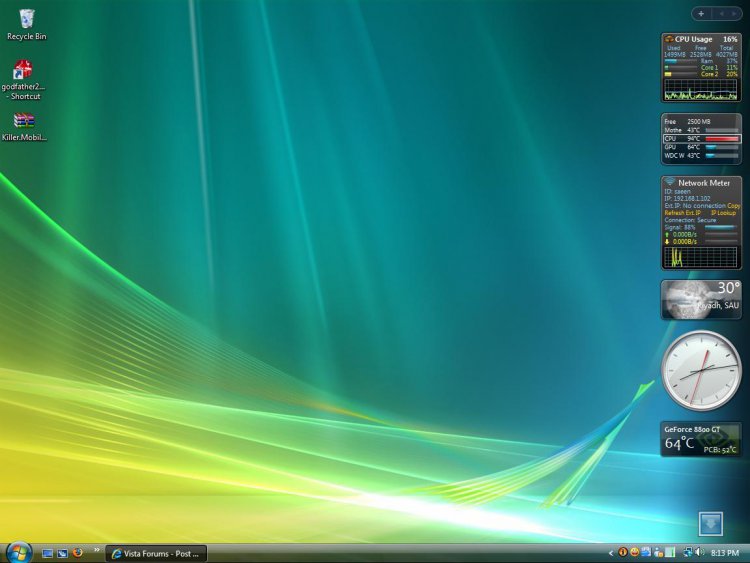
Not at all lagging any more. Under load it reaches 50-55. I added a fan in front of case. When I'll get a little money, I'll buy a cooler master.
Attached Thumbnails
untitled.jpg  
My System SpecsSystem Spec
Old 04-13-2009   #49 (permalink)


Vista Ultimate SP2 x64 : Seven Ultimate x64


Re: Intel E8400 Temp problem

Good to hear mate
My System SpecsSystem Spec
Reply

Thread Tools


Similar Threads
Thread Forum
OCing e8400 with asus mobo Overclocking & Cooling
Max overclock with E8400 Overclocking & Cooling
Windows Vista strange settings on temp folder AppData\Local\Temp\1 Vista security
Successful OC e8400 @ 4.00Ghz Overclocking & Cooling
Intel E8400 General Discussion


Vista Forums is an independent web site and has not been authorized,
sponsored, or otherwise approved by Microsoft Corporation.
"Windows Vista", the Start Orb, and related materials are trademarks of Microsoft Corp.
© Designer Media Ltd

1 2 3 4 5 6 7 8 9 10 11 12 13 14 15 16 17 18 19 20 21 22 23 24 25 26 27 28 29 30 31 32 33 34 35 36 37 38 39 40 41 42 43 44 45 46