Windows Vista Forums
Vista Forums Home Join Vista Forums Windows 7 Forum Vista Tutorials Tags
Welcome to Windows Vista Forums. Our forum is dedicated to helping you find solutions with any problems, errors or issues you are experiencing with Windows Vista. The Vista forum also covers news and updates and has an extensive Windows Vista tutorial section that covers a wide range of tips and tricks.

Go Back   Vista Forums > Vista Forums > Overclocking & Cooling

Vista - Really bad problems with graphics card and ram!?

Reply
 
Old 10-17-2009   #1 (permalink)


Vista Ultimate x64


Really bad problems with graphics card and ram!?

http://forums.nvidia.com/lofiversion/ind…

this relates to my problem but when playing games (cod4) every 2 mins all the textures go weird like pink and black and all weird colours and it freezes when i press alt del and ctrl it fixes again so then i click cancel and continue playing. It happens all the time. My next problem is that cod4 just froze properly and nothing worked except cutting the power. When it restart bsod came up. this has happend twice so far once with cod4 and once with rome total war. the website above links greatly to my issues. when the pc came back on in safe mode i had a problem reports and sollution window come up and say:

Description
A problem with your video hardware caused Windows to stop working correctly.

Problem signature
Problem Event Name: LiveKernelEvent
OS Version: 6.0.6001.2.1.0.256.1
Locale ID: 1033

Files that help describe the problem
WD-20091017-1121.dmp
sysdata.xml
Version.txt

View a temporary copy of these files
Warning: If a virus or other security threat caused the problem, opening a copy of the files could harm your computer.

Extra information about the problem
BCCode: 117
BCP1: FFFFFA80061114E0
BCP2: FFFFFA60024E9220
BCP3: 0000000000000000
BCP4: 0000000000000000
OS Version: 6_0_6001
Service Pack: 1_0
Product: 256_1

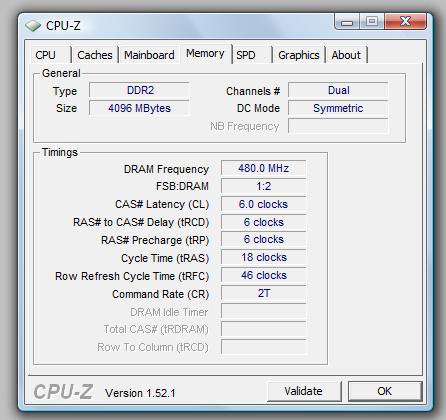
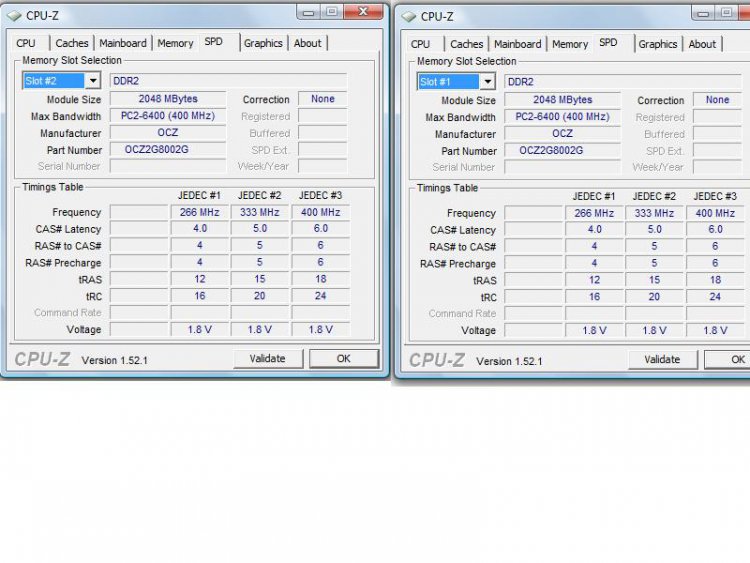
i have 4 gigs of ram vista 64bit ultimate and nvidia 9800gt i have tried 5 different drivers ranging from old beta and new! Please help. it could be deffective ram or my video card! Thanks

I also get nvddklmm.sys has stopped working regulary! (thats with games like crysis and far cry2)

My System SpecsSystem Spec
Old 10-17-2009   #2 (permalink)


Vista Ultimate x64


Re: Really bad problems with graphics card and ram!?

i have loads of dump files!
My System SpecsSystem Spec
Old 10-17-2009   #3 (permalink)


Win7x64


Re: Really bad problems with graphics card and ram!?

Quote  Quote: Originally Posted by jonny321321 View Post
i have loads of dump files!
If they're all stop 0x117s, there's nothing to see in those dumps.

0x117 = VIDEO_TDR_TIMEOUT_DETECTED. The OS has noticed that the combination of driver+video hardware has been unresponsive for an unacceptably long period of time. Suggestions:

1) Make sure you're on the latest video drivers.

2) Don't overclock anything.

3) Make sure the box is adequately cooled.
My System SpecsSystem Spec
Old 10-17-2009   #4 (permalink)


Vista Ultimate x64


Re: Really bad problems with graphics card and ram!?

My card is factory overclocked by xfx but i did fiddle (although that was a while ago long time before my problems with a different pc) ill change it back to default

Im on the latest drivers

All the temps are fine i think my gpu is: 60 celcius idle
My System SpecsSystem Spec
Old 10-17-2009   #5 (permalink)


Vista Ultimate x64


Re: Really bad problems with graphics card and ram!?

Also the resolution changes without me doing anything alot of the time. and i get alot of explorer has stopped work and then it restarts!
My System SpecsSystem Spec
Old 10-17-2009   #6 (permalink)


Win7x64


Re: Really bad problems with graphics card and ram!?

Quote  Quote: Originally Posted by jonny321321 View Post
My card is factory overclocked by xfx...
A loosely translated version of that statement:

"The card was made by a company which is sufficiently unscrupulous to charge more for configuring components to run outside of their design envelope."

My advice would be to avoid similar products (and companies) in the future. Hardware which is "overclocked" is by definition more prone to failure.
My System SpecsSystem Spec
Old 10-17-2009   #7 (permalink)


Vista Ultimate x64


Re: Really bad problems with graphics card and ram!?

Quote:
Quote: Originally Posted by jonny321321
My card is factory overclocked by xfx...


A loosely translated version of that statement:

"The card was made by a company which is sufficiently unscrupulous to charge more for configuring components to run outside of their design envelope."

My advice would be to avoid similar products (and companies) in the future. Hardware which is "overclocked" is by definition more prone to failure.
yeah i know but it was the same price and i thought what the hell. and it came with free assassins creed so i was happy its at the overclocked default now should i underclock it with rivatuner? Or is it not related to the overclocking and its just screwed or what please help!
My System SpecsSystem Spec
Old 10-18-2009   #8 (permalink)


Vista Ultimate x64; Win 7 x64 and x32


Re: Really bad problems with graphics card and ram!?

Overclocked = decreased lifespan of the component
My System SpecsSystem Spec
Old 10-24-2009   #9 (permalink)


Vista Ultimate x64


Re: Really bad problems with graphics card and ram!?

my cpu is overclocked @3.01 GHz its e5200 (originally @ 2.50)
my mothered board is p5kpl-am
My System SpecsSystem Spec
Old 10-24-2009   #10 (permalink)


Vista Home Premium 64bit SP2


Re: Really bad problems with graphics card and ram!?

Quote  Quote: Originally Posted by usasma View Post
Overclocked = decreased lifespan of the component
usually that can be the case but factory overclocked stuff especially from XFX use cherry picked core's and ram they come with a full manufactrers warrenty and with XFX its lifetime (however long they deem a lifetime to be

Can you underclock your card? start with the memory first see what happens , (i think this is your culprit) then move onto the shader clock then lastly the core , try a benchmark each time you underclock something.

i had a factory overclocked 6800 from XFX years ago i had to underclock the ram to stop it artifacting , it didnt do what it said on the box so i sent it back and they replaced it

the overclock could have fried your card ram , if it has its their fault and they will replace it , but you will have to contact their tech support and go through all the tests they ask you , i have dealt with them they are very good and if they deem your card faulty they will replace it free but you will have to pay the shippin to send your old card back

and be ready the first thing they will blame is your PSU :P
My System SpecsSystem Spec
Reply

Thread Tools


Similar Threads
Thread Forum
"Startup Repair" loop and graphics card problems General Discussion
Updating Graphics Card Problems (I'd Like to Uninstall the Update) Vista hardware & devices
Geforce 7900 GS graphics card problems. Vista General
graphics card problems Vista hardware & devices
graphics card problems with ati radeon x300 Vista hardware & devices


Vista Forums is an independent web site and has not been authorized,
sponsored, or otherwise approved by Microsoft Corporation.
"Windows Vista", the Start Orb, and related materials are trademarks of Microsoft Corp.
© Designer Media Ltd

1 2 3 4 5 6 7 8 9 10 11 12 13 14 15 16 17 18 19 20 21 22 23 24 25 26 27 28 29 30 31 32 33 34 35 36 37 38 39 40 41 42 43 44 45 46