![]() |
![]() | ![]() | ![]() | ![]() | ![]() | ![]() | ![]() |
| Welcome to Windows Vista Forums. Our forum is dedicated to helping you find solutions with any problems, errors or issues you are experiencing with Windows Vista. The Vista forum also covers news and updates and has an extensive Windows Vista tutorial section that covers a wide range of tips and tricks. |
| |||||||
![]() |
| |
| | #1 (permalink) |
| vista ultimate x64 | Spybot search & destroy Configuration ? Hi I have Ultimate Windows Vista x64 and I installed "Spybot....". After what usually I've done in the Windows Xp, after update I try to Immunize but it didn't mmunize everything about 800 things was not. I try to do something and my second try was: Unprotected 166860 Protected 0 Total 166860 This is good or not good. Can someone help me and explain what I did wrong ? Probably is setup but I don't have any idea what I suppose to do. Thanks for any advices !!! Last edited by zungul; 07-15-2009 at 11:04 AM.. |
My System Specs![]() |
| | #2 (permalink) |
| VISTA HOME PREMIUM X64/ 7 x64 / 7x86 | Re: Spybot search & destroy Configuration ? Hi , Try going to the spybot.exe in program files (x86) [ I haven't got it installed atm - so can't recall exactly what it is called]. Rt click it , Properties>Compatibility>Tick Run as Admin>Apply>OK Hope it helps. |
My System Specs![]() |
| | #3 (permalink) |
| vista ultimate x64 | Re: Spybot search & destroy Configuration ? I don't have this option in ... Compatibility |
My System Specs![]() |
| | #4 (permalink) |
| Vista Ultimate 64-bit, SP2 | Re: Spybot search & destroy Configuration ? I would suggest that you uninstall Spybot. Although I used it successfully on XP Pro I wasn't happy with it on Vista Ultimate 64-bit. Investigate Spywareblaster & SuperAntispyware. I use them & there are no conflicts or problems. Both have free versions if that's what you want. They also both have excellent support. However it's your choice. ![]() SpywareBlaster® | Prevent spyware and malware. Free download. SUPERAntiSpyware.com | Remove Malware | Remove Spyware - AntiMalware, AntiSpyware, AntiAdware! |
My System Specs![]() |
| | #5 (permalink) |
| vista ultimate x64 | Re: Spybot search & destroy Configuration ? I don't know but maybe this is a reason. Somebody told me to uncheck in Immunize_Profile every (Cookies) in every explorer which I have. What you think it can be the reason? |
My System Specs![]() |
| | #6 (permalink) |
| Home Premium X64, not impressed with W7 RC yet... | Re: Spybot search & destroy Configuration ? You need to run Spybot as administrator to get it to do everything it's supposed to. Type spybot in start menu and right click the spybot icon and choose run as administrator. I was trying out spybot (i used it on xp) and wondered why it didn't always get everything when clicking on immunize. Make sure you don't have any browsers open as well. |
My System Specs![]() |
| | #7 (permalink) |
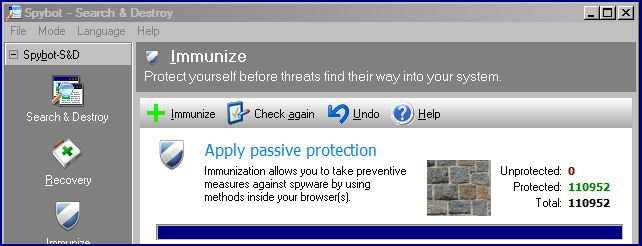
| Vista Home Premium 32bit [x86] - SP2 | Re: Spybot search & destroy Configuration ? Hi I have Ultimate Windows Vista x64 and I installed "Spybot....". After what usually I've done in the Windows Xp, after update I try to Immunize but it didn't mmunize everything about 800 things was not. I try to do something and my second try was: Unprotected 166860 Protected 0 Total 166860 This is good or not good. Can someone help me and explain what I did wrong ? Probably is setup but I don't have any idea what I suppose to do. Thanks for any advices !!! I've just checked the System Requirements for Spybot, and found that the program should perform well with Vista x64. For the record, I have not made any changes whatsoever to the default settings that were installed, and Spybot has performed perfectly since I downloaded it. To start, I always right click the Spybot icon and run it as the Administrator, and when it opens, the first thing I do is check for, and download any updates. Just make sure that all browsers are closed. To Immunize, I first click on the Immunize Shield in the left panel; ![]() If this step does not completely immunize the stated files, click on "Check Again" in the top panel, then click on "+ Immunize", in the same panel. Repeat the process until all Files are immunized. Hope that this helps. Cheers. sassofalco |
My System Specs![]() |
| | #8 (permalink) |
| vista ultimate x64 | Re: Spybot search & destroy Configuration ? Thanks Guys for your help. I'm gonna uninstall Spybot and I'll try everything from beginning with what you said. beginning |
My System Specs![]() |
| | #9 (permalink) |
| Vista Home Premium 32bit [x86] - SP2 | Re: Spybot search & destroy Configuration ? Thanks Guys for your help. I'm gonna uninstall Spybot and I'll try everything from beginning with what you said. beginning |
My System Specs![]() |
![]() |
| Thread Tools | |
| |
Similar Threads | ||||
| Thread | Forum | |||
| Could someone tell me if Spybot Search and Destroy safe? | System Security | |||
| Spybot Search & Destroy | Software | |||
| spybot Search and destroy | System Security | |||
| WindowsLiveOneCare an SpyBot Search & Destroy. | Vista security | |||
| Spybot Search and Destroy | Vista General | |||