![]() |
![]() | ![]() | ![]() | ![]() | ![]() | ![]() | ![]() |
| Welcome to Windows Vista Forums. Our forum is dedicated to helping you find solutions with any problems, errors or issues you are experiencing with Windows Vista. The Vista forum also covers news and updates and has an extensive Windows Vista tutorial section that covers a wide range of tips and tricks. |
| |||||||
![]() |
| |
| | #1 (permalink) |
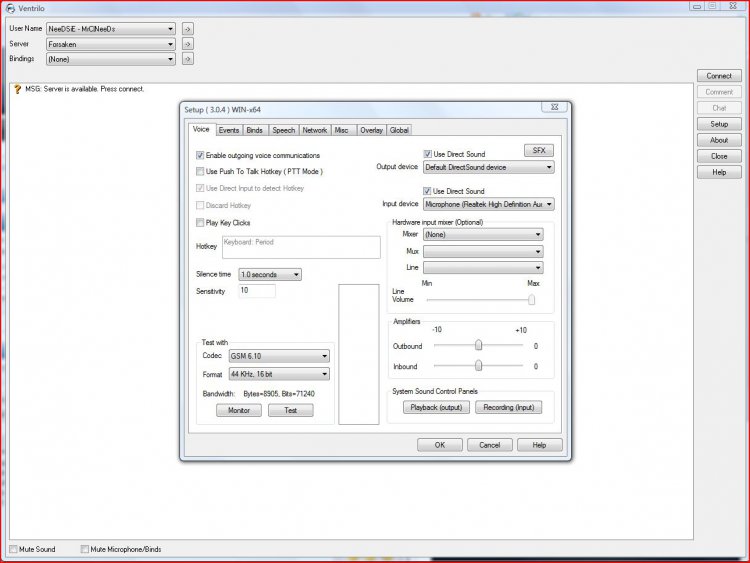
| Vista Ultimate 64 Bit | DSP Group TrueSpeech Audio Codec Hi I recently installed vista 64bit Ultimate and I tried to use ventrilo however it kept giving me the error: Failed to get encoder for specified Codec. Unable to initialize outbound codec (DSP Group TrueSpeech - 8 KHz, 16 bit): Unable to find the specified codec. I have TrueSpeech Installed (says so on WMP) However it doesn't initialize. This is what it says to do on the Vent site. Q: Unable to initialize the codec. CODE = -10 -10 means the codec is found but is marked as disabled. Control panel Sound and multimedia Hardware Double click "Audio Codec" Double click on Microsoft GSM 6.10 Click on "Use this audio codec" Press OK. Since I've just switched to vista I find it hard to navigate around the control panel since its so much different than XP. Can someone translate those XP instructions into Vista, or tell me how to initialize the codec. Thanks. |
My System Specs![]() |
| | #2 (permalink) |
| Vista Home Premium x64 | Re: DSP Group TrueSpeech Audio Codec Hi I recently installed vista 64bit Ultimate and I tried to use ventrilo however it kept giving me the error: Failed to get encoder for specified Codec. Unable to initialize outbound codec (DSP Group TrueSpeech - 8 KHz, 16 bit): Unable to find the specified codec. I have TrueSpeech Installed (says so on WMP) However it doesn't initialize. This is what it says to do on the Vent site. Q: Unable to initialize the codec. CODE = -10 -10 means the codec is found but is marked as disabled. Control panel Sound and multimedia Hardware Double click "Audio Codec" Double click on Microsoft GSM 6.10 Click on "Use this audio codec" Press OK. Since I've just switched to vista I find it hard to navigate around the control panel since its so much different than XP. Can someone translate those XP instructions into Vista, or tell me how to initialize the codec. Thanks. |
My System Specs![]() |
| | #3 (permalink) |
| Vista Ultimate 64 Bit | Re: DSP Group TrueSpeech Audio Codec Yes i can start vent. When i join a channel i get a pop up box with that error. |
My System Specs![]() |
| | #4 (permalink) |
| Vista Home Premium x64 | Re: DSP Group TrueSpeech Audio Codec however i may have found a fix, just checking through it now. ok, you can download the codec again, some issues can restrict access to the vent one, so if you install the klite codec pack from here> k-lite codec Pack full, this pack does include DSP Group TrueSpeech audio codec 1.1.1.5, restart your system and try the codec in ventrilo, should work. Last edited by MrNeeds; 02-24-2009 at 11:31 AM.. |
My System Specs![]() |
| | #5 (permalink) |
| Vista Ultimate 64 Bit | Re: DSP Group TrueSpeech Audio Codec I already have it installed, and The test does not work, it says it cannot be initlized. I'll see if i can get my friend to change the codec. |
My System Specs![]() |
![]() |
| Thread Tools | |
| |
Similar Threads | ||||
| Thread | Forum | |||
| DSP Group TrueSpeech™ Audio CODEC | Sound & Audio | |||
| DSP Group TrueSpeech™ Audio CODEC | Sound & Audio | |||
| truespeech codec | Vista General | |||
| DSP Group TrueSpeech codec | Vista General | |||
| dsp truespeech codec | Vista General | |||