![]() |
![]() | ![]() | ![]() | ![]() | ![]() | ![]() | ![]() |
| Welcome to Windows Vista Forums. Our forum is dedicated to helping you find solutions with any problems, errors or issues you are experiencing with Windows Vista. The Vista forum also covers news and updates and has an extensive Windows Vista tutorial section that covers a wide range of tips and tricks. |
| |||||||
![]() |
| |
| | #1 (permalink) |
| Vista Home Premiun | Recording devices I have a problem with my recording devices. In the window only one microphone. I need realtek digital input and line in. But I don't know how I can get it. Help me, please. I have HP dv6748us. |
My System Specs![]() |
| | #2 (permalink) |
| Vista home premium 32bit | Re: Recording devices Usually when you right click on your speaker icon next to the clock and go to "Recording Devices", you should see it. If not, you have to update or reinstall the driver in "Device Manager". |

My System Specs![]() |
| | #3 (permalink) |
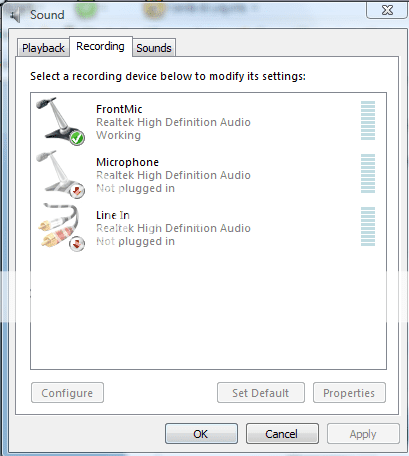
| Vista Home Premiun | Re: Recording devices ![]() Look. Where are other devices? Last edited by Brink; 07-08-2009 at 10:51 PM.. Reason: Fixed image |
My System Specs![]() |
| | #4 (permalink) |
| Vista home premium 32bit | Re: Recording devices Did you plug anything in? I have my front mike plugged in and get this: |
My System Specs![]() |
| | #5 (permalink) |
| Vista Home Premiun | Re: Recording devices I need digital input. |
My System Specs![]() |
![]() |
| Thread Tools | |
| |
Similar Threads | ||||
| Thread | Forum | |||
| configuring recording devices (Stereo-mix) | Vista General | |||
| Devices>Recording: "No Audio Devices Found" | Sound & Audio | |||
| No audio devices are installed in recording | Sound & Audio | |||
| Accidentally deleted the recording devices | Vista hardware & devices | |||
| Recording Devices Tab always freezes | Vista hardware & devices | |||