Windows Vista Forums
Vista Forums Home Join Vista Forums Windows 7 Forum Vista Tutorials Tags
Welcome to Windows Vista Forums. Our forum is dedicated to helping you find solutions with any problems, errors or issues you are experiencing with Windows Vista. The Vista forum also covers news and updates and has an extensive Windows Vista tutorial section that covers a wide range of tips and tricks.

Go Back   Vista Forums > Vista Forums > Sound & Audio

Vista - Latest Realtek HD Audio Driver Version

Reply
 
Old 09-11-2008   #401 (permalink)


vista ultimate x64


Re: New Realtek HD audio driver update

Quote  Quote: Originally Posted by the highlander View Post
I find it ridiculous having to buy a soundcard in order to use my headphones the way i use them in Windows Xp.

Is there a registry change where i can identify what i have connected???
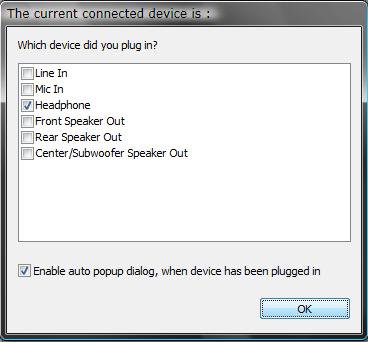
Since i do not get this image as i do in XP


Is there a way to manually enter the "values" on the registry to what i have connected on which plug???
Quote  Quote: Originally Posted by the highlander View Post
How exactly are you doing this? the problem is.. I have no front "jacks" that i can use. But on XP... it was able to detect if i had a headphone or what... Is there a way i can manually ASSIGN what i have installed?
Quote  Quote: Originally Posted by the highlander View Post
Does it finally have a headphone setting?
I'm experiencing this very issue (jack detection working, but no popup), has anyone found a solution yet?
If I disable the front-port detection I'm able to do "Connector Retasking" on the front headphone connection, but this is unfortunately the *only* jack where this option is available.


I'm running R2.03 (6.0.1.5694) on vista ultimate x64 sp1, popup was working on xp & w2k3 (although back then I was not using R2.0x)

Was thinking of trying the other R2.0x, but seeing as this issue has apparantly been around for almost one full year, I'm guessing that wont help.
Will try getting the latest R1.x and see if that helps unless anyone has any other suggestions that is.

My System SpecsSystem Spec
Old 09-11-2008   #402 (permalink)


vista ultimate x64


Re: New Realtek HD audio driver update

Well, stubborn as I am, I decided to see if I could spot changes in the registry when changing the (dead) front headphone jack to for example subwoofer/etc..

And what do you know, I really did!

With a bit of luck I could identify the following:


1. Mappings are saved in the following location (at least for me): "HKEY_LOCAL_MACHINE\SYSTEM\CurrentControlSet\Control\Class\{4D36E96C-E325-11CE-BFC1-08002BE10318}\0000\Settings\DevType_0888_SS147b1083"

2. binary keys
"Pin01" = rear black-coded "RR RL" jack
"Pin07" = front green-coded "headphone" jack

3. hex values
"00 00 00 00" = Line-in
"01 00 00 00" = Mic-in
"02 00 00 00" = headphones
"04 00 00 00" = Front speakers
"05 00 00 00" = Rear speakers
"06 00 00 00" = Center/subwoofer
"07 00 00 00" = Side speakers

After changing it seems I needed to reboot for the new setting to take effect, there is probably some way to register the change with the driver more elegantly via some dll, but since this is nothing I'm interested in changing too often I'm fairly satisfied as-is.

My motherboard is an abit IP-35 Pro, which is using the ALC888 chipset, most likely the settings will be placed in the same location for other motherboards with the same chipset. At the time I was using R1.98, although I'm pretty sure 2.x will be placed in a similiar location, if you are unable to find any binary keys named "PinXX" try simply searching for "Realtek".

Also note that messing about in the registry can corrupt your installation or worse, anyone doing this is on their own, but hopefully I was able to help someone.
My System SpecsSystem Spec
Old 09-11-2008   #403 (permalink)


Vista Home Premium SP2 32bit / Windows 7 Home Premium 32 bit


Re: New Realtek HD audio driver update

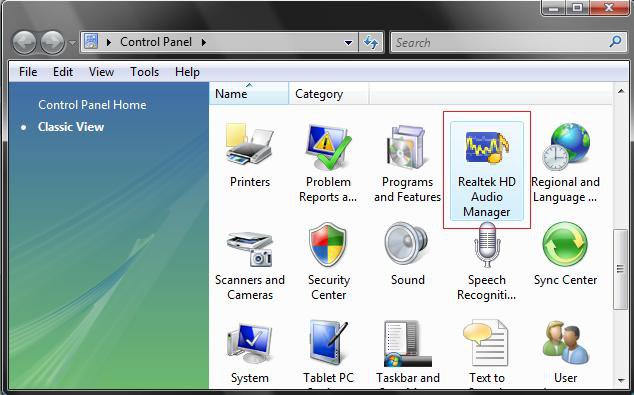
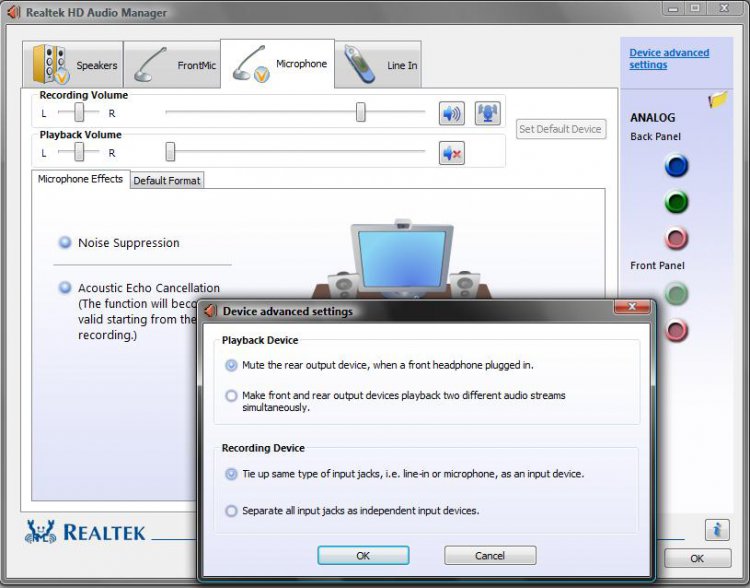
I don't have all the tabs you show when bringing up the audio manager, is it because I only have Home Premium 32 bit or just have two powered speakers. I do have a front jack panel. I have a headset which includes headphones and microphone built in, I've had it for years but never really used it and haven't a clue which plug goes in which jack. The headphones are Logic3 and the connector is one grey and one black plug
In device manager my driver is 6.0.1.5694

audio.jpg
My System SpecsSystem Spec
Old 09-11-2008   #404 (permalink)


vista ultimate x64


Re: New Realtek HD audio driver update

It's probably because your motherboard doesn't have, for example, digital input, and neither do you seem to have a mic connected.

If you either disable front panel jack detection or connect a microphone you should get at least one more tab for the microphone.
My System SpecsSystem Spec
Old 09-11-2008   #405 (permalink)


Vista Home Premium 64bit


Re: New Realtek HD audio driver update

My connection is capable of downloading at 3mb/sec, this driver is dlding at 15 kb/sec. Maybe its time for realtek to change the mouse in the wheel or at least give him some food?

sigh....
My System SpecsSystem Spec
Old 09-12-2008   #406 (permalink)


Vista Home Premium SP2 32bit / Windows 7 Home Premium 32 bit


Re: New Realtek HD audio driver update

Quote  Quote: Originally Posted by idomagic View Post
It's probably because your motherboard doesn't have, for example, digital input, and neither do you seem to have a mic connected.

If you either disable front panel jack detection or connect a microphone you should get at least one more tab for the microphone.

I didn't have anything connected when I took that snip, apart from my speakers which connect via the plugs on the back of the computer.
My System SpecsSystem Spec
Old 09-12-2008   #407 (permalink)


Vista Home Premium x64


2.04 Drivers

2.04 has just been posted. Driver version is 6.0.1.5700.
My System SpecsSystem Spec
Old 09-12-2008   #408 (permalink)


Vista Home Premium 64bit


Re: New Realtek HD audio driver update

thx berserker! I was having a problem with 2.03 crashing, went back to 2.02 in a real hurry, bet they fixed my problem as 8 days for new drivers is pretty fast...
My System SpecsSystem Spec
Old 09-13-2008   #409 (permalink)


Vista x64 Ultimate SP2, Windows 7 Ultimate x64


Re: New Realtek HD audio driver update

Thank you for the update Berserker. The first page has been updated for the new 2.04 version.
My System SpecsSystem Spec
Old 09-13-2008   #410 (permalink)


Ultimate x64


Re: New Realtek HD audio driver update

Hello !
My driver version of Realtek is 6.0.1.5404 it is need to be update to 6.1.0.5700 , but when i press in the options : update driver . it says that Realtek HD not need update , when it does , so i go to the realtek website to download the update , but there server doesnt work and the speed is 1 kb/s, i cant dowload the update 2.4 , can someone send me the update??
My System SpecsSystem Spec
Reply

Thread Tools


Similar Threads
Thread Forum
Realtek HD Audio driver Vista music pictures video
back panel not working for latest realtek driver! Sound & Audio
Realtek AC'97 audio driver provided by Microsoft. Audio error MCE Vista hardware & devices
Latest Creative Beta driver & the latest version of Skype Vista General
Does the x64 version of Vista have driver for Realtek 8029AS? Vista hardware & devices


Vista Forums is an independent web site and has not been authorized,
sponsored, or otherwise approved by Microsoft Corporation.
"Windows Vista", the Start Orb, and related materials are trademarks of Microsoft Corp.
© Designer Media Ltd

1 2 3 4 5 6 7 8 9 10 11 12 13 14 15 16 17 18 19 20 21 22 23 24 25 26 27 28 29 30 31 32 33 34 35 36 37 38 39 40 41 42 43 44 45 46