Windows Vista Forums
Vista Forums Home Join Vista Forums Windows 7 Forum Vista Tutorials Tags
Welcome to Windows Vista Forums. Our forum is dedicated to helping you find solutions with any problems, errors or issues you are experiencing with Windows Vista. The Vista forum also covers news and updates and has an extensive Windows Vista tutorial section that covers a wide range of tips and tricks.

Go Back   Vista Forums > Vista Forums > System Security

Vista - windows defender

Reply
 
Old 09-27-2008   #1 (permalink)


Vista Home Premium 32bit


windows defender

can some one please post a link where i can download windows defender for vista?
i deleted it =/
and microsoft download center says i shuld already have it
thnx for any help

My System SpecsSystem Spec
Old 09-27-2008   #2 (permalink)


Vista x64 Ultimate SP2, Windows 7 Ultimate x64


Re: windows defender

Hello Brandon, and welcome to Vista Forums.

You cannot uninstall, delete, or reinstall Windows Defender in Vista since it is a part of Vista itself. You can turn it off and on though. Could you please explain more about exactly what you deleted to help you restore it?

Shawn
My System SpecsSystem Spec
Old 09-27-2008   #3 (permalink)


Vista Home Premium 32bit


Re: windows defender

well
when i go to
start > control panel > security > all thats listed is:
security center
windows firewall
windows update
and internet options
and the first time i noticed it was when widnows defender came up and said that th programs services have stopped and that i shuld reboot
which i did
and when i went to go see if its services were on it wasn't there
My System SpecsSystem Spec
Old 09-27-2008   #4 (permalink)


Vista x64 Ultimate SP2, Windows 7 Ultimate x64


Re: windows defender

Brandon,

Does Windows Defender open when you click on C:\Program Files\Windows Defender\MSASCui.exe ?

If yes, then check with Method Two in this tutorial to see if Windows Defender (step 8D) was set to be hidden in the Control Panel.

Control Panel - Hide Icon


This is usually caused by malware. I would recommend that you run a thorough antivirus and spyware scan to help be safe.

Hope this helps,
Shawn
My System SpecsSystem Spec
Old 09-27-2008   #5 (permalink)


Vista Home Premium 32bit


Re: windows defender

the windows defender folder is completly missing
My System SpecsSystem Spec
Old 09-27-2008   #6 (permalink)


VISTA HOME PREMIUM X64/ 7 x64 / 7x86


Re: windows defender

Quote  Quote: Originally Posted by brandon5377 View Post
the windows defender folder is completly missing
Hello brandon,

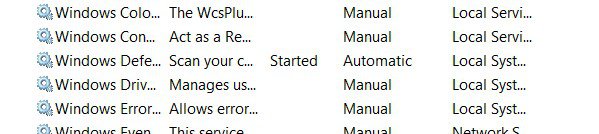
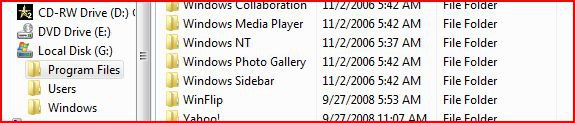
Could you please check to see if you can find Defender listed here


or here


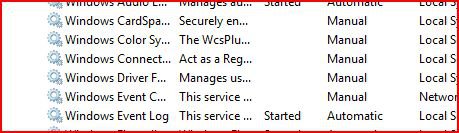
and under services.msc , here


Thanks

SIW2
Attached Thumbnails
defender12008-09-27_230620.jpeg   defender22008-09-27_230734.jpeg   defender32008-09-27_230825.jpeg  
My System SpecsSystem Spec
Old 09-27-2008   #7 (permalink)


Vista Home Premium 32bit


Re: windows defender

its not under programs files....

ffd.jpg


or servces....

services.jpg
My System SpecsSystem Spec
Old 09-27-2008   #8 (permalink)


VISTA HOME PREMIUM X64/ 7 x64 / 7x86


Re: windows defender

Hi,

How did you delete it, exactly.? Did you right click the folder and delete - pretty sure you would need to take ownership to do that.

SIW2
My System SpecsSystem Spec
Old 09-27-2008   #9 (permalink)


Vista Home Premium 32bit


Re: windows defender

Quote  Quote: Originally Posted by brandon5377 View Post
well
and the first time i noticed it was when widnows defender came up and said that th programs services have stopped and that i shuld reboot
which i did
and when i went to go see if its services were on it wasn't there
...
My System SpecsSystem Spec
Old 09-27-2008   #10 (permalink)


VISTA HOME PREMIUM X64/ 7 x64 / 7x86


Re: windows defender

Hi brandon,

Yes, I saw that - but when you said you deleted it - thought maybe you meant you had done so as it wasn't working. Seems to have deleted itself?

Probably worth doing a full scan if you have another anti - malware tool.

Worth trying a system restore to before this happened

System Restore - How to

If that doesn't work, you might use a file recovery tool to see if it finds anything on your hd.

If you don't already have one, you can get a good freebie from

www.glarysoft.com

Better to download and install it on a separate partition - so as not to overwrite anything.
My System SpecsSystem Spec
Reply

Thread Tools


Similar Threads
Thread Forum
Solved Windows defender V windows malicious software removal tool System Security
Error codes 80244019 (windows Update) and 0x8024402c (windows Defender) Windows Updates
Vista, Windows Firewall, Windows Defender, UAC, Avast - is this fairly secure, or is anything else needed? Advice appreciated. Vista General
Windows defender can't get updated definition and Windows update fail too Vista General
Error in Windows Vista Defender cant change anything in Defender! Vista security


Vista Forums is an independent web site and has not been authorized,
sponsored, or otherwise approved by Microsoft Corporation.
"Windows Vista", the Start Orb, and related materials are trademarks of Microsoft Corp.
© Designer Media Ltd

1 2 3 4 5 6 7 8 9 10 11 12 13 14 15 16 17 18 19 20 21 22 23 24 25 26 27 28 29 30 31 32 33 34 35 36 37 38 39 40 41 42 43 44 45 46