Windows Vista Forums
Vista Forums Home Join Vista Forums Windows 7 Forum Vista Tutorials Tags
Welcome to Windows Vista Forums. Our forum is dedicated to helping you find solutions with any problems, errors or issues you are experiencing with Windows Vista. The Vista forum also covers news and updates and has an extensive Windows Vista tutorial section that covers a wide range of tips and tricks.

Go Back   Vista Forums > Vista Forums > System Security

Vista - Programs stopped working

Reply
 
Old 02-10-2009   #1 (permalink)


Windows Vista


Programs stopped working

Hi all i need serious help.

All of a sudden some of my programs stopped working, for example catalysst control center is suposed to start as soon as vista starts, but now it gives me an error like:

"CCC.exe has stopped working"

Same with some others...

Yes i ran AVG, i ran malware, and superantispyware, none of them finds anything.
I cant even load daemon tools now, it gives me some error: "Engine loading was failed", cant uninstall it, it gives me another error, and some of the programs like netlimiter if i start them from my objectdock dock they automaticly stop working, only when i start them from the normal .exe they dont crash.

All this happened all of a sudden...anyone has any ideas??

Thx a lot in advance,

Muff

My System SpecsSystem Spec
Old 02-10-2009   #2 (permalink)


Windows Vista Ultimate x64


Re: Programs stopped working

Hi Muff

What Firewall are you using? Have you configured your security software so that the Catalyst Control Centre is a trusted start-up program. Is Windows Defender or UAC blocking it from normal start-up. Did you run the Display Driver as an Administrator when you installed it?

Personally I found the Catalyst Control Centre lagging a little on start-up anyway so I only installed the Display Driver instead.

I'm assuming you are running the latest version of the ATI Driver?

I might be wrong, but it may well be a 'Permissions' issue.

One more thing, are you running 32Bit or 64Bit, and if 64, is ObjectDock compatible with it?

Kind Regards

Neil
My System SpecsSystem Spec
Old 02-10-2009   #3 (permalink)


Vista Ultimate 32bit, Windows 7 32bit.


Re: Programs stopped working

Hi Muff,

The first step i would recommend here is system restore since you have multiple issues. if system restore is not your option then you need to get more information from "problem reports and solutions" about faulting module, most of the time it would be an dll or exe file. if it is a dll file you may have to download and extract it to system32 after renaming the old file (Needs to take ownership) or if it is exe (probram) then try uninstall and reinstall the latest version.

as Mr Smiley mention it could be issue (Conflict) with ObjectDock. Just verify follow this article How to troubleshoot a problem by performing a clean boot in Windows Vista and find whether it is issue with the service or just the startup item (Could be ObjectDock).


My System SpecsSystem Spec
Old 02-11-2009   #4 (permalink)


Windows Vista


Re: Programs stopped working

First of all thx a lot for both you responses, and sorry for the comeback i only woke up now.

@ Smiley:

Im using windows firewall, i tried disabling it to se if the problem resided theew but no luck, also i dont have UAC enabled but strangely some .exe files now appear with that colored shield above them, dont really know why...
As for object dock, and catalyst control center, the strange thing is that they have always worked fine, this laptop is rather recent, like 2 months and it stil has all the sony vaio configuratios and original vista install.


@ prasathkumar:

I already did a system restore, no luck there. Actually i had to do one, and i forgot to mention that somewhere in the middle of this i used all those anti spyware softwares i rebooted and i could no longer login into vista, cause it said my install was not original, and it actually is the original that came from sony vaio. About objectdock, like i said above it have always worked fine so no reason to all of a sudden stop working...


I cant say accuratly cause i really dont remember, but maybe, these problems started to happen once i installed AVG or something and i turned on some vista security options like UAC and used AVG (free version btw) as vista's protection against harmfull software, and maybe thats when the problems came up. All i know is that now stuff like daemon tools cant even boot on startup, some .exe from object dock cant load, stopped working (like daemon tools) as soon as they are executed, and others like ccc.exe and AML.exe stop working as soon as they are executed. Also strangely some .exe have that weird shield above them even though UAC is disabled.

Oh and i play starcraft online, i have the original CD and CD key ofcorse bue i use a image in my comp to play cause the CD has some problems cause its SOOOOOOOOO old, and now i installed alcoholl 120% (since dameon stopped working) and it even says now that my CD key is invalid...and that message appeared to me the first time i ran starcraft after installing AVG (stil with daemon tools, last use before stopped working), before that dramatic boot after wich everything stopped working propperly.

Sorry for the extensive writin i jus tried to be as specific as i can.

Thankyou so much for you opinions,
Sincerily,

Muff
My System SpecsSystem Spec
Old 02-11-2009   #5 (permalink)


Windows Vista


Re: Programs stopped working

Any other ideas would be welcome :P
My System SpecsSystem Spec
Old 02-11-2009   #6 (permalink)


Vista Ultimate SP2 x64 Windows 7 Ultimate x64 TECHNET


Re: Programs stopped working

Hi Muff,

You can try a few other things. Make sure all your services are set as they should be. They may affect other programs from running. Here is a list that shows you the services default settings.Windows Vista Service Pack 1 Service Configurations by Black Viper

And also Brinks tutorial on it.
Services

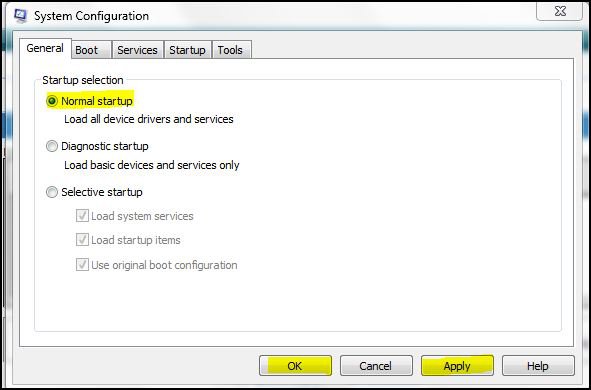
You could also type msconfig in your start menu search and check for normal startup.
msconfig1.jpg

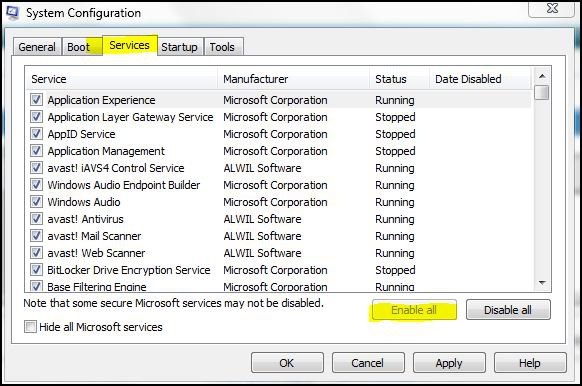
Also, check enable all if you have the option.
msconfig2.jpg


You could also run SFC and see if it can any system files that may have been damaged.
System Files - SFC Command
http://www.vistax64.com/software-too...heck-tool.html

And there's always the consideration of doing a repair install if you had the Vista installation disk.
Repair Install For Vista
My System SpecsSystem Spec
Old 02-11-2009   #7 (permalink)


Windows Vista


Re: Programs stopped working

Wow, im definitly gonna try that, ill give u feedback as soon as i know if it worked or no.

Thx a lot!
My System SpecsSystem Spec
Old 02-11-2009   #8 (permalink)


Vista Ultimate 32bit, Windows 7 32bit.


Re: Programs stopped working

Hi Muff,

Please let us know the result after you tried to use the computer in safe mode....need faulting module information as well (from "problem reports and solutions").
My System SpecsSystem Spec
Old 02-11-2009   #9 (permalink)


Windows Vista


Re: Programs stopped working

Well did all that and stil have the same problems..
The SFC thing detected erros that could not be fixed, i guess that means i gotta reinstall vista, its not that big of a deal, only problem is that first, sony vaios dont come with the OS DVD/CD, and second, i have linux installed in another partition, and i think that if i reinstall vista ill have to reinstall linux as well, at least thats what ive been told.

If anyone has any sugestions on the best way to format this, or any good tips please feel free to post I will only format this on the weekend so...

Thx a lot for all your help and time

Muff
My System SpecsSystem Spec
Old 02-11-2009   #10 (permalink)


Windows Vista


Re: Programs stopped working

@ prasathkumar sorry i only saw your post now, ill do that right away
My System SpecsSystem Spec
Reply

Thread Tools


Similar Threads
Thread Forum
32 bit programs have stopped working!!! Software
programs "stopped working" Vista General
"programs" have stopped working. Vista General
Programs and Features has stopped working Vista performance & maintenance
PROGRAMS STOPPED WORKING Vista General


Vista Forums is an independent web site and has not been authorized,
sponsored, or otherwise approved by Microsoft Corporation.
"Windows Vista", the Start Orb, and related materials are trademarks of Microsoft Corp.
© Designer Media Ltd

1 2 3 4 5 6 7 8 9 10 11 12 13 14 15 16 17 18 19 20 21 22 23 24 25 26 27 28 29 30 31 32 33 34 35 36 37 38 39 40 41 42 43 44 45 46