HI Calmat
Something very similar happened to my girl friend, yesterday. In her case, and maybe yours, the entire anti virus was gone. If you cannot find Security Essentials, at all, try to reinstall. It solved our problem. My guess, its has something to do with the MSE update, dated April 28. Cant hurt to try.
BTW, good to see you again, buddy and wish you luck
EDIT: Your post shows that the object of the shortcut (the Anti Virus is gone, the same problem that we had).
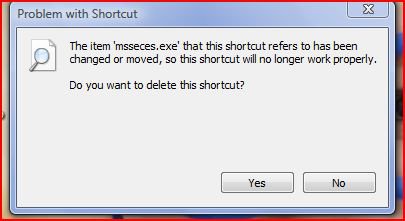
Last edited by richc46; 02 May 2012 at 09:21 AM.
hello rich
nice to hear from you again, hope you are well.
I think you are right i could not find the programme to create a shortcut, so i
have reinstalled and it seems to be running ok.
thanks for your help.
regards calmat
Hello Rich
The problem i had with my MSE shortcut disappearing has happened again. It seems
to be happening every time i add an update.
Any ideas how to solve this problem.
Do i have to update my computer every time that microsoft sends me an update.
regards calmat
This is what you do Cal.
Set your Windows updater to notify and not to install. Then when you get the updates, there will be one that says MSE Client update package. Right click on that one and then hide. Your problem will be over.
For Vista and Seven
http://www.sevenforums.com/tutorials...gs-change.html
hello rich
I have set my updater to this
Check for updates but let me choose whether to download and install them.
Will this be alright.
I have received the update you said, I did not install but right clicked and hid it, did I do right.
If I receive other updates is it alright to download and install them.
regards calmat
Cal
It is my opinion that the only update that can cause this problem is the one that you hid. If I am right, you should not have problems with future updates.
hi rich
should i set my updater back to automatic install or should i leave it on the setting
that i sent you in my last reply
calmat
Once you set an update to hide, it will not install unless you unhide. I prefer to set my Windows update to notify. I like to know what I install in my computer. The choice is yours, however. Whatever you decide the problem update will not install unless you unhide.
hello rich
thanks for solving this problem for me, very much appreciated
regards calmat
| Similar Threads | ||||
| Thread | Thread Starter | Forum | Replies | Last Post |
| Launch new instance of program through keyboard shortcut on desktop shortcut | sayeo87 | General Discussion | 1 | 11 Nov 2009 |
| shortcut on desktop - deleting the word "shortcut" | snomazushi | Vista General | 5 | 29 Mar 2009 |
| Desktop Shortcut Icons are not actually Shortcut Icons | turnbeau | Vista file management | 0 | 17 Dec 2008 |
| How do you change the target of the shortcut or shortcut command l | Catie | Vista General | 2 | 18 Aug 2007 |
| Removing "Shortcut" word after creating a shortcut? | nLinked | Vista file management | 9 | 08 Apr 2007 |
