Windows Vista Forums
Vista Forums Home Join Vista Forums Windows 7 Forum Vista Tutorials Tags
Welcome to Windows Vista Forums. Our forum is dedicated to helping you find solutions with any problems, errors or issues you are experiencing with Windows Vista. The Vista forum also covers news and updates and has an extensive Windows Vista tutorial section that covers a wide range of tips and tricks.

Go Back   Vista Forums > Vista Forums > Tutorials

Vista - Restore Backup Files

Comment
 

Restore Backup Files

How to Restore Backup Files in Vista
Published by Brink
10-19-2007

How to Restore Backup Files in Vista
Information
  This will show you how to restore backed up versions of files, that have been lost, damaged, or changed accidentally, made from the Backup Files feature in Vista. You can restore individual files, groups of files, or all files that you have backed up. For more information, see: Windows Help and How-to: Back up and Restore: FAQs
NOTE
  Backups are saved in this format: (backup location)\(computer name)\Backup Set (year-month-day) (time)
  • If the backup was done on Local Disk D: at 9/7/2007 1:00:50 PM (It uses 24 hour time), then the full backup file path would be: D:\Computer\Backup Set 2007-09-07 130050
  • You would right click the folder Backup Set 2007-09-07 130050 and click Delete to delete that backup.
RELATED LINKS:


Here's How:
1. Open the Control Panel. (Classic View)

2. Click on the Backup and Restore Center icon.

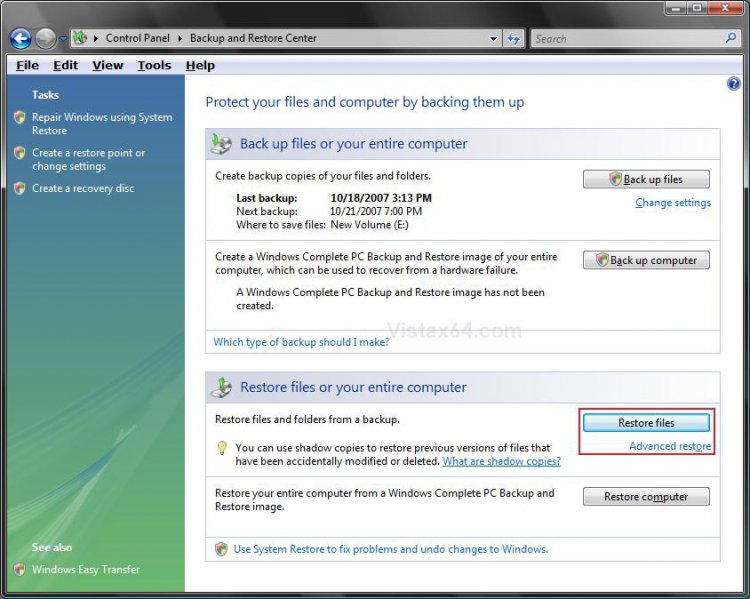
3. Click on the Restore Files button. (See screenshot below)
NOTE: To restore a backup not shown here, click Advanced restore instead and click Advanced restore (Restore files from a backup made on another computer).
restore_files.jpg
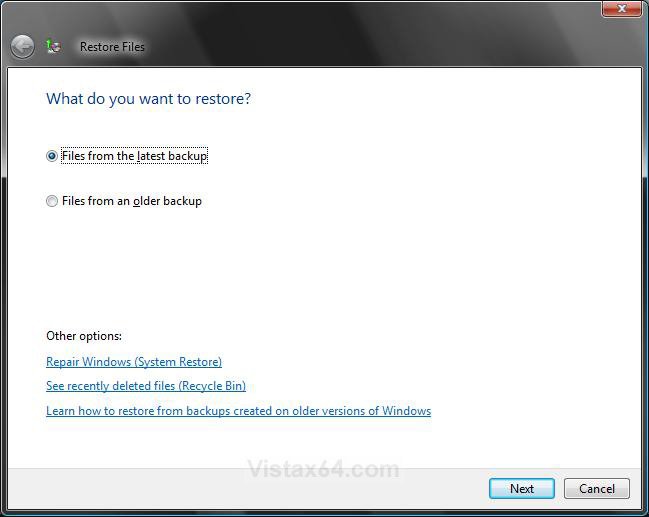
4. Dot what you want to restore, latest or older backup files, and click on Next. (See screenshot below)
what_to_restore.jpg
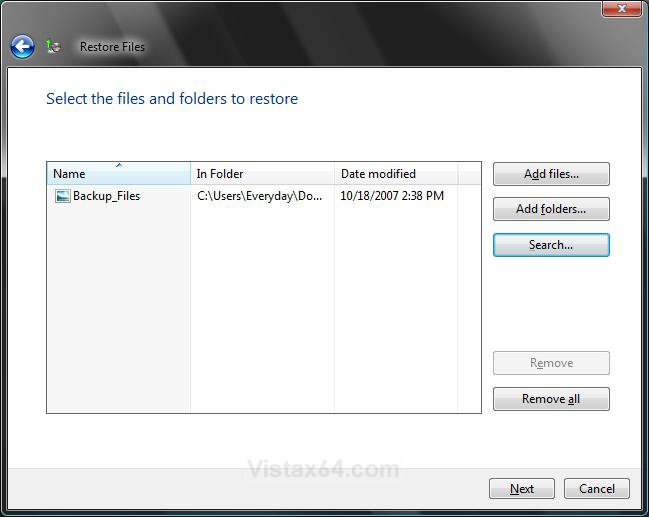
5. Select the Backup files to restore and click on Next. (See screenshot below)
NOTE: This will be from the backup file that you selected in step 4. If it is not here, then click Search to navigate to the backup files location.
A) To Remove the Selected Backup - Click on the Remove button.

B) To Remove All the Backups Listed Here - Click on the Remove all button.
select_restore.jpg
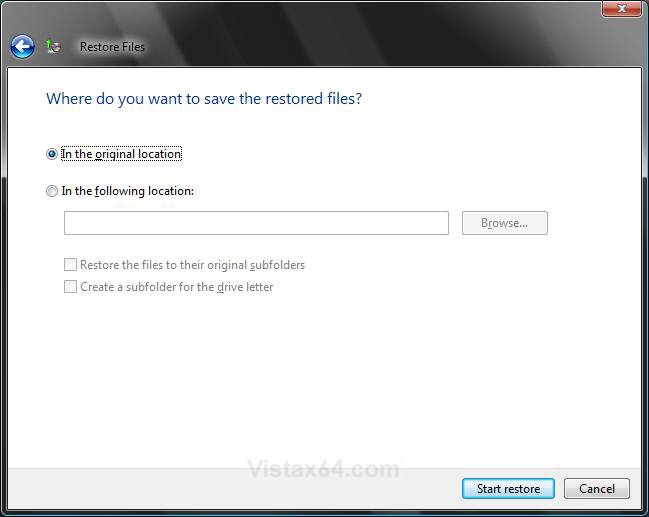
6. Select where you want to restore the files to and click on Start Restore. (See screenshot below)
NOTE: Normally you would pick Original Location to replace the files with the backup files. Otherwise, you can save the backup files to another location to manually replace the files you want with the backups.
where_restore.jpg
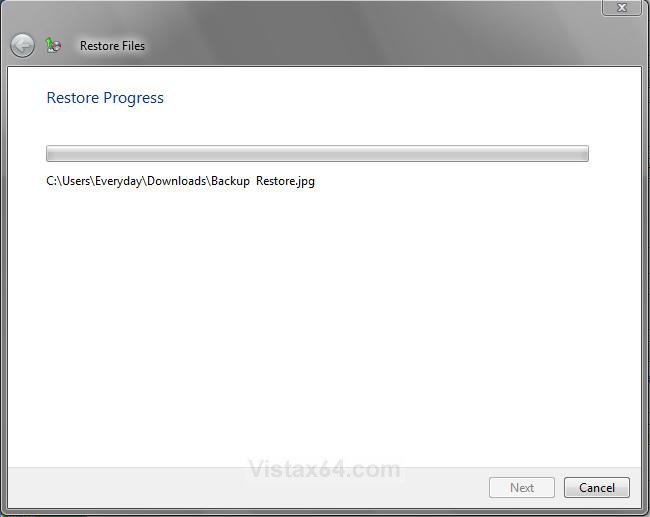
7. You will now see the progress window. (See screenshot below)
restore_progress.jpg
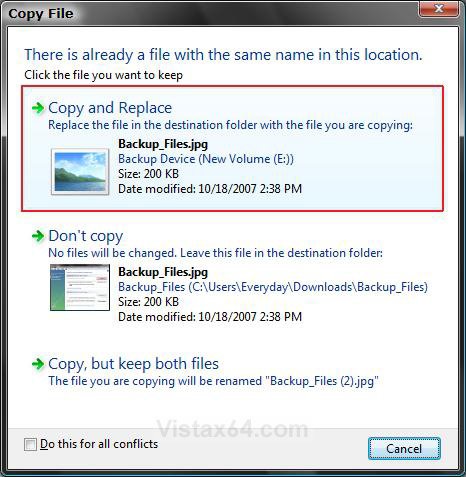
8. If you already have a copy or older copy of the file in that location from step 6, then you will see this window below. If not, then you will see step 9 below.
A) Just click on Copy and Replace to replace the file with the backup copy of the file. (See screenshot below)
copy_and_replace.jpg
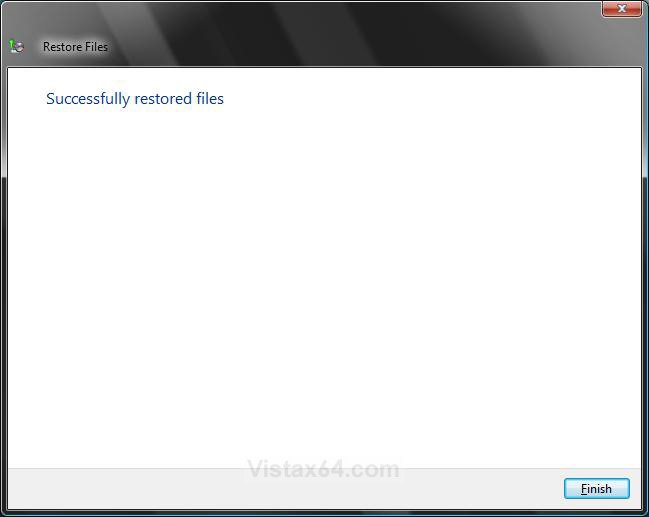
9. When the restore is completed, you will see this window. Click on Finish. (See screenshot below)
successfully_restored.jpg
That's it,
Shawn

Published by
Brink's Avatar
Administrator

Join Date: Apr 2007
Location: Texas, USA
Posts: 25,919
Rep Power: 150
Brink has a reputation beyond reputeBrink has a reputation beyond reputeBrink has a reputation beyond reputeBrink has a reputation beyond reputeBrink has a reputation beyond reputeBrink has a reputation beyond reputeBrink has a reputation beyond reputeBrink has a reputation beyond reputeBrink has a reputation beyond reputeBrink has a reputation beyond reputeBrink has a reputation beyond repute

Tutorial Tools

Applies to
All Vista Versions
64 Bit & 32 Bit

Old 1 Week Ago  
LinusWS


Vista home premium 32 bit


Re: Restore Backup Files

THANKS - DID ALL THAT, BUT WHAT HAPPENS WHEN I GET THE MESSAGE: "THE FILES YOU ARE RESTORING HAVE SECURITY PERMISSIONS FOR A USER ACCT WHICH COULD NOT BE FOUND IN THIS COMPUTER. THE MISSING USER ACCT IS SHOWN BELOW: PC\ADMIN
PLEASE USE THE CONTROL PANEL TO CREATE A USER ACCT WITH THE SAME NAME. THE SECURITY PERMISSIONS ON THESE FILES WILL BE REASSIGNED TO THAT USER ACCT."
I DO HAVE MY ADMINISTRATOR ACCT NAMED PC.
THEN I GET "THE USER ACCT PC\ADMIN WAS NOT FOUND FOR THE FOLLOWING REASON: NO MAPPING BETWEEN ACCT NAMES AND SECURITY IDs WAS DONE (0x80070534) PLEASE ENSURE THAT YOU CREATED A USER ACCT WITH THE SAME NAME."
THE BACKUP DISK WAS PREPARED ON A VISTA 32 BIT COMPUTER NAMED PC. I NEEDED TO RESTORE VISTA, AND AM TRYING TO RESTORE THE BACKUP. IT IS THE SAME VISTA 32 BIT.
WHAT SETTINGS DO I NEED TO CHANGE TO ALLOW THE NEW VISTA TO RECOGNIZE THE FILES OF THE BACKUP. I AM ABLE TO RESTORE THE FILE FOLDERS, BUT THE FILES WITHIN THE FOLDERS DO NOT TRANSFER.
THANKS FOR YOUR HELP

My System SpecsSystem Spec
Old 1 Week Ago  
Brink


Vista x64 Ultimate SP2, Windows 7 Ultimate x64


Re: Restore Backup Files

Hello Linus, and welcome to Vista Forums.

See if taking ownership of the backup folder (see NOTE at top of the tutorial for location) and all of it's sub files and folders, then allowing your account "Full Control" may allow it to restore afterwards.

Hope this helps,
Shawn
My System SpecsSystem Spec
Comment

Tutorial Tools


Similar Threads
Tutorial Category
Re: Backup and Restore from files Live Mail
Vista Ultimate, Windows Backup, Full Image & Files, When Programs & Documents Are Uninstalled Or Deleted? Also, A Restore Point Regiistry Backup Question? Vista General
HOw to restore files from a Vista files only backup Vista General
best backup software for Vista Home Ultimate that will allow me toselect files and folders to backup and restore Vista performance & maintenance


Vista Forums is an independent web site and has not been authorized,
sponsored, or otherwise approved by Microsoft Corporation.
"Windows Vista", the Start Orb, and related materials are trademarks of Microsoft Corp.
© Designer Media Ltd
Tutorial powered by GARS 2.1.8m ©2005-2006

1 2 3 4 5 6 7 8 9 10 11 12 13 14 15 16 17 18 19 20 21 22 23 24 25 26 27 28 29 30 31 32 33 34 35 36 37 38 39 40 41 42 43 44 45 46