
How to Change the Default Vista Fonts
 Information
This will show you how to change most or all of the default fonts in Windows Vista for Active Title Bar, Icon, Inactive Title Bar, Menu, Message Box, Palette Title, Selected Items, ToolTip, and various Dialog Box text and buttons.
 Tip
TipThe Fonts folder is located at:C:\Windows\Fonts to see a list of available fonts that you can use below.
 OPTION ONE
NOTE: This will let you change the default font, font size, and font color for the Active Title Bar, Icon, Inactive Title Bar, Menu, Message Box, Palette Title, Selected Items, and ToolTip text.
1. Open the Advanced Appearance settings window.
2. Click on the Item: you want to change the Font for. (See screenshot below)
NOTE: These are the Items that have fonts that can be changed. Repeat this for each item you want to change the font for. The font settings that are grayed out are not available with the selected color scheme.
- Active Title Bar
- Icon
- Inactive Title Bar
- Menu
- Message Box
- Palette Title
- Selected Items
- ToolTip
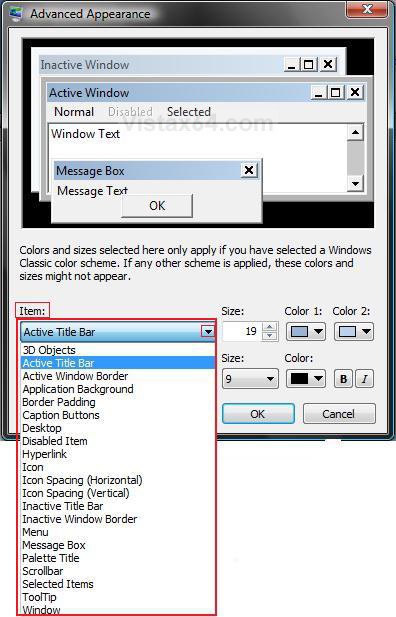
3. To Change the Item Font -
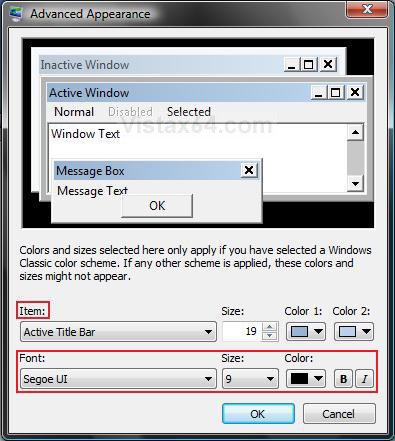
A) Click on the Font: drop down menu and select a font. (See screenshot below)
4. To Change the Item Font Size -
A) Click on the Size: drop down menu and select a number for the size. The higher the number, the larger the size.
5. To Change the Item Font Color -
A) Click on the Color: drop down menu and select a color.
6. To Have the Item Font in Bold -
A) Click the B button to highlight it. If it is not highlighted, then the font will not be in bold.
7. To Have the Item Font in Italic -
A) Click on the I button to highlight it. If it is not highlighted, then the font will not be in italic.
8. Click on OK.
9. Click on OK to apply changes.
OPTION TWO NOTE: This will let you change the default fonts for most of the Windows 7 dialog box text and button text through the registry.
1. Open the Start Menu.
2. In the white line (Start Search) area, type regedit and press Enter.
3. Click on the Continue button in the UAC prompt.
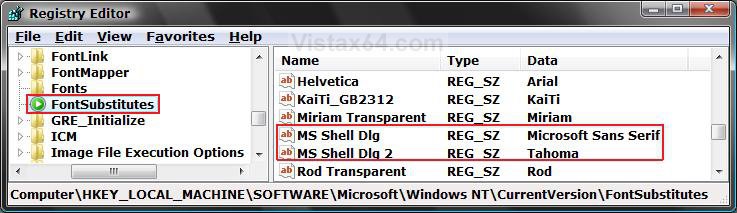
4. In regedit, go to: (See screenshots below step 5)
Code:
HKEY_LOCAL_MACHINE\SOFTWARE\Microsoft\Windows NT\CurrentVersion\FontSubstitutes
5. In the right pane, right click on MS Shell Dlg and click on Modify.
NOTE: The default fonts are the ones displayed below.
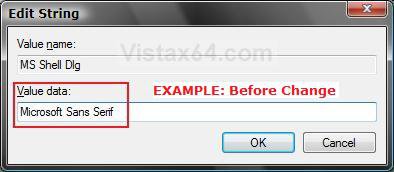
6. Type in the name of the font you want to use and click on OK. (See screenshot below)
NOTE: You can get the name of the font from the Font Folder Location C:\Windows\Fonts. Be sure that you use the exact same font name and that it is spelled correctly.
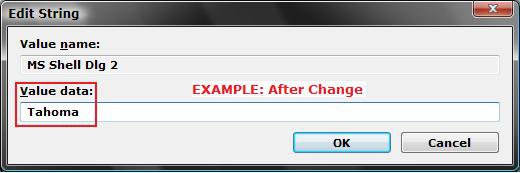
7. In the right pane, right click on MS Shell Dlg 2 and click on Modify.
8. Type in the name of the font you want to use and click on OK. (See screenshot below)
NOTE: You can get the name of the font from the Font Folder Location C:\Windows\Fonts. Be sure that you use the exact same font name and that it is spelled correctly.
8. Close regedit.
9. Log off and log on, or restart the computer to apply the changes.
OPTION THREE NOTE: This will let you change the default fonts used by Vista using the registry.
1. To Change Default Fonts Using a REG File Download
NOTE: This changes the default fonts in Vista to the Tahoma font. You could use this REG file download to make doing step 2 below easier by editing the REG file for the font you want to use instead of Tahoma.
A) Click on the Download button below, and download the file below.
Set_Tahoma_Default_Font.reg

B) Click on Save, and save the .reg file to the desktop.
C) Right click the downloaded .reg file and click on Merge.
D) Click on Run, Yes, Yes, and OK when prompted.
E) Log off and log on, or restart the computer to apply changes.
F) When done, you can delete the downloaded .reg file if you like.
2. To Manually Change Default Fonts by Creating a REG File
NOTE: The REG file in step 1 is the same as in step 2B below. You can use it and just edit the font that you would like to use instead of Tahoma in step below.
A) Open Notepad.
B) Copy and Paste the code below into Notepad.
Code:
[/INDENT][/INDENT]
[INDENT][INDENT]Windows Registry Editor Version 5.00[/INDENT][/INDENT]
[INDENT][INDENT][/INDENT][/INDENT]
[INDENT][INDENT][HKEY_LOCAL_MACHINE\SOFTWARE\Microsoft\Windows NT\CurrentVersion\Fonts][/INDENT][/INDENT]
[INDENT][INDENT]"Segoe UI (TrueType)"=""[/INDENT][/INDENT]
[INDENT][INDENT]"Segoe UI Bold (TrueType)"=""[/INDENT][/INDENT]
[INDENT][INDENT]"Segoe UI Italic (TrueType)"=""[/INDENT][/INDENT]
[INDENT][INDENT]"Segoe UI Bold Italic (TrueType)"=""[/INDENT][/INDENT]
[INDENT][INDENT][/INDENT][/INDENT]
[INDENT][INDENT][HKEY_LOCAL_MACHINE\SOFTWARE\Microsoft\Windows NT\CurrentVersion\FontSubstitutes][/INDENT][/INDENT]
[INDENT][INDENT]"Segoe UI"="Tahoma"[/INDENT][/INDENT]
[INDENT][INDENT]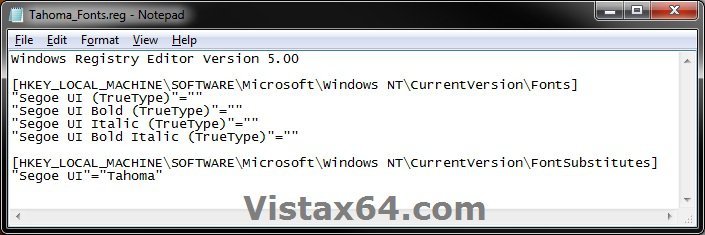
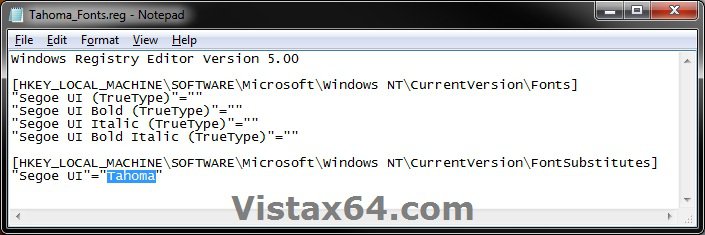
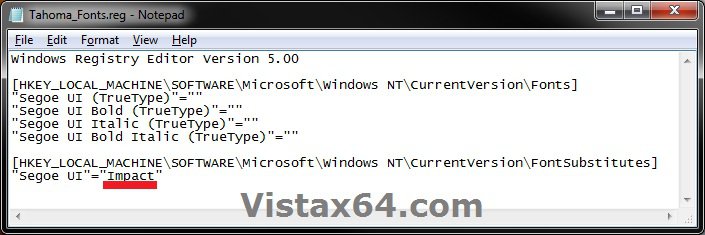
C) In Notepad, edit Tahoma in quotes with the name of the font that you would like to use in instead with it still in quotes. (see screenshot below)
NOTE: You can get the name of the font from the font folder location C:\Windows\Fonts. Be sure that you use the exact same font name that is listed. Do not include the Regular part in the font name. For example, I would type Impact instead of Impact Regular.
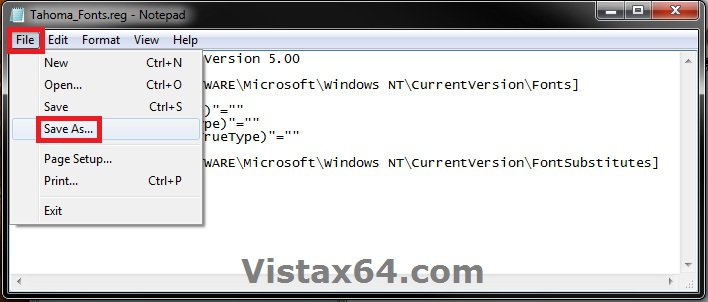
D) In Notepad, click on File (Menu bar) and Save As. (see screenshot below)
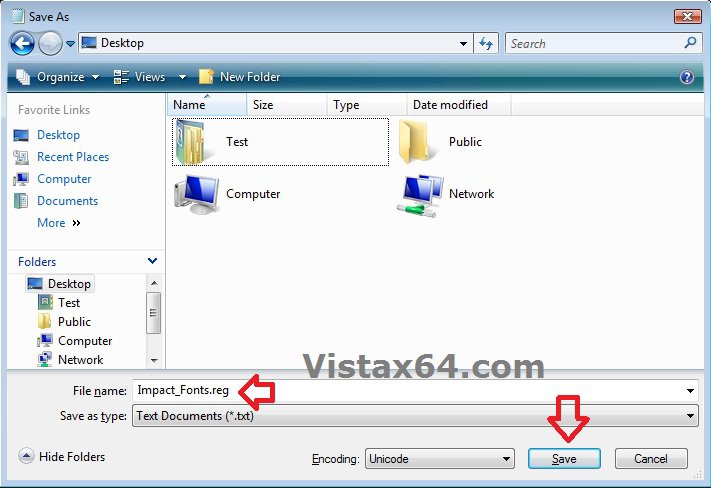
E) Type in a name you would like with a .reg file extension (ex: Impact-Fonts.reg), then click on the Save button. (see screenshot below)
D) Right click the created .reg file and click on Merge.
E) Click on Yes, Yes, and OK when prompted.
F) Log off and log on, or restart the computer to apply changes.
3. To Restore the Default Fonts
NOTE: This will undo all changes that you made using either step 1 or step 2 above, and restore the original default fonts used by Windows 7.
A) Click on the Download button below, and download the file below.
Default_Fonts.reg
B) Click on Save, and save the .reg file to the desktop.
C) Right click the downloaded .reg file and click on Merge.
D) Click on Run, Yes, Yes, and OK when prompted.
E) Log off and log on, or restart the computer to apply changes.
F) When done, you can delete the downloaded .reg file if you like.
That's it,
Shawn
Attachments

Last edited:


