Windows Vista Forums
Vista Forums Home Join Vista Forums Windows 7 Forum Vista Tutorials Tags
Welcome to Windows Vista Forums. Our forum is dedicated to helping you find solutions with any problems, errors or issues you are experiencing with Windows Vista. The Vista forum also covers news and updates and has an extensive Windows Vista tutorial section that covers a wide range of tips and tricks.

Go Back   Vista Forums > Vista Forums > Tutorials

Vista Tutorial - Transient Multimon Manager (TMM)

Comment
 
Old 12-20-2007  
Brink
Administrator


Join Date: Apr 2007
Vista x64 Ultimate SP2, Windows 7 Ultimate x64


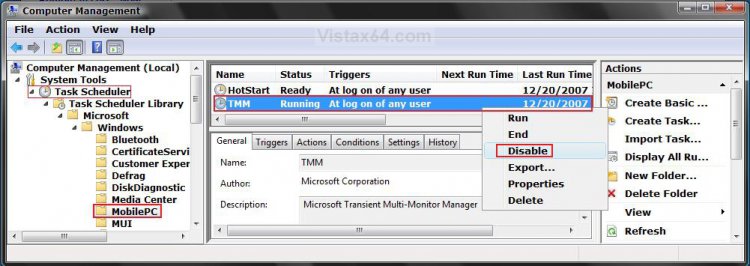
Transient Multimon Manager (TMM)

How to Disable or Enable the Transient Multimon Manager (TMM) in Vista
...

My System SpecsSystem Spec
Old 02-09-2008  
Brink
Administrator


Join Date: Apr 2007
Vista x64 Ultimate SP2, Windows 7 Ultimate x64


Re: Transient Multimon Manager (TMM)

Your welcome Bare Foot Kid,

That sounds like a great deal to me.

I'm glad that you were able to fix your problem.

Shawn

My System SpecsSystem Spec
Old 02-23-2009  
tommygun
Member


Join Date: Apr 2008
Vista Ultimate x32 & Vista Home Premium x32


Re: Transient Multimon Manager (TMM)

Hi Shawn.

What is the HotStart above the TMM entry about?

Thanks in advance,
My System SpecsSystem Spec
Old 02-23-2009  
Brink
Administrator


Join Date: Apr 2007
Vista x64 Ultimate SP2, Windows 7 Ultimate x64


Re: Transient Multimon Manager (TMM)

Hello Tommy,

HotStart is part of MobilPC, but this link below can help explain more about it though. It does not look safe to disable though.

Configuring Windows HotStart
My System SpecsSystem Spec
Old 02-23-2009  
gravesmeister
Not a huge Vista fan


Join Date: Feb 2009
Windows Vista Home Premium 32bit


Thumbs up Re: Transient Multimon Manager (TMM)

I wish I would have joined this forum months ago. I used to hate it when my monitor would blink over and over again and it would take a long time to boot up. Thanks for this tutorial. Also I noticed that my desktop is ready to be used after booting quicker now. Great Job!
My System SpecsSystem Spec
Old 02-23-2009  
dinesh
Vista Expert


Join Date: Sep 2008
Windows 7 RTM 64-bit


Re: Transient Multimon Manager (TMM)

every time my computer turns on, it gives a black screen after MS logo. Now i came to know that it was actually searching for monitors in that time. Thanks for this wonderful tutorial. Now my system boots up quickly.
My System SpecsSystem Spec
Old 02-23-2009  
tommygun
Member


Join Date: Apr 2008
Vista Ultimate x32 & Vista Home Premium x32


Re: Transient Multimon Manager (TMM)

Quote  Quote: Originally Posted by Brink View Post
Hello Tommy,

HotStart is part of MobilPC, but this link below can help explain more about it though. It does not look safe to disable though.

Configuring Windows HotStart
.......thanks a lot for the link to explain HotStart.

I think I better leave it enabled as you suggested.......
My System SpecsSystem Spec
Old 02-24-2009  
Brink
Administrator


Join Date: Apr 2007
Vista x64 Ultimate SP2, Windows 7 Ultimate x64


Re: Transient Multimon Manager (TMM)

You're welcome Gravemiester, Dinesh, and Tommy.
My System SpecsSystem Spec
Comment

Tutorial Tools


Similar Threads
Tutorial Category
Microsoft Transient Multi-Monitor Manager??? Vista General
Transient Errors Continued Vista General
Transient Multi-Monitor Manager causing stuttering Vista General
Multimon with two video cards in Vista Vista hardware & devices
MultiMon w/o Aero? Vista hardware & devices


Vista Forums is an independent web site and has not been authorized,
sponsored, or otherwise approved by Microsoft Corporation.
"Windows Vista", the Start Orb, and related materials are trademarks of Microsoft Corp.
© Designer Media Ltd
Tutorial powered by GARS 2.1.8m ©2005-2006

1 2 3 4 5 6 7 8 9 10 11 12 13 14 15 16 17 18 19 20 21 22 23 24 25 26 27 28 29 30 31 32 33 34 35 36 37 38 39 40 41 42 43 44 45 46