
How to Enable or Disable DEP in Vista, Windows 7, and Windows 8
 Information
Data Execution Prevention (DEP) is a security feature that can help prevent damage to your computer from viruses and other security threats. Harmful programs can try to attack Windows by attempting to run (also known as execute) code from system memory (RAM) locations reserved only for Windows and other authorized programs. These types of attacks can harm your programs and files. If DEP notices a program on your computer using memory incorrectly, it closes the program and notifies you with the DEP stop error. DEP is ran in a software mode and in a hardware mode. If your processor supports DEP (NX for AMD, and XD for Intel), then you will have hardware and software DEP. If it doesn't, then Vista will just use software DEP. 64 bit applications will have DEP enabled all the time by default, but 32 bit applications do not and must have DEP manually enabled for them. For more information, see: Windows Help and Support: Data Execution Prevention: FAQs
 Note
NoteIf a program is being closed by DEP, then make sure that it is a DEP compatible version and check for an updated version. If it is not DEP compatible, then you can uninstall the program or turn off DEP for that particular program.
 Warning
Do not disable DEP, or exclude (OptOut) a program, unless you have adequate protection and are having problems only with a known safe program that DEP will not let run and you cannot live without it. Remember DEP stopped the program for a reason. Either it is just a improperly running program, or some sort of malware trying to get into restricted memory.
Adequate Protection:
Adequate Protection:
- Antivirus program with realtime scanning (EX: Avast or AVG are good ones)
- A spyware/adware program with realtime scanning (EX: Windows Defender, Spybot Search and Destroy)
- Enable Vista's UAC (User Account Control). It asks you for permission first for anything that wants to run with full access to the computer.
NOTE: DEP is enabled by default. If you installed Enhanced Mitigation Experience Toolkit (EMET), then it will be used by Windows instead of DEP and gray out the DEP settings like below.
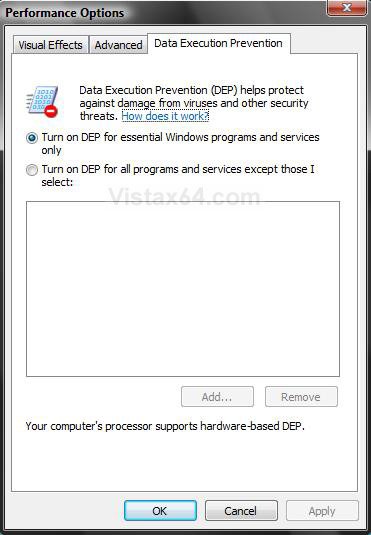
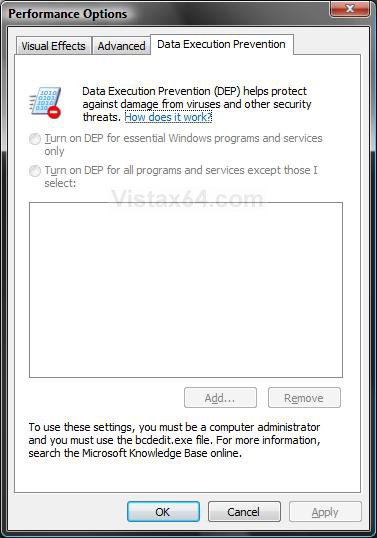
 OPTION ONE
NOTE: If you have a 64-bit CPU, then you may also have a no exectute option in BIOS that is the built in DEP on the CPU.
1. Open an elevated command prompt.
2. To Enable DEP
A) In the elevated command prompt, type in bold below and press Enter. (See screenshot below)
NOTE: If for some reason this command does not enable DEP after restarting the computer, then use the bcdedit.exe /set {current} nx AlwaysOn command instead.
bcdedit.exe /set {current} nx OptIn
B) You should get a success message back
C) Close the elevated command prompt.
D) Restart the computer to apply.

3. To Disable DEP
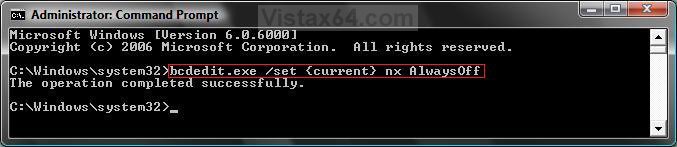
A) In the command prompt, type in bold belowand press Enter. (See screenshot below)
bcdedit.exe /set {current} nx AlwaysOff
B) You should get a success message back.
C) Close the command prompt.
D) Restart the computer to apply.
4. To Verify the Status of DEP
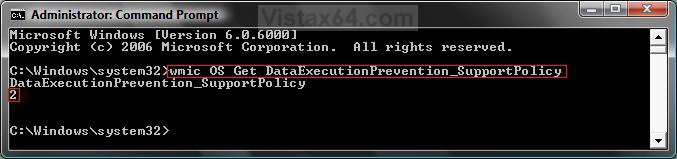
A) In the command prompt, type in bold below and press Enter. (See screenshot below table)
wmic OS Get DataExecutionPrevention_SupportPolicy
B) You will get a number (see table below) that will tell you the status of DEP.
C) Close command prompt when done.
Note 2 is the default setting.
Note
Number | Description | Status |
AlwaysOff | DEP is disabled for all processes. (Step 3 above) | |
1 | AlwaysOn | DEP is enabled for all processes. (Note under step 2) |
2 | OptIn | DEP is enabled for only Windows system components and services have DEP applied. Default setting. (Step 2 above) |
3 | OptOut | DEP is enabled for all processes. Administrators can manually create a list of specific applications which do not have DEP applied. (How to Turn DEP On or Off for a Program) |
OPTION TWO NOTE: This will be for the 32 bit version of Internet Explorer.
- For a 32 bit Vista version: C:\Program Files\Internet Explorer\iexplore.exe
- For a 64 bit Vista version: C:\Program Files (x86)\Internet Explorer\iexplore.exe
WarningSome Active X Internet Explorer add-ons may not work with DEP on. It can cause them to crash and prevent the startup of IE by DEP closing it. If this happens to you, then see: How to Fix a Crashing Internet Explorer in Vista or disable DEP again.
1. Open the Start Menu.
2. Click on All Programs and right click on Internet Explorer, then click Run as administrator.
NOTE: If you cannot get IE7 to open using step 2, then click on All Programs and Accessories. Next, right click on Internet Explorer (No Add-ons) and click on Run as administrator instead.
WARNING: If you do not use Run as administrator, the Enable memory protection to help mitigate online attacks option will be grayed out in steps 5 and 6 below, and you will not be able to enable or disable it.
3. In Internet Explorer, click on Tools and Internet Options.
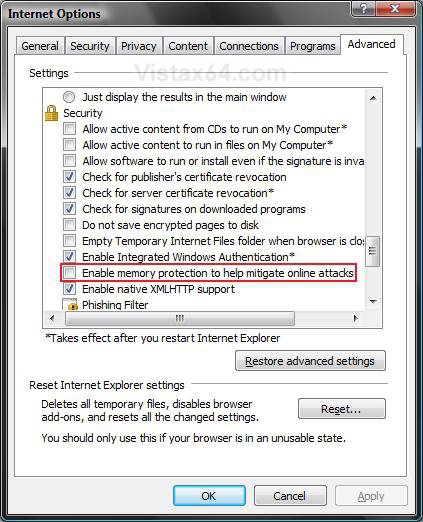
4. Click on the Advanced tab. (See screenshot below)
5. To Enable DEP for the 32 bit Internet Explorer
A) Under Security, check Enable memory protection to help mitigate online attacks.
B) Go to step 7.
6. To Disable DEP for the 32 bit Internet Explorer
A) Under Security, uncheck Enable memory protection to help mitigate online attacks.
7. Click on OK to apply.
That's it,
Shawn
Attachments

Last edited by a moderator:


