
How to Change or Move Virtual Memory Paging File in Vista, Windows 7, and Windows 8
 Information
If your computer lacks the random access memory (RAM) needed to run a program or operation, Windows uses virtual memory to compensate. Virtual memory combines your computer’s RAM with temporary space on your hard drive. When RAM runs low, virtual memory moves data from RAM to a space called a paging file. Moving data to and from the paging file frees up the RAM to complete its work.
Windows manages the virtual memory size automatically by default. This will show you how to manually change the size of virtual memory if the default size is not enough for your needs, and how to change what drive is used for the paging file.
For more detailed information about the page file, see:
Mark's Blog : Pushing the Limits of Windows: Virtual Memory
and
The Pagefile Done Right! | Citrix Blogs
For more information about the new swap file in Windows 8, see:
Windows 8 / Windows Server 2012: The New Swap File - Ask the Performance Team - Site Home - TechNet Blogs
Windows manages the virtual memory size automatically by default. This will show you how to manually change the size of virtual memory if the default size is not enough for your needs, and how to change what drive is used for the paging file.
For more detailed information about the page file, see:
Mark's Blog : Pushing the Limits of Windows: Virtual Memory
and
The Pagefile Done Right! | Citrix Blogs
For more information about the new swap file in Windows 8, see:
Windows 8 / Windows Server 2012: The New Swap File - Ask the Performance Team - Site Home - TechNet Blogs
 Note
NoteThe more RAM your computer has, the better your programs will generally run performance wise since Windows may not have to use virtual memory as often. If a lack of RAM is slowing your computer, you might be tempted to increase virtual memory to compensate. However, your computer can read data from RAM much more quickly than from a hard disk, so adding RAM is a better solution. Plus, Windows usually does a great job at managing virtual memory for you.
The Virtual Memory Paging File is hidden protected operating system file at this location: C:\pagefile.sys
The Virtual Memory Paging File is hidden protected operating system file at this location: C:\pagefile.sys
 Tip
TipTo improve the performance of Windows, you can place the page file on a second physical hard drive instead of the same C: drive that Windows is on. Doing this allows Windows to dump temp junk onto one drive while not having to interrupt reads or writes on the other drive.
You will not gain any performance by moving the page file to just another partition on the same HDD that Windows is installed on.
To Reset the Page File:
Turn the page file off and on for the drive it's on with restarting the computer after each time.
You will not gain any performance by moving the page file to just another partition on the same HDD that Windows is installed on.
To Reset the Page File:
Turn the page file off and on for the drive it's on with restarting the computer after each time.
 Warning
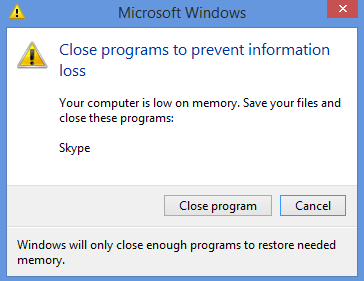
If you receive any type of low memory error message like below, then you need to either add more RAM or increase the size of the page file so that you can run the programs on your computer.
I would advise to not turn off the page file even if you have a lot of RAM installed. Some programs will still require using the page file to run properly.
I would advise to not turn off the page file even if you have a lot of RAM installed. Some programs will still require using the page file to run properly.
Here's How:
NOTE: You will need to be logged in as an administrator to be able to modify the page file.
1. Open the Start Menu.
A) Right click on the Computer button and click on Properties.
B) Go to step 3.
OR
2. Open the Control Panel (Classic View - Vista or Icons view - Windows 7).
A) Click on the System icon.
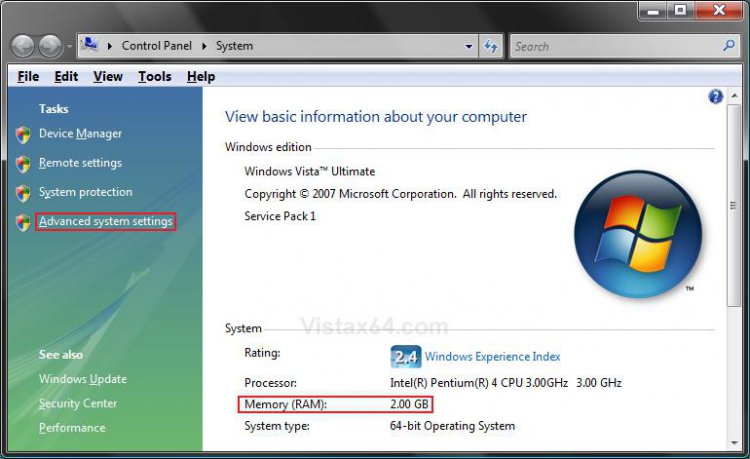
3. Click on Advanced system settings. (See screenshot below)
NOTE: While your here, note how much Memory (RAM) you have installed under the System section.
4. If prompted by UAC, then click on Continue (Vista) or Yes (Windows 7).
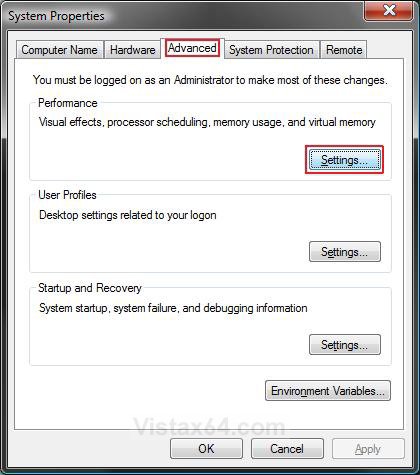
5. In the Advanced tab, click on the Settings button in the Performance section. (See screenshot below)
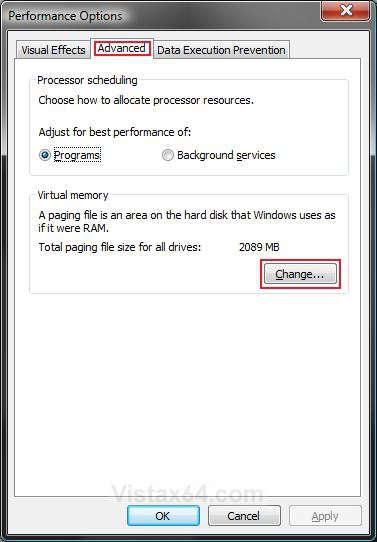
6. Click on the Advanced tab. (See screenshot below)
7. Under Virtual memory, click on the Change button.
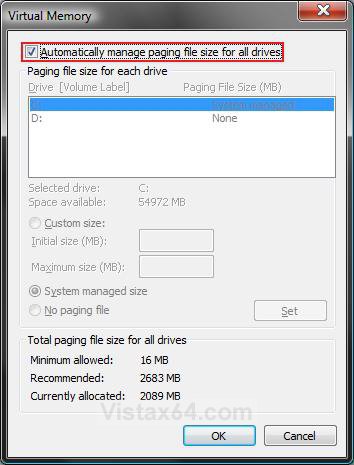
8. To Turn Off Automatic Virtual Memory Management for All Drives
A) Uncheck the Automatically manage paging file size for all drives box. (See screenshot below)
NOTE: This turns off automatic virtual memory management by Windows so you can manually change the drive and size to what you want instead.
B) Go to step 10.
9. To Turn On Automatic Virtual Memory Management for All Drives
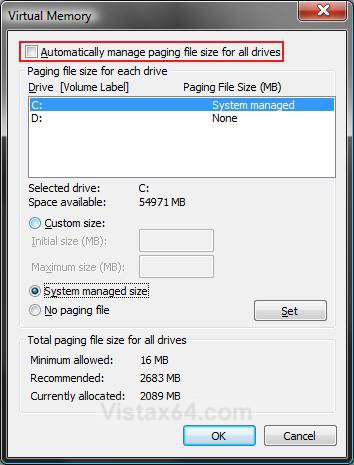
A) If one of the listed drives (ex: C: ) is set as System Managed already, then check the Automatically manage paging file size for all drives box. Click on OK and go to step 17. (See screenshot below)
OR
B) If one of the listed drives is not set as System Managed already, then uncheck the Automatically manage paging file size for all drives box and do step 10 and step 12.
10. To Select a Drive to Add or Change the Paging File
NOTE: By default, Windows uses the same drive letter that it is installed on. This system drive is usually the C: drive.
WARNING: If you have another internal NTFS drive listed and want to use it instead, then make sure it is as fast or faster than the drive Windows is installed on. Make sure you only use a separate hard drive, not another partition on the same hard drive as Windows is installed on. This will cause a decrease in performance if you do. You cannot move the page file to an external or removable drive.
A) Click on a listed hard drive you want to change or add a paging file to for Windows to use. (See screenshot below step 9A)
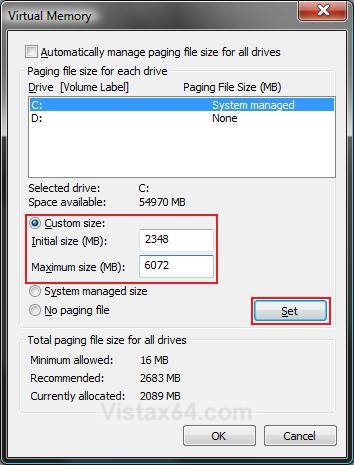
11. To Have a Custom Paging File Size for the Selected Drive
NOTE: You would do this if you do not want to use the automatic system managed size by Windows.
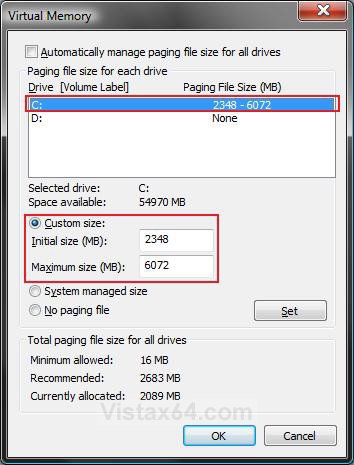
A) Dot Custom size. (See screenshots below step 15)
B) Type in a size for the Initial size in MB (1 GB = 1024 MB).
NOTE: This will be the minimum size.
C) Type in a size for the Maximum size you want in MB (1 GB = 1024 MB).
D) Go to step 14.
12. To Have a System Managed Paging File Size for the Selected Drive
NOTE: This will let Windows automatically manage the size of the paging file for this selected drive as needed.
A) Dot System managed size. (See screenshots below step 9)
B) Go to step 14.
13. To Remove the Paging File from the Selected Drive
WARNING: Make sure that you have at least one drive selected to have a paging file on. Otherwise your computer may slow down dramatically.
NOTE: You would usually only do this if you have more than one drive that you already added a paging file to from step 11 above.
A) Dot No paging file. (See screenshots below step 15)
14. Click the Set button. (See left screenshot below)
NOTE: Repeat steps 10 to 14 if you would like to make more changes to the paging file, or add a paging file to another listed drive.
15. Click on OK. (See right screenshot below)
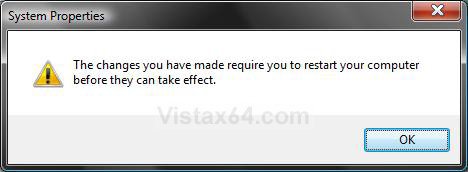
16. If the Paging File Size was Decreased
NOTE: If the paging file was decreased, the computer will need to be restarted before the changes can be applied. You will not see this if you increased the size.
A) Click OK. (See screenshot below)
17. Click on OK. (See screenshot below step 7)
18. Click on OK. (See screenshot below step 5)
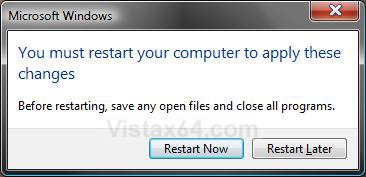
19. If the Paging File Size was Decreased
NOTE: You will not see this if you increased the size.
A) Click Restart Now. (See screenshot below)
NOTE: Be sure to save and close anything open first. This will restart the computer immediately.
That's it,
Shawn
Related Tutorials
- How to Start the Memory Diagnostics Tool in Vista
- How to Disable or Enable Vista Services With a Advice Guide
- How to Use ReadyBoost in Vista
- How to Change What Superfetch will Preload in Vista
- How to Disable or Enable Superfetch in Vista
- How to Enable or Disable Clear Virtual Memory Paging File at Shutdown in Vista and Windows 7
- How to Free Up and Recover Hard Drive Space in Windows 7
- How to Enable or Disable Page File Encryption in Vista and Windows 7
- How to Change Default Location of Temporary Files Folder in Vista, Windows 7, and Windows 8
- How to Open Advanced Tools in Windows 7 and Windows 8
Attachments
Last edited by a moderator:


