
How to Fix the Error "Your user profile was not loaded correctly! You have been logged on with a temporary profile." in Vista and Windows 7
 Information
A user profile is a collection of settings that make the computer look and work the way you want it to for a user account. It contains the account's settings for desktop backgrounds, screen savers, pointer preferences, sound settings, and other features. User profiles ensure that your personal preferences are used whenever you sign in to Windows.
A user profile is different from a user account, which you use to sign in to Windows. Each user account has at least one user profile associated with it.
When you log on to Vista using a temporary profile (user account), and you receive this error message:
Your user profile was not loaded correctly! You have been logged on with a temporary profile.
Changes you make to this profile will be lost when you log off. Please see the event log for details or contact your administrator.
For more information, see:
A temporary profile is loaded after you log on to a Windows Vista-based system
A user profile is different from a user account, which you use to sign in to Windows. Each user account has at least one user profile associated with it.
When you log on to Vista using a temporary profile (user account), and you receive this error message:
Your user profile was not loaded correctly! You have been logged on with a temporary profile.
Changes you make to this profile will be lost when you log off. Please see the event log for details or contact your administrator.
For more information, see:
A temporary profile is loaded after you log on to a Windows Vista-based system
 Tip
TipThis problem usually occurs if the current user's profile was accidentally deleted from the system or got corrupted.
 Warning
If you have this error message below instead, then see: How to Fix the Error "The User Profile Service failed the logon. User profile cannot be loaded."
The User Profile Service failed the logon. User profile cannot be loaded.
The User Profile Service failed the logon. User profile cannot be loaded.
EXAMPLE: Error Message in Windows 7
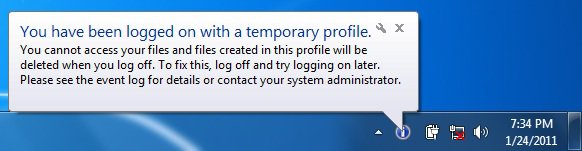
 STEP ONE
  Warning
You must be logged on to an administrator account using either step 1 or 2 below before you can move on to do the STEP TWO section below.
1. To Log on to another Administrator account
NOTE: If you do not have another Administrator account, then proceed to step 2.
A) Go to the STEP TWO section below.
OR
2. To Boot into Safe Mode for the built-in Administrator account
NOTE: You may not need to enable the built-in Administrator account. If this was the only normal administrator account you had, then Safe Mode should automatically boot into the built-in Administrator account.
TipIf you cannot boot into Windows and do not have a Windows installation DVD, then you can create and use the boot disc below to boot into Safe Mode with instead.
Tip
Windows 7: (Option Two at link)
Vista: (Option One at link)
B) If Safe Mode did not boot into the built-in Administrator
account, then enable the built-in Administrator account. If it did , then go to step 2C.
C) Log off in Safe Mode, and then log on to the built-in Administrator account to logon with that account in Safe Mode.
D) Go to the STEP TWO section below.
OR
3. To Enable the Built-in Administrator account at Boot
A) For how, see: How to Enable the Built-in Elevated "Administrator" Account from WinRE
B) When enabled, log in to the built-in Administrator account, and go to the STEP TWO section below for what you would like to do
STEP TWO 1. Backup anything that you do not want to lose in this user account's C:\Users\(user-name) profile folder, if the profile folder still exists, to another location, then delete the (user-name) profile folder.
2. Open the Start menu.
3. In the Start Menu search box, type regedit and press Enter.
4. If prompted by UAC, then click on Continue (Vista) or Yes (Windows 7).
5. In regedit, go to: (See screenshot below step 7)
Code:
HKEY_LOCAL_MACHINE\SOFTWARE\Microsoft\Windows NT\CurrentVersion\ProfileList
6. In the left pane, click on one of the S-1-5..... folders (SID key) with the long number. (See screenshot below step 7)
NOTE: It should have .bak at the end of it.
A) In the right pane, look at the ProfileImagePath to see if this is the same user account that you deleted in step 1 above.
B) Repeat step 6 until you find the one that you deleted in step 1 above.
7. To Backup the Registry SID Key
WARNING: You should backup this SID key to be safe in case you delete the wrong one in step 8 below.
A) Right click on the SID key from step 6, and click on Export.
B) Type in a name and save the REG file to a safe location.
NOTE: This is your backup. To Restore the Backup, right click on the REG backup file and click on Merge.
C) Continue on to step 8.
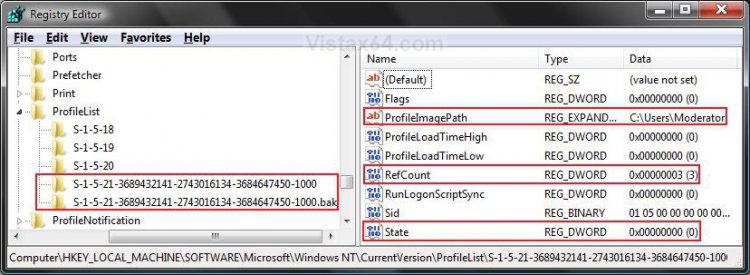
8. Right click on the SID key, from step 6 with bak at the end, and click on Delete. (see screenshot above)
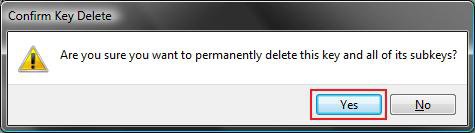
9. Click on Yes to confirm deletion. (See screenshot below)
10. If there is another SID key with the exact same long number from step 6 for this user account without bak at the end, repeat step 7 first, then right click on this same SID key, and click on Delete. (see screenshot below step 7)
11. Click on Yes to confirm deletion. (See screenshot below step 9)
12. Close regedit.
13. Log off and log on.
 Note
Note After you log on to the computer, the profile folder you are having problems with is re-created. If not, then try a System Restore using a restore point dated before you got this error. If this still does not help, then you will need to create a new account and restore the user folder files from the backup created at step 1.
That's it,
Shawn
Related Tutorials
- How To Perform a Repair Installation For Vista
- How to Do a System Restore in Vista
- How to Do a Startup Repair in Vista
- How to Do a Clean Install of Vista with a Upgrade Version
- How to Do a Clean Install with a Full Version of Vista
- How to Fix the Error "The User Profile Service failed the logon. User profile cannot be loaded."
- How to Change the User Folder Name of a User Profile in Windows 7
- How to Fix Windows 7 Logon Screen Showing Only "Other User" and Last Logged On User Icon
Attachments

Last edited by a moderator:


