
How to Fix the Windows Sidebar Gadget Not Displaying Correctly in Vista
 Information
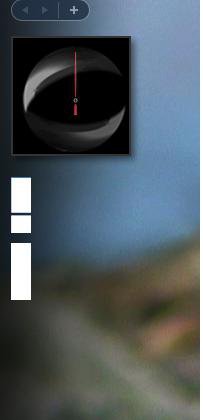
This will show you how to fix the Windows Sidebar when the clock gadget is displayed as a black square and all other gadgets show up as white rectangles with one of those information (i) icons and a plus sign.
 Note
NoteThis usually happens if the XML registration is missing in the system. The steps below will show you how to fix this.
EXAMPLE: Windows Sidebar not displaying correctly
 OPTION ONE
NOTE: This does the same thing as in OPTION TWO below, but automatically. If your Vista is not displayed as the C: drive in Computer, then do OPTION TWO below instead and substitute C: in the last command with your drive letter instead.
1. Click on the Download button below to download the file below.
Reset_Gadgets.bat

2. Click on Save (if prompted), and save the .bat file to your desktop.
3. Right click on the downloaded .bat file and click on Run as administrator.
4. You will see a command prompt flash open and close as the .bat file runs.
5. When finished, restart the computer to apply.
6. Check to see if Windows Sidebar is displaying correctly now. If not, then do a System Restore using a restore point dated before the problem.
OPTION TWO NOTE: This does the same thing as in OPTION ONE above, but manually.
1. Open a elevated command prompt (right click - Run as administrator
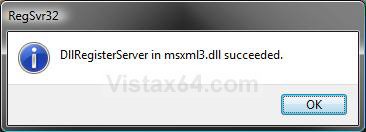
2. In the elevated command prompt, type in each command below and press Enter one at a time. After each time your press Enter, you will need to click on OK before doing the next command. (see screenshot below)
Code:
[/INDENT][/INDENT]
[INDENT][INDENT][LIST][/INDENT][/INDENT]
[INDENT][INDENT][*]taskkill /im sidebar.exe /f[/INDENT][/INDENT]
[INDENT][INDENT][*]regsvr32 msxml3.dll[/INDENT][/INDENT]
[INDENT][INDENT][*]regsvr32 scrrun.dll[/INDENT][/INDENT]
[INDENT][INDENT][*]regsvr32 jscript.dll[/INDENT][/INDENT]
[INDENT][INDENT][*]regsvr32 atl.dll[/INDENT][/INDENT]
[INDENT][INDENT][*]Regsvr32 "%ProgramFiles%\Windows Sidebar\sbdrop.dll"[/INDENT][/INDENT]
[INDENT][INDENT][*]Regsvr32 "%ProgramFiles%\Windows Sidebar\wlsrvc.dll"[/INDENT][/INDENT]
[INDENT][INDENT][*]reg delete "HKEY_CURRENT_USER\Software\Microsoft\Windows\CurrentVersion\Internet Settings\Zones" /f[/INDENT][/INDENT]
[INDENT][INDENT][/LIST][INDENT][B][COLOR=red]NOTE:[/COLOR][/B] [I]This command will reset the security zones in Internet Explorer back to the default settings[/I].[/INDENT][/INDENT]
[INDENT][INDENT][/INDENT][/INDENT][/INDENT]
[INDENT][INDENT][LIST][/INDENT][/INDENT]
[INDENT][INDENT][*][B]"[COLOR=red]C:[/COLOR][/B]\Program Files\Windows Sidebar\sidebar.exe"[/INDENT][/INDENT]
[INDENT][INDENT][/LIST][INDENT][B][COLOR=red]NOTE:[/COLOR][/B] [I]If your Vista is not displayed as the [B]C:[/B] drive in Computer, then substitute [B][COLOR=red]C:[/COLOR][/B] in the command above with your drive letter instead.[/I][/INDENT][/INDENT]
[INDENT][INDENT][/INDENT]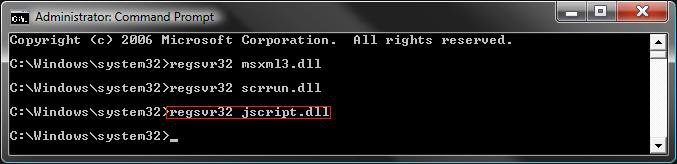
3. Restart the computer to apply.
4. Check to see if Windows Sidebar is displaying correctly now. If not, then do a System Restore using a restore point dated before the problem.
That's it,Shawn
Attachments
Last edited by a moderator:


