
How to Create a Drive Shortcut in Vista
 Information
This will show you how to create a shortcut for any drive that has a letter for it in Computer. You can then place this shortcut where you like for easy use.
Here's How:
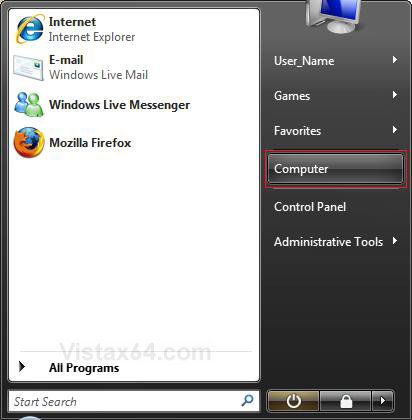
1. Open the Start menu.
2. Click on the Computer button. (See screenshot below)
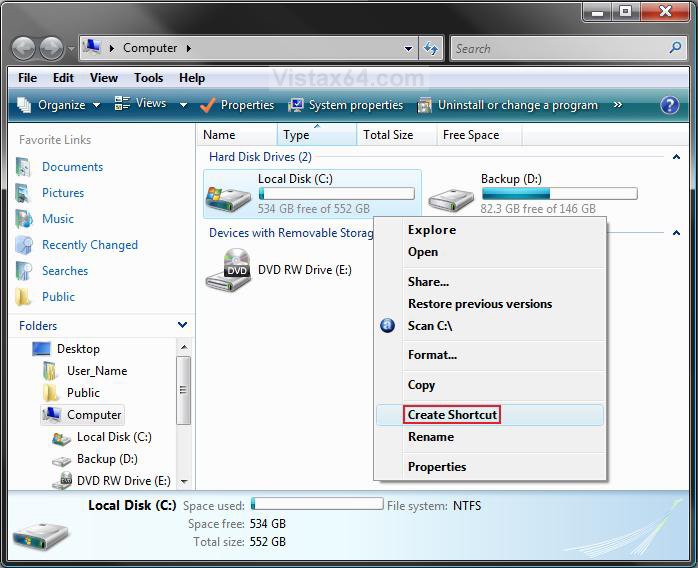
3. In the Computer window, right click on the drive you want a shortcut for and click on Create Shortcut. (See screenshot below)
NOTE: This will create a shortcut of the selected drive on the desktop.
4. Move the drive shortcut where you like for easy use.
That's it,Shawn
Related Tutorials
- How to Shrink and Create a Partition with Disk Management in Vista
- How to Delete and Extend a Partition with Disk Management in Vista
- How to Change a Drive Icon in Vista
- How to Hide or Show Drive Letters in Vista, Windows 7, and Windows 8
- How to Add, Change, or Remove a Drive Letter in Vista
- How to Disable or Enable Low Disk Space Warning in Vista
- How to Increase Hard Drive Performance in Vista
- How to Remove or Show Drives in the Vista and Windows 7 "Send To" Context Menu
- How to Restrict or Unrestict Drive Access in Vista
- How to Rename a Drive in Vista
- How to Customize the Send To Context Menu in Vista
- How to Use Quick Launch in Vista
- How to Mount or Dismount a Drive or Partition to a Folder in Vista
Attachments

Last edited by a moderator: