
How to Use the Malicious Software Removal Tool in Vista
 Information
This will show you how to open and use the Malicious Software Removal Tool (MRT) to manually run scans for and automatically remove malicious software.
For more information and FAQs about the Malicious Software Removal Tool, please read:
The Microsoft Windows Malicious Software Removal Tool helps remove specific, prevalent malicious software from computers that are running Windows 7, Windows Vista, Windows Server 2003, Windows Server 2008, Windows XP, or Windows 2000
For more information and FAQs about the Malicious Software Removal Tool, please read:
The Microsoft Windows Malicious Software Removal Tool helps remove specific, prevalent malicious software from computers that are running Windows 7, Windows Vista, Windows Server 2003, Windows Server 2008, Windows XP, or Windows 2000
 Tip
Tip- The Microsoft Malicious Software Removal Tool is normally installed and updated on the second Tuesday of every month by the KB890830 Windows Update.
- After a scan with MRT, the scan log is located at: C:\Windows\Debug\mrt.log
- After a scan with MRT, yhe event log is located at: C:\Windows\Debug\mrteng.log
 Note
NoteThe Malicious Software Removal Tool normally runs in quiet mode. If it detects malicious software on your computer, the next time that you log on to your computer as a computer administrator, a balloon will appear in the notification area to make you aware of the detection and prompt you to run a full scan.
 Warning
The Microsoft Malicious Software Removal Tool does not replace an antivirus program. It is strictly a post-infection removal tool. Therefore, it is strongly recommend that you install and use an up-to-date antivirus program.
The Microsoft Malicious Software Removal Tool differs from an antivirus program in three key ways:
The Microsoft Malicious Software Removal Tool differs from an antivirus program in three key ways:
- The tool removes malicious software from an already-infected computer. Antivirus products block malicious software from running on a computer. It is significantly more desirable to block malicious software from running on a computer than to remove it after infection.
- The tool removes only specific, prevalent malicious software. Specific, prevalent malicious software is a small subset of all the malicious software that exists today.
- The tool focuses on the detection and removal of active malicious software. Active malicious software is malicious software that is currently running on the computer. The tool cannot remove malicious software that is not running. However, an antivirus product can perform this task.
Here's How:
NoteThe Windows Malicious Software Removal Tool - (KB89030) Windows Update will need to be installed first before you will have it available in Windows Vista.
If not, then you can also download and install it manually from Microsoft at:
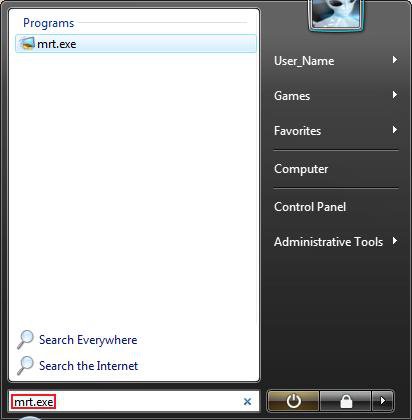
1. Open the Start Menu.
2. In the white line (Start Search) area, type mrt.exe and press Enter. (See screenshot below)
NOTE: You can also type mrt.exe in the RUN window. This file is located at C:\Windows\System32\mrt.exe.
3. If prompted by UAC, click on Continue.
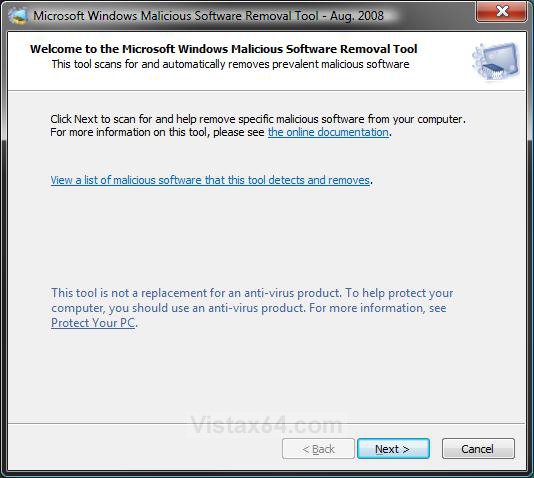
4. Click on the Next button. (See screenshot below)
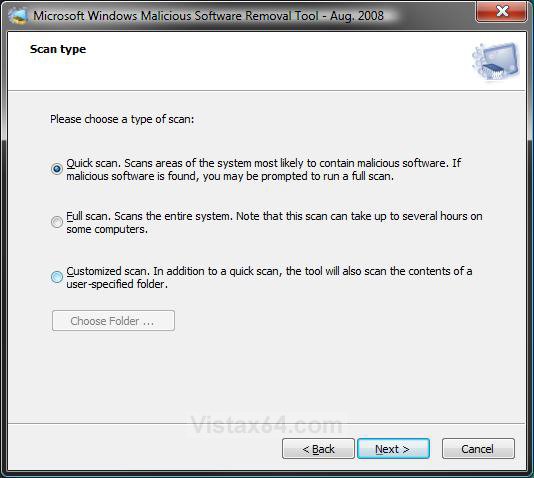
5. Select and dot the type of scan you would like to run and click on Next. (See screenshot below)
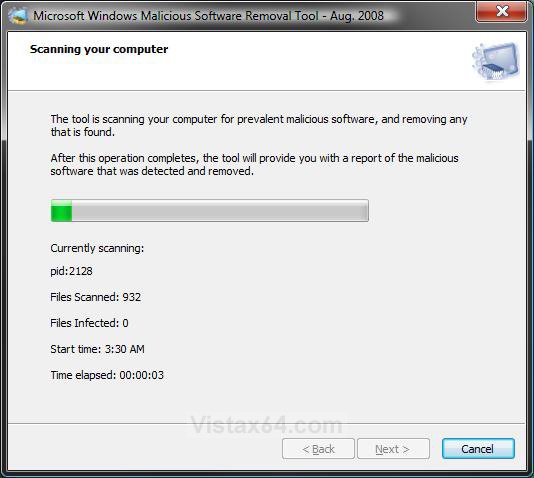
6. It will now start the scan and can take a bit to finish depending on what scan type you selected in step 5. (See screenshot below)
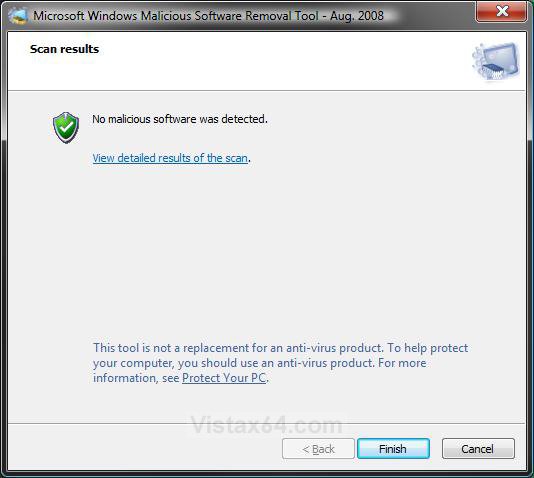
7. When finished, it will report the scan results. (See screenshot below step 8)
8. Click on the Finish button when you are ready to close the Microsoft Malicious Software Removal Tool window.
NOTE: To see detailed scan results, click on the View detailed results of the scan link.
TipHow to Run the "Windows Malicious Software Removal Tool" from the Command Prompt
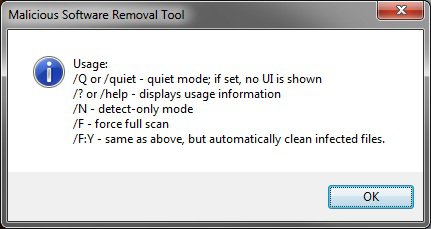
In a command prompt, type mrt.exe followed by one of the switches below. For example, type mrt.exe /F:Y to run a full scan and automatically clean the infected files.
That's it,
Shawn
Attachments

Last edited by a moderator:


 I created a shortcut in my desktop:D