Windows Vista Forums
Vista Forums Home Join Vista Forums Windows 7 Forum Vista Tutorials Tags
Welcome to Windows Vista Forums. Our forum is dedicated to helping you find solutions with any problems, errors or issues you are experiencing with Windows Vista. The Vista forum also covers news and updates and has an extensive Windows Vista tutorial section that covers a wide range of tips and tricks.

Go Back   Vista Forums > Vista Forums > Tutorials

Vista - Windows Calendar - Enable or Disable

Comment
 

Windows Calendar - Enable or Disable

How to Enable or Disable Windows Calendar in Vista
Published by Brink
10-19-2008

How to Enable or Disable Windows Calendar in Vista
Information
  This will show you how to Enable (Turn on) or Disable (Turn off) Windows Calendar for all users on the computer.
NOTE
  The Windows Calendar .exe file is located at:


C:\Program Files\Windows Calendar\WinCal.exe
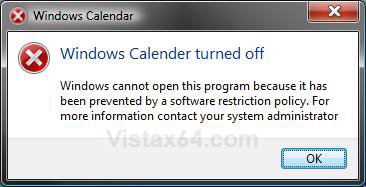
RELATED LINK:EXAMPLE: Windows Calendar Disabled
Name:  Disabled.jpg
Views: 3209
Size:  44.6 KB


METHOD ONE:
Through the Local Group Policy Editor
NOTE
  This method is only available for the Vista Business, Ultimate, and Enterprise editions. See Method Two below for the Vista Home Basic and Home Premium edition.
1. Open the Local Group Policy Editor.

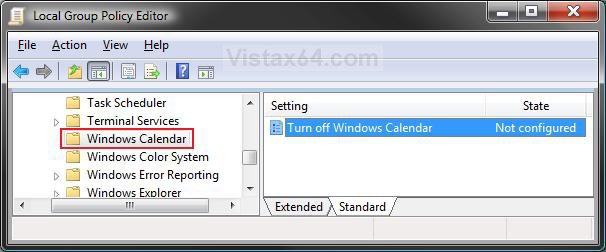
2. In the left pane, click on User Configuration, Administrative Templates, Windows Components, and Windows Calendar (See screenshot below)
group_policy.jpg
3. In the right pane, right click on Turn off Windows Calendar and click on Properties. (See screenshot above)

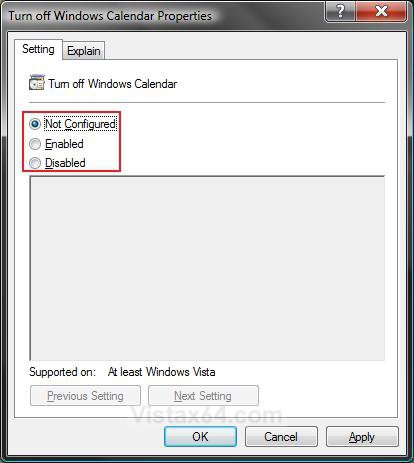
4. To Enable Windows Calendar -
A) Select (dot) Disabled or Not Configured and click on OK. (See screenshot below step 5A)

B) Go to step 6.
5. To Disable Windows Calendar -
A) Select (dot) Enabled and click on OK.
properties.jpg
6. Close the Local Group Policy Editor window. Your done.


METHOD TWO:
Through the Registry
NOTE
  This method will work for all Vista versions.
Through a Download:
1. To Enable Windows Calendar -
A) Click on the download button below to download the
Enable_Windows_Calendar.reg file.

B) Go to step 3.


2. To Disable Windows Calendar -
A) Click on the download button below to download the
Disable_Windows_Calendar.reg file.


3. Click on Save, and save the .reg file to the Desktop.

4. Right click on the .reg file (on Desktop) and click on Merge.

5. Click on the Run button for Security Warning pop-up.

6. Click on Continue (UAC), Yes, and then OK when prompted.

7. When done, you can delete the .reg file (on Desktop).
The Manual Way:
1. Open the Start Menu.

2. In the white line (Start Search) area, type regedit and press Enter.

3. Click on the Continue button in the UAC prompt.

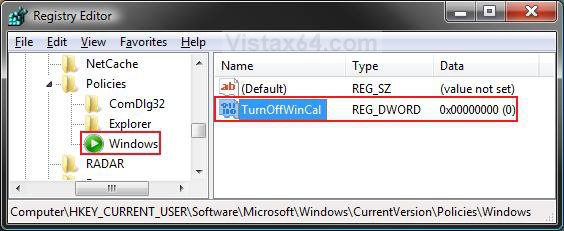
4. In regedit, go to: (See screenshot below)
HKEY_CURRENT_USER\Software\Microsoft\Windows\CurrentVersion\Policies\Windows
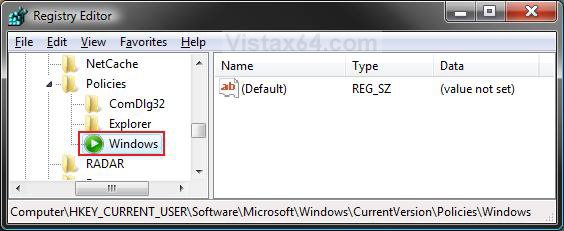
NOTE: If Windows is not there, then right click on Policies in the left pane and click on New and Key. Type Windows and press Enter.
reg1.jpg
5. To Disable Windows Calendar -
A) In the right pane, right click on a empty area and click on New and DWORD (32-bit) Value.
(See screenshot below)

B) Type TurnOffWinCal and press Enter.

C) Right click on TurnOffWinCal and click on Modify.
reg2.jpg
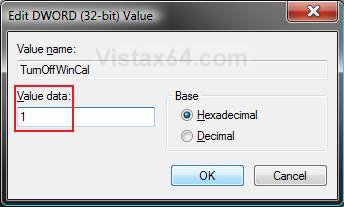
D) Type 1 and click on OK. (See screenshot below)
Name:  Modify.jpg
Views: 3204
Size:  31.4 KB
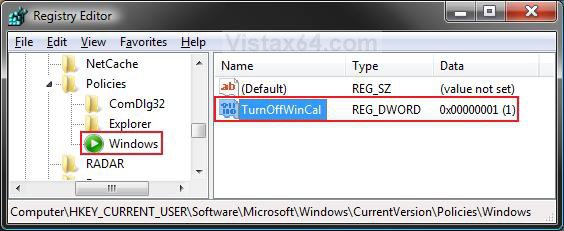
E) The registry will now look like this. (See screenshot below)
reg3.jpg
F) Go to step 7.
6. To Enable Windows Calendar -
A) In the right pane, right click on TurnOffWinCal and click on Delete. (See screenshot above)

B) Click on Yes to confirm deletion.
7. Close regedit.
That's it's,
Shawn

Published by
Brink's Avatar
Administrator

Join Date: Apr 2007
Location: Texas, USA
Posts: 25,934
Rep Power: 150
Brink has a reputation beyond reputeBrink has a reputation beyond reputeBrink has a reputation beyond reputeBrink has a reputation beyond reputeBrink has a reputation beyond reputeBrink has a reputation beyond reputeBrink has a reputation beyond reputeBrink has a reputation beyond reputeBrink has a reputation beyond reputeBrink has a reputation beyond reputeBrink has a reputation beyond repute

Tutorial Tools

Applies to
All Vista Versions
64 Bit & 32 Bit

Old 11-18-2008  
Ricks Desktop


Vista Home Prem 32 bit


Re: Windows Calendar - Enable or Disable

==Windows Calendar has stopped working Nag Screen ==

Method Two worked like a charm !! ( Vista Home Prem. here )

I have tried the "hot fix" links @ Microsoft with no luck, and at this point I refuse to upgrade to SP1 (which supposedly will fix this problem)... to have it possibly create more problems in other areas.

Your help is much appreciated !. That nag screen is now gone, everytime I boot up, saying a program ( I NEVER will use !! ) has stopped working.

Manual editing the registry is not for the weak of heart, and one should ALWAYS make a backup, before editing the registry, which Shawn forgot to say, ( or downloading the "hot fix" he has posted a link to).

I would at least strongly suggest, that anyone using Method # 2 backup the Registry, before running the hot fix, of manual editing via Regedit, or the download fix-it.

THANKS again Shawn :-)

My System SpecsSystem Spec
Old 11-18-2008  
Brink


Vista x64 Ultimate SP2, Windows 7 Ultimate x64


Re: Windows Calendar - Enable or Disable

You're welcome Rick, and welcome to Vista Forums.

Shawn
My System SpecsSystem Spec
Comment

Tutorial Tools


Similar Threads
Tutorial Category
Windows Sidebar - Enable or Disable Tutorials
Windows Features - Disable or Enable Tutorials
Windows Mail - Enable or Disable Tutorials
Windows Experience Index - Enable or Disable Tutorials
psv enable and disable via windows explorer and log in save how to? Vista General


Vista Forums is an independent web site and has not been authorized,
sponsored, or otherwise approved by Microsoft Corporation.
"Windows Vista", the Start Orb, and related materials are trademarks of Microsoft Corp.
© Designer Media Ltd
Tutorial powered by GARS 2.1.8m ©2005-2006

1 2 3 4 5 6 7 8 9 10 11 12 13 14 15 16 17 18 19 20 21 22 23 24 25 26 27 28 29 30 31 32 33 34 35 36 37 38 39 40 41 42 43 44 45 46