Windows Vista Forums
Vista Forums Home Join Vista Forums Windows 7 Forum Vista Tutorials Tags
Welcome to Windows Vista Forums. Our forum is dedicated to helping you find solutions with any problems, errors or issues you are experiencing with Windows Vista. The Vista forum also covers news and updates and has an extensive Windows Vista tutorial section that covers a wide range of tips and tricks.

Go Back   Vista Forums > Vista Forums > Tutorials

Vista - Single Click option

Comment
 

Single Click option

How to Single Click to Open an Item in Vista
Published by Papaw
02-17-2007

How to Single Click to Open an Item in Vista
Information
  This will show you how to open a item with a single click instead of the default double click in Vista.
NOTE
  This works with XP also and some already know this but once you change from double click to single you will never go back.
RELATED LINKS:

Here's How:
1. Open Folder Options.

2. For a Single Click -
NOTE: With Single Click, hovering the mouse pointer over a item (Ex: file or folder) will select it.
A) Dot Single-click to open an item (point to select).

B) Go to step 4.
3. For a Double Click -
NOTE: With Double Click, you will need to click once on the item (Ex: file or folder) to select it.
A) Dot Double-click to open an item (single-click to select).
4. Click on OK.
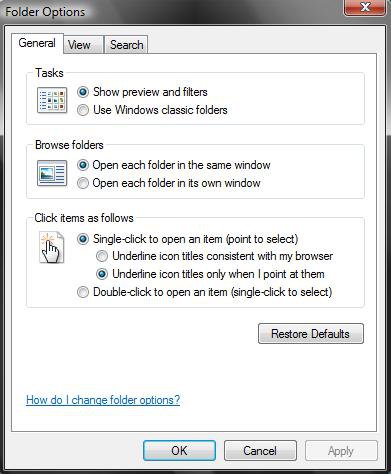
singleclick.jpg
Jack

Published by
Newbie
Join Date: Feb 2007
Location: Fort Worth, Tx.
Posts: 1
Rep Power: 25
Papaw has a spectacular aura aboutPapaw has a spectacular aura aboutPapaw has a spectacular aura about

Tutorial Tools

Applies to
All Vista Versions
64 Bit & 32 Bit

Old 01-16-2009  
LMURRAY


vista home 32bit


Thumbs up Re: Single Click option

The directions were perfect, it couldn't be easier even for someone like me.

THANK YOU!!

My System SpecsSystem Spec
Old 01-27-2009  
movingvans


Vista 32


Re: Single Click option

The drawbacks to single click (well spoken tut btw)

1-lag before file or folder is opened (increase double click speed to help, but good luck performing a double click in an actual application.)

2-Things get selected accidentally, especially when making ctrl+clicks (imo, holding the ctrl key should automatically switch things over to single click mode.)

2.1-With the Save as dialog box, files can sometimes get clicked and you have to manually rename the file to it's default name.

3-Renaming files and folders is less convienient (F2 if your hand is near by)

4-Setting focus to a file in a window that is not active requires a middle click and a hover. (I usually end up left clicking the title bar instead of mid-click cause that button is easier.)

5-Waiting for the mouse hover is SOOO boring. (edit: just found Mouse Hover Time - Change)

I haven't switched back cause of hand problems but I have concidered hotkeying a toggle between single and double mode (I do batches of task 2, 3, 4 and 5 periodically). Does anyone know how to set up that hotkey by any chance?

Last edited by movingvans; 01-29-2009 at 07:51 PM..
My System SpecsSystem Spec
Comment

Tutorial Tools


Similar Threads
Tutorial Category
How to single click Vista account administration
Single Click Instead Of Double Click Vista General
Single Click? Vista General
mouse single click Vista hardware & devices
hot to change mouse to single click instead of double click to ope Vista hardware & devices


Vista Forums is an independent web site and has not been authorized,
sponsored, or otherwise approved by Microsoft Corporation.
"Windows Vista", the Start Orb, and related materials are trademarks of Microsoft Corp.
© Designer Media Ltd
Tutorial powered by GARS 2.1.8m ©2005-2006

1 2 3 4 5 6 7 8 9 10 11 12 13 14 15 16 17 18 19 20 21 22 23 24 25 26 27 28 29 30 31 32 33 34 35 36 37 38 39 40 41 42 43 44 45 46