
How to Set 64 bit or 32 bit WMP in 64 bit Vista as Default
 Information
In Windows Vista x64, the 32-bit edition of Windows Media Player 11 (WMP 11) is set as the default Windows Media Player. This is done to avoid and reduce any compatibility issues or problems that may arise with codecs or other DirectShow related plug-ins or add-ons that a majority of are still built for 32-bit operating system. However, if you decide to use the 64-bit version of WMP11 with your 64bit Vista, you can use a few easy methods to launch 64 bit WMP11 or simply switch, change or swap the system default media player to x64 Windows Media Player, and revert back to x86 version when you need to.
 Tip
TipIf you would like to make Windows Media Player (WMP) shortcuts, then this is the location of the file to create shortcuts from.
- 32-bit WMP11 -
C:\Program Files (x86)\Windows Media Player\wmplayer.exe - 64-bit WMP11 -
C:\Program Files\Windows Media Player\wmplayer.exe
Here's How:
1. Open a elevated command prompt.
2. To Make 64 bit WMP Default
NOTE: This changes the default WMP shortcuts to point to the 64 bit WMP.
A) In the elevated command prompt, type
unregmp2 /SwapTo:64 and press Enter.
B) Go to step 7.
3. To Make 32 bit WMP Default
NOTE: This changes the default WMP shortcuts to point to the 32 bit WMP.
A) In the elevated command prompt, type
unregmp2 /SwapTo:32 and press Enter.
4. Close the elevated command prompt.
5. Open the Start menu.
6. In the white line (Start Search) area type, regedit and press Enter.
7. If prompted, click on Continue in the UAC prompt.
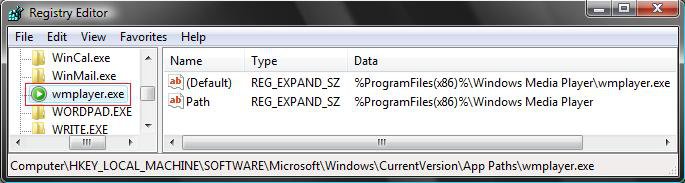
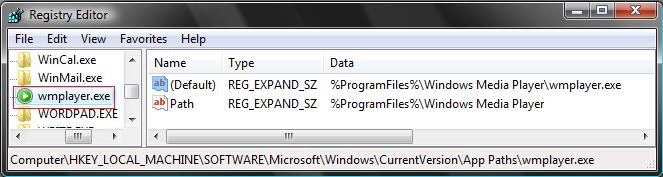
8. In regedit, go to: (See screenshot below)
Code:
HKEY_LOCAL_MACHINE\SOFTWARE\Microsoft\Windows\CurrentVersion\App Paths\wmplayer.exe9. In the right pane, right click on (Default) and click on Modify.
NOTE: By default this is set to the 32 WMP.
10. To Make 64 bit WMP Default
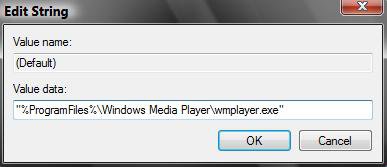
NOTE: The will change the default WMP file associations to the 64 bit WMP.
A) Type
%ProgramFiles%\Windows Media Player\wmplayer.exe (See screenshot below)
B) Click on OK to apply.
11. To Make 32 bit WMP Default
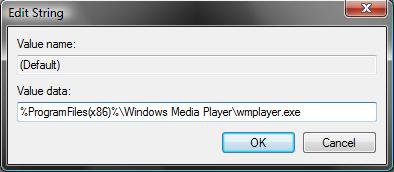
NOTE: This changes the default WMP file associations to the 32 bit WMP.
A) Type
%ProgramFiles(x86)%\Windows Media Player\wmplayer.exe
B) Click on OK to apply.
12. In the right pane, right click on Path and click on Modify. (See screenshot below step 9)
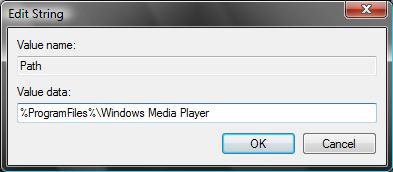
13. To Make 64 bit WMP Default
A) Type
%ProgramFiles%\Windows Media Player (See screenshot below)
B) Click on OK to apply.
14. To Make 32 bit WMP Default
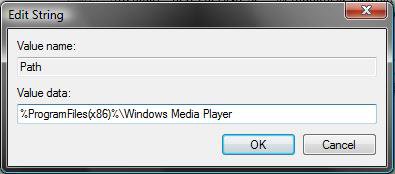
A) Type
%ProgramFiles(x86)%\Windows Media Player (See screenshot below)
B) Click on OK to apply.
15. Your Registry should look like this below now for the 64 bit WMP.
That's it,
Shawn
Attachments

Last edited by a moderator: