
How to Change the Size of Desktop Icons in Vista
 Information
This will show you how to increase or decrease the size of all the icons on the Desktop in Vista. The icons size is set to Medium Icons by default.
 Note
NoteTo see the icons for internet URL shortcuts on the Desktop instead of the default e icon, you must have the View set to Classic Icons. For more on this, see: How to Add a Fully Functional IE7 Shortcut Icon to the Desktop in Vista
 OPTION ONE
1. Right click on a empty space on the desktop.
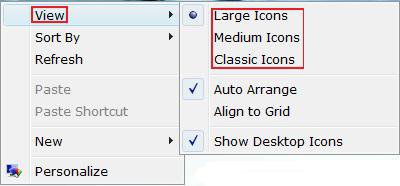
2. Click on View. (See screenshot below)
3. Select the size you want. (Classic, Medium, or Large Icons)
OPTION TWO NOTE: This will also work on all icons in Windows Explorer.
1. Highlight the Icon.
2. Press and hold down the CTRL key (Control).
NOTE: You may need to also press and hold the right mouse button with some older mouse models.
3. Roll your mouse scroll wheel up or down to adjust the icon size
NOTE: The trick is not moving the mouse while rolling the scroll wheel. (up=larger, down=smaller)
4. Release the CTRL key when done.
That's it,Shawn
Related Tutorials
- How to Restore and Change a Desktop Icon in Vista
- How to Create a "Desktop Icon Settings" Shortcut in Vista and Windows 7
- How to Add a Fully Functional IE7 Shortcut Icon to the Desktop in Vista
- How to Change the Quick Launch Icon Size in Vista
- How to Change the Desktop Control Panel Icon in Vista
- How to Add or Remove a Desktop Toolbar in Vista
- How to Change the Desktop Icons View Alignment and Sort By Order in Vista
- How to Change the Desktop Theme in Vista
- How to Display Small or Large Icons in the Vista Start Menu
- How to Change the Windows Explorer Columns and Sort Order in Vista
- How to Hide or Show Desktop Icon Text in Vista
- How to Add or Remove the Public Folder Desktop Icon in Vista
Attachments
Last edited:


