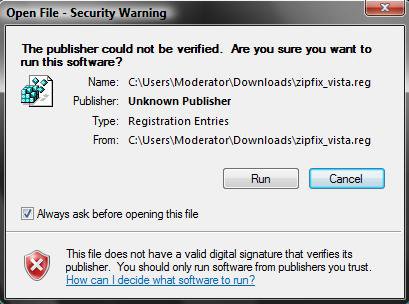
Last edited by Brink; 07 May 2009 at 04:24 AM.
Hello I am having a problem with my compressed folder. I have ran step 1 and two however one one profile this step did not fix the problem it still tries to open with IE. I have rebooted and everthing. Also on the profile that it did fix it opens up in a embroidery software program I downloaded. How do I change it back to open up in the regular progam. I am afraid that I will mess something up again. I don't know what program to select to open up my pes files. Thank you.


Hello RW, and welcome to Vista Forums.
Parts of the REG file will only affect the user account that is currently logged on and merged in. Log on to that user profile, and merge the REG file in it as well to see if it may help afterwards.
Hope this helps,
Shawn
Thanks for the reply. I have tried what you have suggested and that did not work. It still wants to open with IE.


Strange. Did you restart the computer after applying the REG file?
If so, you might consider using the free program 7-Zip for ZIP files. It's a great little program.
Yes I have shutdown my computer.
Shawn,
Awesome! Problem solved. My computer stopped opening zip files all of a sudden yesterday. Followed other threads, other users had success finding explorer.exe to open zips with......I couldnt locate the explorer at all on my computer. Found this forum, downloaded zipfix_vista like you recommended, and worked. Thanks alot. Im now a new member of this forum, and will keep link in favorites as a first go to if future problems arise.
-Ethan![]()


You're most welcome Ethan, and welcome to Vista Forums.![]()
So i changed the Zip file to "open with" Word by mistake, i do i make so it goes back to its original Zip file?


Hello Jovanny, and welcome to Vista Forums.
You can download and merge the REG file in the tutorial on the first page of this thread to restore the default association of ZIP files.![]()
Hi there,
sorry to add to this list of problems! hope someone can help me please?
My system just stopped giving me "extract..." when drag and right-click a .zip file.
Extract All is working, and zip and unzip functions and association is fine. It is only the drag with right button no longer shows "extract.." I only have Copy, Move, Create shortcut.
I used to have extract... as well.
Any ideas?
PS i have run the reg repairs on the file assocation just in case.
Thanks!
Gus
| Similar Threads | ||||
| Tutorial | Tutorial Starter | Category | Comments | Last Post |
| system restore more than one restore file | neil baker | Vista General | 4 | 15 Aug 2008 |
| File restore after Complete PC Restore - 0x80070057 error | OliverNZ | Vista performance & maintenance | 4 | 04 Jun 2008 |
| I deleted a file, tried to restore it, and it didn't restore. | Dazedandconfused | Vista file management | 1 | 09 Apr 2008 |
| Backup and Restore Center support DVD DL? | Harry | Vista performance & maintenance | 2 | 01 Apr 2008 |
| Restore support for tape backup | Andrew | Vista performance & maintenance | 0 | 13 Mar 2007 |