
How to Extend Vista Trial Period for Up to 120 Days
 Information
Vista gives you a 30 day trial period before you have to activate Vista or pay for a product key number. This will show you how to extend the trial period 30 days at a time for up to 3 times for a total of 120 days before you must either activate with a legally purchased product key number or uninstall Vista.
Microsoft has allowed this rearm option to extend this trial period for another 30 days for up to 3 times.
3 (rearms) x 30 (days) = 90 (days extended) + 30 (default days) = 120 days total trial period.
For more information, see: Windows Help and How-to: Activating Windows FAQs
Microsoft has allowed this rearm option to extend this trial period for another 30 days for up to 3 times.
3 (rearms) x 30 (days) = 90 (days extended) + 30 (default days) = 120 days total trial period.
For more information, see: Windows Help and How-to: Activating Windows FAQs
 Note
Note- For the license terms for Vista, see: Microsoft: License Terms for Software Licensed from Microsoft
- If you are locked out of your computer and in Reduced Functionality Mode, then see: How to Get Out of Reduced Functionality Mode in Vista
 Tip
TipCommon Activation ERROR Messages:
For more information, see: Microsoft Help and Support: KB925616
For more information, see: Microsoft Help and Support: KB925616
- Activate Windows Now
- Your activation period has expired and Windows is no longer working.
- To use Windows you must activate this copy of Windows.
 Warning
It is recommended to wait until you only have only 1 day to activate left before doing this to make the most out of the 3 times you have to use this rearm option.
Be sure to activate Vista before the trial period runs out, or you will be in Reduced Functionality Mode.
Be sure to activate Vista before the trial period runs out, or you will be in Reduced Functionality Mode.
TipTo See How Long You Have Left On Trial Period:
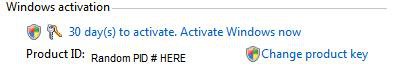
1. Open the Start Menu.
2. Right click on Computer and click on Properties.
A) Go to step 3.
OR
1. Open the Control Panel (Classic view)
2. Click on System icon.
3. Scroll down to the bottom and you will see this screenshot.
4. Activate Vista.
 STEP ONE
NOTE: You will need to make sure that the Data value for SkipRearm is set to 0 (zero) first for this to work.
OPTION ONE:
Using a REG File Download
1. Set SkipRearm to 0 (number zero)
A) Click on the Download button below to download the file below.
Set_SkipRearm_to_0.reg

2. Click on Save, and save the .reg file to the Desktop.
3. Right click on the downloaded .reg file and click on Merge.
4. Click on Run, Continue (UAC), Yes, and then OK when prompted.
5. When done, you can delete the downloaded .reg file if you like.
OPTION TWO:
Manually in Registry Editor
1. Open the Start Menu.
2. In the white line (Start Search) area, type regedit and press Enter.
3. If prompted, click on Continue in the UAC prompt.
4. In regedit, go to: (See screenshot below)
HKEY_LOCAL_MACHINE\SOFTWARE\Microsoft\Windows NT\CurrentVersion\SL
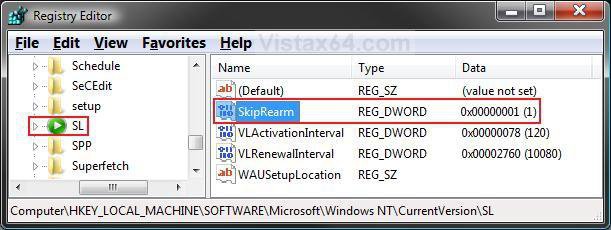
5. To Set SkipRearm to 0 (number zero)
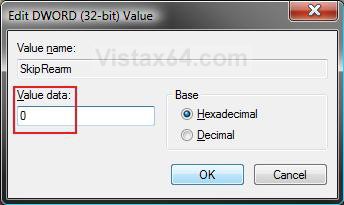
A) In the right pane, right click on SkipRearm and click on Modify. (See screenshot above)
B) Type 0 (number zero) and click on OK. (See screenshot below)
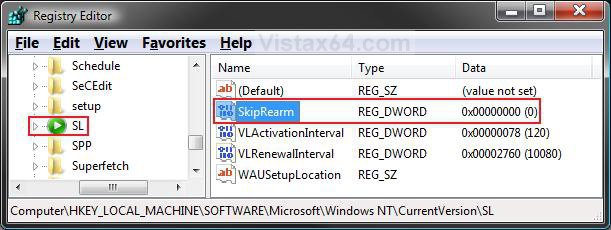
C) The registry will now look like this. (See screenshot below)
6. Close regedit.
STEP TWO NOTE: Be sure to do Step One above first, or this may not work for you.
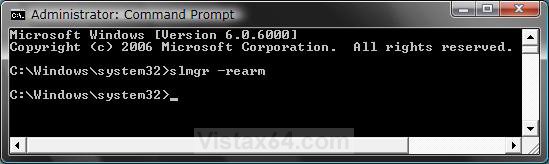
1. Open a elevated command prompt.
2. In the elevated command prompt, type slmgr -rearm and press Enter. (See screenshot below)
WARNING: This will only work if you haven't used up your 3 times already. If this is past the 3 times, you will probably receive a VBScript permission denied error.
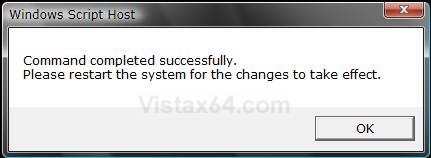
3. It will take a few moments, but a window will pop-up asking to reboot. (See screeshot below)
4. Click on OK and restart the computer.
5. Your Activation period has been extended by 30 days.
6. You can repeat the above steps up to 3 times for the full 120 days.You shouls onyl do this when your activation trial period is almost up to get the most out of the 3 times you have.
NOTE: After doing this for 3 times, this will not work anymore and you must either activate with a legally purchased product key number or uninstall Vista.
7. Activate Vista soon.
That's it,Shawn
Related Tutorials
- How to Activate Vista Normally and by Phone Activation
- How to See Windows Vista Current License Information
- How to Do a Clean Install of Vista From a Upgrade Version
- How to Do a Clean Install with a Full Version of Vista
- How to Perform a Repair Installation for Vista
- How to Get Out of Reduced Functionality Mode in Vista
- How to Uninstall the Product Key Number and Deactivate Windows 7 and Vista
Attachments

Last edited by a moderator:


 Anyway......
