
How to Enable or Disable the Real Built-in Administrator Account in Vista
 Information
In Vista, even though you are using an administrator account, you still run with Standard account privileges. When a program or a action by you tries to run with administrators rights, you must first give it permission before it is allowed. This is the User Account Control (UAC). The hidden real Built-in Administrator Account does not use UAC and is like the one in XP with full rights on your computer. For more information, see: Microsoft Help and Support: KB942956
 Warning
If you enable the hidden Built-in Administrator Account, it is recommended that you do not use this account all the time since everything installed and running on your computer will also have full access to computer too. Instead, I would recommmend that you use it for administrative purposes only, and then use a Standard or normal administrator user account that is restricted for everyday tasks for better security.
 Note
Note- This will not delete your current account. It just adds a new account named Administrator that is the real administrator account in Vista.
- If you do not have any other administrator account on your computer, then you will automatically startup into the built-in Administrator account when you boot into Safe Mode.
Here's How:
1. Open a elevated command prompt.
2. To Enable the Hidden Built-In Administrator Account
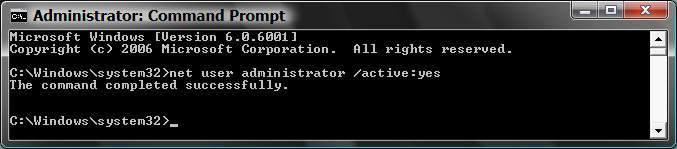
A) In the elevated command prompt, type the command in bold below and press Enter. (See screenshot below)
net user administrator /active:yes
B) Go to step 7.
3. To Disable the Hidden Built-in Administrator Account
WARNING: Make sure you are not logged into the built-in Administrator account when trying to disable it. You must be logged into a normal administrator account to do this instead. It will not work if you try to disable the built-in Administrator account while you are still logged on to it.
A) In the elevated command prompt, type the command in bold below and press Enter. (See screenshot below)
net user administrator /active:no
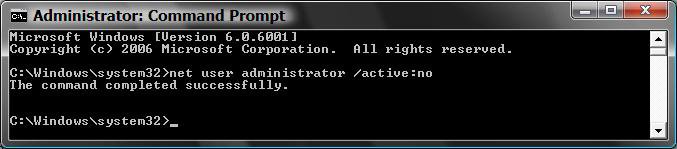
4. You will get the message, The command completed successfully. If not, repeat the step.
NOTE: If you are still unable to enable the built-in Administrator account from here, then try this again in Safe Mode instead.
5. Close the elevated command prompt.
6. Log off (in Start Menu) and you will see your new built-in Administrator account next to your current account(s).
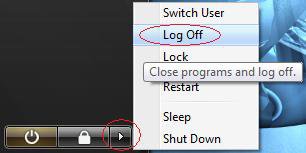
7. Click on the new Administrator account display picture icon and log on to it.
8. You should create a password for this account for better security.
9. You will then need to set up it's desktop preferences like any other account.
That's it,Shawn
Related Tutorials
- How to Logon Automatically at Startup in Vista
- How to Elevate Administrators UAC Privilege Level in Vista
- Enable or Disable User Account Control (UAC) Prompt for Built-in Administrator in Windows
- How to Turn UAC On or Off in Vista
- How to Create a New User Account in Vista
- How to Take Ownership of a Item in Vista
- How to Enable or Disable the User Account Control (UAC) Blacking Out of Screen in Vista
- How to Change a User Account Type in Vista
- How to Create a Password for a User Account in Vista
- How to Restore the Administrative Tools Shortcuts in Vista
- How to Start Vista in Safe Mode
- How to Rename the Vista Built-in Administrator Account
- How to Reset User Profile of Built-in Administrator Account to Default in Windows
Attachments

Last edited by a moderator:


