Vista Forums
Vista Forums Home Join Vista Forums Donate Vista Tutorials Tags

Welcome to Vista Forums we are your forum to discuss Windows Vista x64 and x86 systems. Whether you need help or just want to post an idea you have on Vista, this is the forum for you.
Register at Vista forums...the world biggest Windows Vista resource Join Vista Forums Now

Go Back   Vista Forums > Vista Forums > Tutorials

Vista Tutorial Categories Network & Internet Tutorials File & Folder Settings Tutorials Taskbar & Start Menu Tutorials Performance & Maintenance Tutorials General Tips Tutorials Programs & Features Tutorials Context Menu Tutorials Shortcut Tutorials Security & System Tools Tutorials Parental Controls Tutorials User Account Tutorials Hardware & Drivers Tutorials Appearance & Personalization Tutorials Backup & Restore Tutorials Music, Photo, Video and Media Tutorials Power Management Tutorials

Send To Context Menu

Update your Vista Drivers Update Your Drivers Now!!
Poll: Did this Tutorial help and work for you?
Poll Options
Did this Tutorial help and work for you?

Comment
 
Tutorial Tools Display Modes
<!-- google_ad_section_start -->Send To Context Menu<!-- google_ad_section_end -->
Send To Context Menu
How to Customize the Send To Context Menu in Vista
Published by Brink
05-30-2007

How to Customize the Send To Context Menu in Vista
Information
  This will show you how to add or delete shortcut items from the Send To menu in the Context Menu.
Tip
  To remove or show drive letters in the Send To context menu, see: How to Remove or Show Drive Letters in the Vista Send To Context Menu . Drives in the Send To menu can cause it to open slowly or hang for a bit.
NOTE
  The Send To menu folder is located at:
NOTE: You must have Show hidden files and folders checked in Folder Options to see the AppData folder. For how, see: How to Open and Change Folder Options in Vista

C:\Users\(your username)\AppData\Roaming\Microsoft\Windows\SendTo


RELATED LINKS:
EXAMPLE: Send To Context Menu with added Notepad
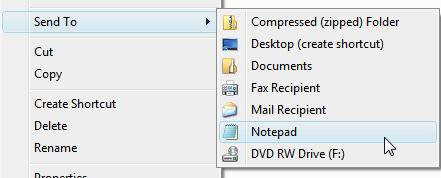
Name:  sendto.jpg
Views: 1756
Size:  14.2 KB

Here's How:
1. Open a Windows Explorer window.
2. Navigate to C:\Users\(your username)\AppData\Roaming\Microsoft\Windows\SendTo
NOTE: [You must have Show hidden files and folders checked in Folder Options to see the AppData folder. See: How to Open and Change Folder Options in Vista
A) Go to step 3.
OR

1. Open the Start Menu.
2. In the white line (Start Search) area, type shell:sendto and press Enter.
3. Add or Delete whatever shortcut you want for any drive, folder, or application that uses the Open With option.
NOTE: For example: Notepad, Paint, Photo Gallery, dvd drive, any folder, etc. For a drive, right click on the drive in Computer and click Create Shortcut for it to placed on the desktop, then move the shortcut to here.
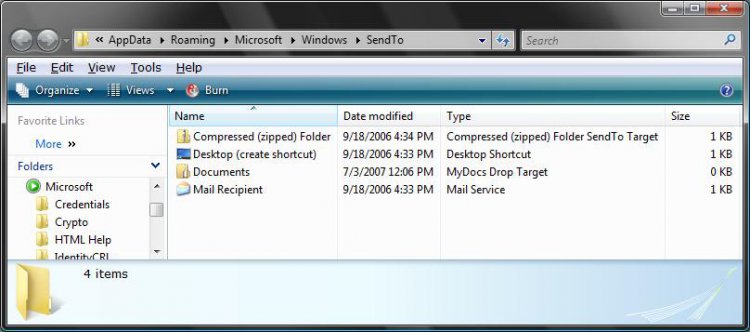
Click the image to open in full size.
That's it,
Shawn

Published by
Brink's Avatar
Administrator
Join Date: Apr 2007
Location: Texas, USA
Posts: 16,485
Rep Power: 150
Brink has a reputation beyond reputeBrink has a reputation beyond reputeBrink has a reputation beyond reputeBrink has a reputation beyond reputeBrink has a reputation beyond reputeBrink has a reputation beyond reputeBrink has a reputation beyond reputeBrink has a reputation beyond reputeBrink has a reputation beyond reputeBrink has a reputation beyond reputeBrink has a reputation beyond repute

Tutorial Tools
Show Printable Version Show Printable Version
Email this Page Email this Page

Applies to
All Vista Versions
64 Bit & 32 Bit

Old 11-22-2007  
Brink's Avatar
Brink
Administrator


Join Date: Apr 2007
Vista x64 Ultimate SP1
Texas, USA
 
Rep Power: 150
Brink has a reputation beyond reputeBrink has a reputation beyond reputeBrink has a reputation beyond reputeBrink has a reputation beyond reputeBrink has a reputation beyond reputeBrink has a reputation beyond reputeBrink has a reputation beyond reputeBrink has a reputation beyond reputeBrink has a reputation beyond reputeBrink has a reputation beyond reputeBrink has a reputation beyond repute
  Brink is offline

Re: SendTo context menu

Updated 11-22-2007 to include the restore default Send To items.

Shawn

My System SpecsSystem Spec
Old 04-04-2008  
jedinight2002
Newbie


Join Date: Apr 2008
Visdta Ultimate 32bit
 
Rep Power: 8
jedinight2002 has a spectacular aura aboutjedinight2002 has a spectacular aura aboutjedinight2002 has a spectacular aura about
  jedinight2002 is offline

Angry Re: Send To Context Menu

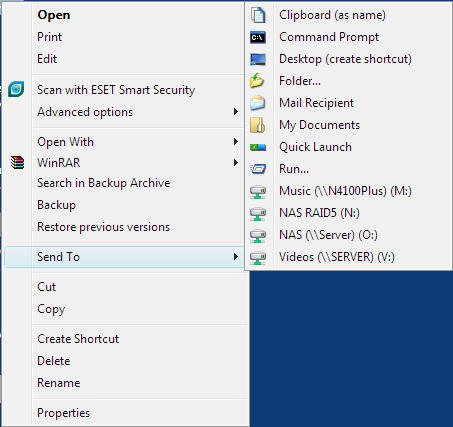
I have checked both my Sent To folders and they do not contain any references to my mapped network drives, however all mapped network drives are appearing in the Send To list.

This means if I accidentally hover over the Send To menu so that it expands, Vista
interrogates all the network drives which means spinning up all 8 disks in my NAS whcih takes about 30-45 seconds - VERY ANNOYING.

Any ideas how I can stop this?
My System SpecsSystem Spec
Old 04-04-2008  
jedinight2002
Newbie


Join Date: Apr 2008
Visdta Ultimate 32bit
 
Rep Power: 8
jedinight2002 has a spectacular aura aboutjedinight2002 has a spectacular aura aboutjedinight2002 has a spectacular aura about
  jedinight2002 is offline

Smile Send To Toys

Here is a really useful application I have come across that allows you to customise the Send To menu, including adding useful options such as being able to send to the Quick Launch menu.

And its FREE!

:: gabrieleponti.com ::
My System SpecsSystem Spec
Old 04-04-2008  
Brink's Avatar
Brink
Administrator


Join Date: Apr 2007
Vista x64 Ultimate SP1
Texas, USA
 
Rep Power: 150
Brink has a reputation beyond reputeBrink has a reputation beyond reputeBrink has a reputation beyond reputeBrink has a reputation beyond reputeBrink has a reputation beyond reputeBrink has a reputation beyond reputeBrink has a reputation beyond reputeBrink has a reputation beyond reputeBrink has a reputation beyond reputeBrink has a reputation beyond reputeBrink has a reputation beyond repute
  Brink is offline

Re: Send To Context Menu

Hi Jedinight2002,

I suppose that you could remove the ones that you do not plan on using Send To with from the Send To folder.

That's a nice free program you ran across. I wish it had some more options though on what it can add.

Shawn
My System SpecsSystem Spec
Old 04-05-2008  
jedinight2002
Newbie


Join Date: Apr 2008
Visdta Ultimate 32bit
 
Rep Power: 8
jedinight2002 has a spectacular aura aboutjedinight2002 has a spectacular aura aboutjedinight2002 has a spectacular aura about
  jedinight2002 is offline

Re: Send To Context Menu

Quote:
Brink
View Post
Hi Jedinight2002,
I suppose that you could remove the ones that you do not plan on using Send To with from the Send To folder.
Sorry Shawn, I don't understand what you are suggesting.

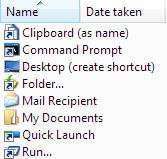
The options in the Send To Menu are not the same as the icons in the send to folder. See attached:

Name:  1.jpg
Views: 306
Size:  39.2 KB
Name:  2.jpg
Views: 304
Size:  11.2 KB
My System SpecsSystem Spec
Old 04-05-2008  
Brink's Avatar
Brink
Administrator


Join Date: Apr 2007
Vista x64 Ultimate SP1
Texas, USA
 
Rep Power: 150
Brink has a reputation beyond reputeBrink has a reputation beyond reputeBrink has a reputation beyond reputeBrink has a reputation beyond reputeBrink has a reputation beyond reputeBrink has a reputation beyond reputeBrink has a reputation beyond reputeBrink has a reputation beyond reputeBrink has a reputation beyond reputeBrink has a reputation beyond reputeBrink has a reputation beyond repute
  Brink is offline

Re: Send To Context Menu

Quote:
jedinight2002
View Post
Quote:
Brink
View Post
Hi Jedinight2002,
I suppose that you could remove the ones that you do not plan on using Send To with from the Send To folder.
Sorry Shawn, I don't understand what you are suggesting.

The options in the Send To Menu are not the same as the icons in the send to folder. See attached:
Sorry Jedinight,

This will show you how to remove the drive letters from the Send To context menu.

Send To Context Menu - Remove or Show Drive Letters

Shawn
My System SpecsSystem Spec
Comment

Tags
context menu, send to

Tutorial Tools
Display Modes


Update your Vista Drivers Update Your Drivers Now!!

Similar Threads
Tutorial Tutorial Starter Category Comments Last Post
New Context Menu - Restore Default Menu Items Brink Tutorials 6 1 Week Ago 06:31 PM
Send To Context Menu - Remove or Show Drive Letters Brink Tutorials 2 08-27-2008 09:37 AM
Send To Context Menu - Restore Default Menu Items Brink Tutorials 4 08-23-2008 04:34 PM
Send To - Add or Remove from Context Menu Brink Tutorials 0 04-20-2008 01:48 AM
No more "Send to mail recipient" in context menu! HrundiBakshi Vista General 6 05-31-2007 05:12 AM


Vistax64.com is an independent web site and has not been authorized,
sponsored, or otherwise approved by Microsoft Corporation.
"Windows Vista", the Start Orb, and related materials are trademarks of Microsoft Corp.
© Designer Media 2005-2008
Tutorial powered by GARS 2.1.8m ©2005-2006