
How to Turn Windows Features On or Off in Vista
 Information
Some Vista features are installed (turned on) by default, while others are not. These features will remain stored on your hard disk all the time (CAB files), so you can turn them on or off when you want to.
This will show you how to turn the Windows Features that you want on or off in Vista.
This will show you how to turn the Windows Features that you want on or off in Vista.
 Note
NoteThe available features listed will vary according to the edition of Vista you have.
 Tip
TipIf Windows Features is empty, then see:
You receive error code "0x80073712" or the "Windows Features" dialog box is empty when you try to install updates or components in Windows 7 or in Windows Vista
You receive error code "0x80073712" or the "Windows Features" dialog box is empty when you try to install updates or components in Windows 7 or in Windows Vista
Here's How:
1. Open the Control Panel (Classic View).
2. Click on the Programs and Features icon.
3. Click on the Turn Windows Features on or off link on the left side. (Circled in red below)
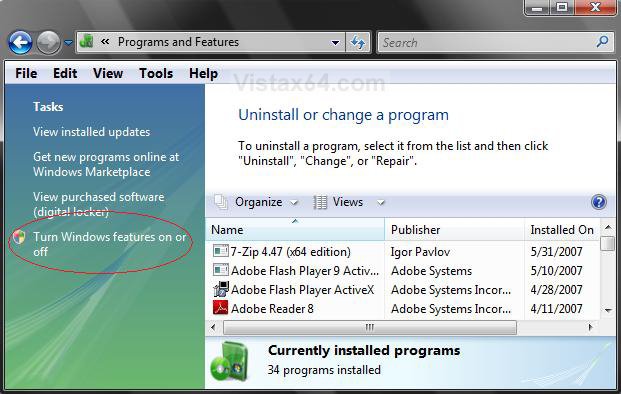
4. Click on the Continue button in the UAC prompt.
5. It will take a moment to load.
6. Now just check or uncheck the programs you want On or OFF. (See screenshots below)
Note- Some of the features shown below are only available for the Vista Ultimate version. (EX: Windows Ultimate Extras)
- If you let the mouse pointer hover over the listed Windows Features, you will get a brief desciption of what they are for. For a more detailed description of them, scroll down a bit here: Windows Vista Feature Guide
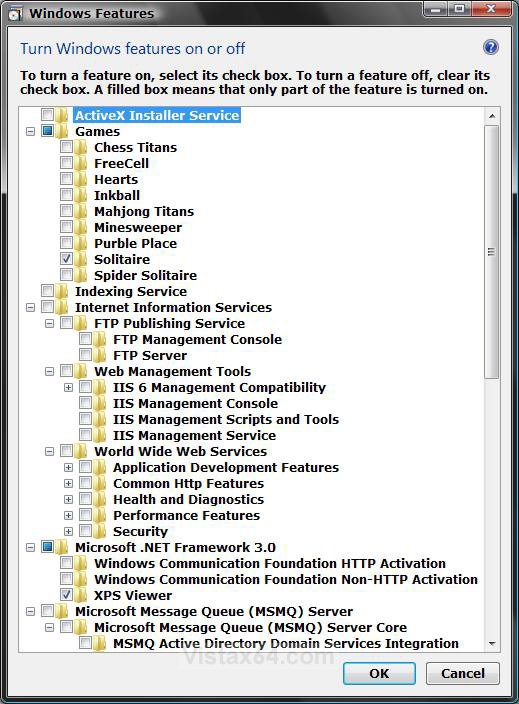
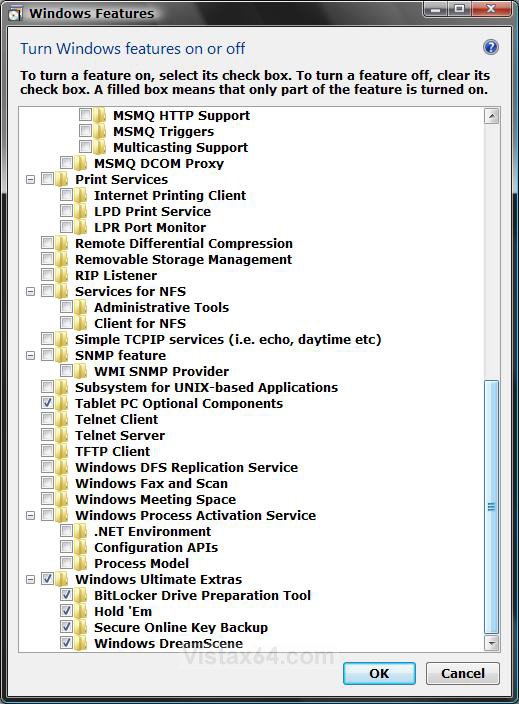
7. Click on OK when done.
8. You will now see this.
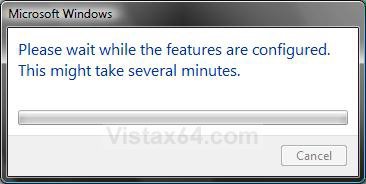
9. You may need to restart the computer when this is finished. If you do, it will let you know.
That's it,Shawn
Related Tutorials
- How to Uninstall a Windows Update in Vista
- How to Turn Windows Update Automatic Updating On or Off in Vista
- How to Turn Windows Sidebar On or Off in Vista
- How to Turn Windows Defender On or Off
- How to Turn Windows Firewall On or Off in Vista
- How to Enable or Disable DEP in Vista
- How to Turn DEP On or Off for a Program
- How to Disable or Enable the Security Center in Vista
- How to Turn UAC On or Off in Vista
- How to Enable or Disable the Control Panel in Vista
- How to Disable or Enable Vista Services with an Advice Guide
- How to Enable or Disable Folder Options in Vista
- How to Uninstall or Change a Program in Vista
- How to Turn Narrator On or Off in Vista
- How to Turn the On-Screen Keyboard On or Off in Vista
- How to Turn Magnifier On or Off in Vista
- How to Turn System Restore On or Off in Vista
- How to Enable or Disable Windows Mail in Vista
- How to Disable or Enable Windows Features Access in Vista
- How to Enable or Disable Windows Calendar in Vista
Attachments
Last edited by a moderator:


