
How to Disable or Enable Security Center in Vista
 Information
Security Center alerts you when your security software is out of date, turned off, or when your security settings should be strengthened. Security Center monitors the following: Firewall, Automatic updating, Antivirus, Antispyware (EX: Windows Defender), Internet security settings, and UAC (User Account Control).
 Warning
If you disable the Security Center, then you will not be alerted if something disables one of your security programs.
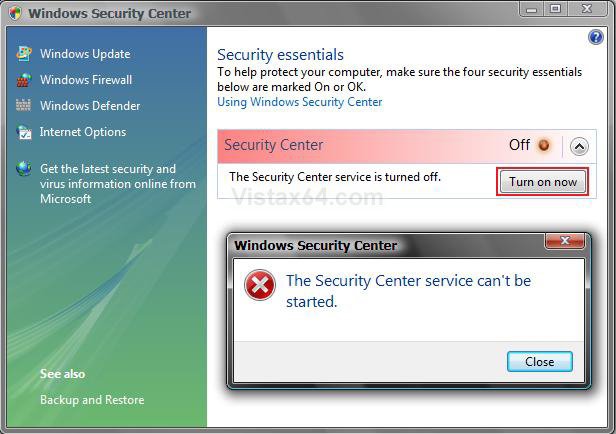
EXAMPLE: Security Center Disabled
 STEP ONE
1. If you are Disabling the Security Center
NOTE: You will need to do this before you Disable the Security Center in step 7 below.
A) Turn off the Security Center alert warning notification.
B) Go to STEP TWO below.
2. If you are Enabling the Security Center
NOTE: You will only be able to do this after you enabled the Security Center in step 8 below.
A) Turn on the Security Center alert warning notification if you want to.
B) Continue to STEP TWO.
STEP TWO 3. Open the Start Menu.
4. In the white line (Start Search) area, type services and press Enter.
5. Click on Continue in the UAC prompt.
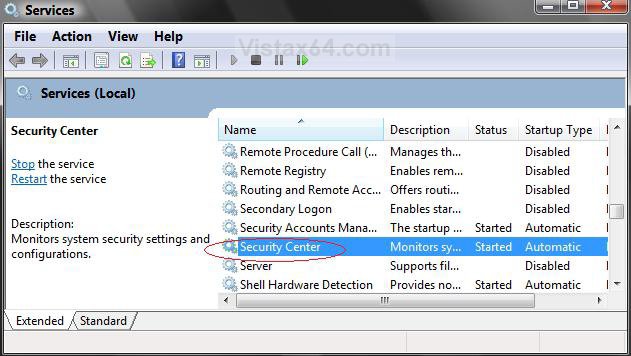
6. Scroll down and right click on Security Center and click on Properties. (See screenshot below)
7. To Disable Security Center
NOTE: Be sure to do step 1 above before you disable the Security Center.
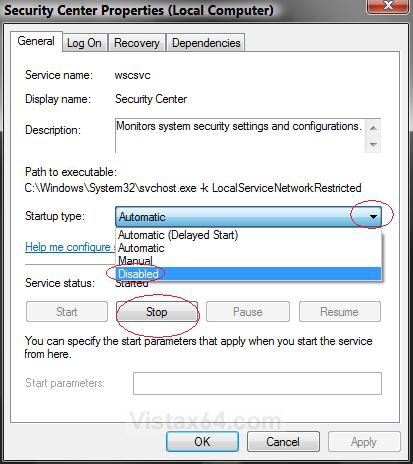
A) Click on the Stop button and wait a second for it to stop. (See screenshot below step 9)
B) To the right of Startup type, click on the drop down menu arrowand select Disable. (See screenshot below step 9)
C) Click on the Apply button.
8. To Enable Security Center
NOTE: Be sure to do step 2 above after enabling the Security Center.
A) To the right of Startup type, click on the drop down menu arrow and select Automatic. (See screenshot below step 9)
B) Click on the Apply button.
C) Click on the Start button.
9. Click on OK.
10. Close Services Window.
That's it,Shawn
Related Tutorials
- How to Disable or Enable the Security Center Alert Warning Notification in Vista
- How to Turn Windows Defender On or Off
- How to Turn UAC On or Off in Vista
- How to Turn DEP On or Off for a Program
- How to Enable or Disable DEP in Vista
- How to Restore or Remove the Security Tab in Vista
- How to Disable or Enable a Specific Security Center Alert Notification in Vista
- How to Fix the Vista Security Center Reporting Incorrect Information
Attachments
Last edited by a moderator:


 i've research for this security center stuff. and find out that you can disable this annoying red X shield on taskbar by renaming these files wscapi.dll wscsvc.dll wscui.cpl into .bak extension or anything that you desire (i had copied these files in other folder, backup)
