Vista Forums
Vista Forums Home Join Vista Forums Donate Vista Tutorials Tags

Welcome to Vista Forums we are your forum to discuss Windows Vista x64 and x86 systems. Whether you need help or just want to post an idea you have on Vista, this is the forum for you.
Register at Vista forums...the world biggest Windows Vista resource Join Vista Forums Now

Go Back   Vista Forums > Vista Forums > Tutorials

Vista Tutorial Categories Network & Internet Tutorials File & Folder Settings Tutorials Taskbar & Start Menu Tutorials Performance & Maintenance Tutorials General Tips Tutorials Programs & Features Tutorials Context Menu Tutorials Shortcut Tutorials Security & System Tools Tutorials Parental Controls Tutorials User Account Tutorials Hardware & Drivers Tutorials Appearance & Personalization Tutorials Backup & Restore Tutorials Music, Photo, Video and Media Tutorials Power Management Tutorials

Military Time

Poll: Did this Tutorial help and work for you?
Poll Options
Did this Tutorial help and work for you?

Comment
 
Tutorial Tools Display Modes
<!-- google_ad_section_start -->Military Time<!-- google_ad_section_end -->
Military Time
How to Set the Clock to Military 24 Hour Time in Vista
Published by Brink
06-03-2007

How to Set the Clock to Military 24 Hour Time in Vista

Information
  This will show you how to have the clock display in either the 24 hour Military time or the default 12 hour Standard time.
RELATED LINKS:
EXAMPLE: 24 Hour Time
Clock.jpg

Here's How:
1. Open the Control Panel. (Classic View)
2. Click on the Regional and Language Options icon.
3. Click on the Customize this format button. (Circled Red below)
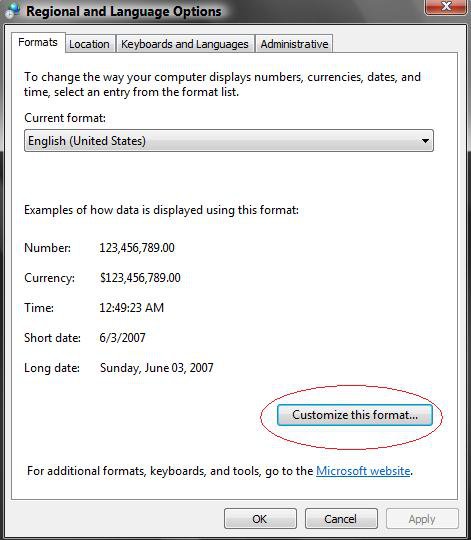
Customize.jpg

4. Click on the Time tab. (See screenshot below step 6)

5. To Change the Time to 24 Hour Military Time -
A) Click on the drop down arrow next to the Time Format: and click on HH:mm:ss. (See circled in red below)
B) Go to step 7.
6. To Change the Time Back to 12 Hour Standard Time -
A) Click on the drop down arrow next to the Time Format: and click on h:mm:ss tt.
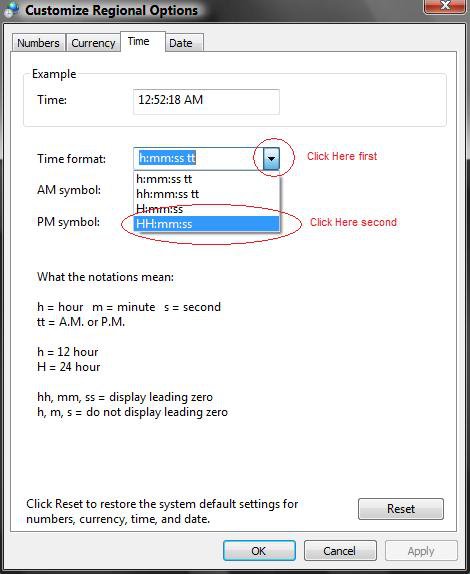
Time.jpg

7. Click OK to apply. (See screenshot above)
8. Click OK to close. (See screenshot below step 3)
9. Close the Control Panel.
That's it,
Shawn
Published by
Brink's Avatar
Administrator
Join Date: Apr 2007
Location: Texas, USA
Posts: 15,407
Rep Power: 150
Brink has a reputation beyond reputeBrink has a reputation beyond reputeBrink has a reputation beyond reputeBrink has a reputation beyond reputeBrink has a reputation beyond reputeBrink has a reputation beyond reputeBrink has a reputation beyond reputeBrink has a reputation beyond reputeBrink has a reputation beyond reputeBrink has a reputation beyond reputeBrink has a reputation beyond repute

Tutorial Tools
Show Printable Version Show Printable Version
Email this Page Email this Page

Applies to
All Vista Versions
64 Bit & 32 Bit

Rating
Skill Level
20%20%20%
1

Old 07-21-2008  
TimstaH's Avatar
TimstaH
Junior Member


  TimstaH is offline

Re: Military Time

I feel like a tit now after reading this :P
Never knew it was so easy & right under my nose..

heh
Old 07-21-2008  
Brink's Avatar
Brink
Administrator


  Brink is offline

Re: Military Time

LOL Tim. Do not feel bad. Vista just takes a little bit to get use to with all of the differences from XP and features.

Welcome to Vista Forums,
Shawn
Old 07-21-2008  
TimstaH's Avatar
TimstaH
Junior Member


  TimstaH is offline

Re: Military Time

Yeah, been using it for a year now and still keep finding ways to make things better and smoother
Old 4 Weeks Ago  
WildEagle
Banned


  WildEagle is offline

Re: Military Time

I was assuming the obvious, and there by overlooking the obvious. In this case, I assumed I couldn't change the clock to 24 hour time, and never bothered checking the help section, so I ended up missing it entirely.
Comment

Tags
appearance & personalize, military, time

Tutorial Tools
Display Modes


Similar Threads
Tutorial Tutorial Starter Category Comments Last Post
Windows System Time and Desktop time not matching up Coloradokittykitten Vista General 2 07-09-2008 10:32 AM
Change FROM military time nicolendamien Vista General 10 01-24-2008 09:32 PM
Military/Retired/Dependents: Outlook is here for Vista!! Referee06 Vista mail 0 11-03-2007 05:40 AM
Internet Time Synchronization Incorrect - Showing Standard Time Alice PowerShell 2 10-28-2007 04:45 PM
One question about Windows Time Synchronize with Internet Time Ser Xiyangfangzi Vista General 0 05-21-2007 08:32 PM


Vistax64.com is an independent web site and has not been authorized,
sponsored, or otherwise approved by Microsoft Corporation.
"Windows Vista", the Start Orb, and related materials are trademarks of Microsoft Corp.
© Designer Media 2005-2008
Tutorial powered by GARS 2.1.8m ©2005-2006

1 2 3 4 5 6 7 8 9 10 11 12 13 14 15 16 17 18 19 20 21 22 23 24 25 26 27 28 29 30 31 32 33 34 35 36 37 38 39 40 41 42 43 44 45 46 47 48 49 50