Windows Vista Forums
Vista Forums Home Join Vista Forums Windows 7 Forum Vista Tutorials Tags
Welcome to Windows Vista Forums. Our forum is dedicated to helping you find solutions with any problems, errors or issues you are experiencing with Windows Vista. The Vista forum also covers news and updates and has an extensive Windows Vista tutorial section that covers a wide range of tips and tricks.

Go Back   Vista Forums > Vista Forums > Tutorials

Vista Tutorial - Navigation Pane in Vista Windows Explorer

Comment
 
Old 06-08-2007  
Brink
Administrator


Join Date: Apr 2007
Vista x64 Ultimate SP2, Windows 7 Ultimate x64


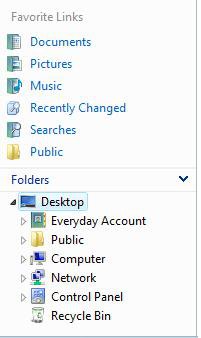
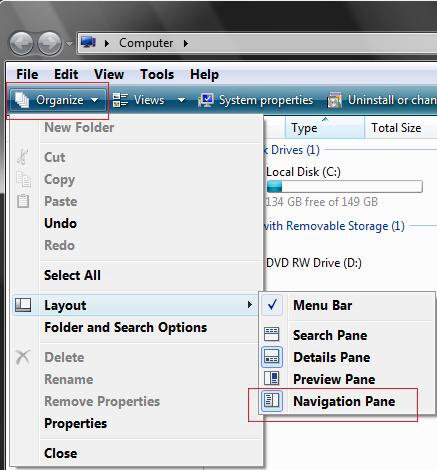
Navigation Pane in Vista Windows Explorer

How to Turn the Navigation Pane On or Off in Vista

...

My System SpecsSystem Spec
Old 08-14-2008  
Brink
Administrator


Join Date: Apr 2007
Vista x64 Ultimate SP2, Windows 7 Ultimate x64


Re: Navigation Pane in Vista Windows Explorer

Hi Siffy, and welcome to Vista Forums.

The Navigation Pane is tied to each folder template type in a Windows Explorer window. If you turn it off in say the All Items (details) template, it will still be on in the Pictures and Videos template. You just will need to repeat it once in each template type. For the "File -> Open" or "File -> Save As -> Browse" type windows, you will need to turn off the Navigation Pane in it, then close the window to have it not be on the next time you open it in each individual application.

Hope this helps,
Shawn

My System SpecsSystem Spec
Old 08-14-2008  
Siffy
Newbie


Join Date: Aug 2008
Vista Home Premium x64 SP1


Re: Navigation Pane in Vista Windows Explorer

Quote  Quote: Originally Posted by Brink View Post
Hi Siffy, and welcome to Vista Forums.

The Navigation Pane is tied to each folder template type in a Windows Explorer window. If you turn it off in say the All Items (details) template, it will still be on in the Pictures and Videos template. You just will need to repeat it once in each template type. For the "File -> Open" or "File -> Save As -> Browse" type windows, you will need to turn off the Navigation Pane in it, then close the window to have it not be on the next time you open it in each individual application.

Hope this helps,
Shawn
Thank you for the welcome. Well, I tried turning off auto template discovery to see if that would help, by following your tutorial through step 20.
Windows Explorer Folder View settings
That didn't make the pane go away either. I can open the folder, turn off the pane, close the folder, then open it again and the pane will reappear by itself. Is there no way to completely remove the Navigation Pane and/or Templates? I really have no use for either feature, as I find both more of a hindrance than helpful.
My System SpecsSystem Spec
Old 08-14-2008  
Brink
Administrator


Join Date: Apr 2007
Vista x64 Ultimate SP2, Windows 7 Ultimate x64


Re: Navigation Pane in Vista Windows Explorer

Siffy,

There is no way to completely remove the Navigation Pane the way you are wanting. The only option is turning it on or off.

Do all of Method Two (download or manual) in that Folder Views tutorial link. Afterwards, turn off the Navigation Pane for that Windows Explorer window and close it. It should remain turned off when you open it next time.
My System SpecsSystem Spec
Old 08-14-2008  
Siffy
Newbie


Join Date: Aug 2008
Vista Home Premium x64 SP1


Re: Navigation Pane in Vista Windows Explorer

Quote  Quote: Originally Posted by Brink View Post
Siffy,

There is no way to completely remove the Navigation Pane the way you are wanting. The only option is turning it on or off.

Do all of Method Two (download or manual) in that Folder Views tutorial link. Afterwards, turn off the Navigation Pane for that Windows Explorer window and close it. It should remain turned off when you open it next time.
Just noticed I wasn't specific. Method 2 is what I have already done. I skipped the part "Increase Folder View Cache Memory" but completed the rest. The Nav Pane still turns itself back on.
My System SpecsSystem Spec
Old 08-14-2008  
Brink
Administrator


Join Date: Apr 2007
Vista x64 Ultimate SP2, Windows 7 Ultimate x64


Re: Navigation Pane in Vista Windows Explorer

Siffy,

That's strange. I must admit that I'm not sure why it keeps turning on for you in that same Windows Explorer folder template type if you have turned it off in the same type of window and closed it. I do not seem to be having a problem with it staying off or on as selected. Is it just for that particular folder, or all of them?

In the mean time, you might also run a sfc /scannow command to see if it can find and fix any bad system files that may be contributing to this.

System Files - SFC Command
My System SpecsSystem Spec
Old 02-22-2009  
AF4K
Newbie


Join Date: Feb 2009
Vista Home 32bit


Unhappy Re: Navigation Pane in Vista Windows Explorer

I have tried all of this and it STILL doesn't work the way I want it to.
It ONLY works if you use EXPLORE rather than open.

And the tree is now gone. (navigation pane...) Wrong result!
What I want is to click pen a folder on my desktop, then click a subfolder
open and have it open in a seperate window.
Is that too much to ask? XP can do this... why can't Vista?

Just clicking on a folder on my desktop forces the new sub-folder to
re-use the same window again not starting in a new, seperate one like
I need it to. Anyone have ANY suggestions?

TIA
My System SpecsSystem Spec
Old 02-22-2009  
Brink
Administrator


Join Date: Apr 2007
Vista x64 Ultimate SP2, Windows 7 Ultimate x64


Re: Navigation Pane in Vista Windows Explorer

Hello AF4K,

Not sure what this has to do with turning the Navigation Pane on or off, but you should be able to right click on the folder or subfolder than click on Open in new window for it to. You might also see if this can helps as well.

Open a Folder in the Same or Separate New Window

Hope this helps,
Shawn
My System SpecsSystem Spec
Old 02-22-2009  
AF4K
Newbie


Join Date: Feb 2009
Vista Home 32bit


Re: Navigation Pane in Vista Windows Explorer

Thanks but no that doesn't work. There is no option for "open in another window" when you right click on a sub-folder icon.

I got this resolved by implementing a number of tweaks I found on other sites.
It seems like very few Vista users know how to resolve this and it is quite
a common problem.
My System SpecsSystem Spec
Old 02-22-2009  
Brink
Administrator


Join Date: Apr 2007
Vista x64 Ultimate SP2, Windows 7 Ultimate x64


Re: Navigation Pane in Vista Windows Explorer

AF4K,

Can you PM me the links to the tweaks you used to resolve this. I would be happy to see what I can do to write something up to help others with this same problem.

Thank you,
Shawn
My System SpecsSystem Spec
Old 09-17-2009  
edgordil
Newbie


Join Date: Sep 2009
Vista Home Premium 32bit


Re: Navigation Pane in Vista Windows Explorer

Hi Brink,

I would like to know how to put the navigation pane over the menu bar. Actually I got several 3rd party application that are menu bars in explorer, but I want the navigation pane to go to the top of the window. Something like the image

This:

Click the image to open in full size.

To look like this:

Click the image to open in full size.


In the image the black pane with tumbenails is an app that works like a menu bar.

Since I'm using WindowsBlinds for skinning vista, any change in the aero.msstyles with a HEX editor is not applied, but any change in the shellstyle.dll is efective. If the changes are in the regitry that could work to.

Thanks for your help!!!!
My System SpecsSystem Spec
Comment

Tutorial Tools


Similar Threads
Tutorial Category
why windows explorer folder pane cant synchronize with detial pane Vista General
Windows Explorer computer navigation pane is missing... Vista General
Windows Explorer & Navigation Pane woes Vista General
Newest windows vista updates messed with navigation pane? Vista General
Ajusting the navigation pane affects all windows? Thats no good. Vista file management


Vista Forums is an independent web site and has not been authorized,
sponsored, or otherwise approved by Microsoft Corporation.
"Windows Vista", the Start Orb, and related materials are trademarks of Microsoft Corp.
© Designer Media Ltd
Tutorial powered by GARS 2.1.8m ©2005-2006

1 2 3 4 5 6 7 8 9 10 11 12 13 14 15 16 17 18 19 20 21 22 23 24 25 26 27 28 29 30 31 32 33 34 35 36 37 38 39 40 41 42 43 44 45 46