Vista Forums
Vista Forums Home Join Vista Forums Donate Vista Tutorials Tags

Welcome to Vista Forums we are your forum to discuss Windows Vista x64 and x86 systems. Whether you need help or just want to post an idea you have on Vista, this is the forum for you.
Register at Vista forums...the world biggest Windows Vista resource Join Vista Forums Now

Go Back   Vista Forums > Vista Forums > Tutorials

Vista Tutorial Categories Network & Internet Tutorials File & Folder Settings Tutorials Taskbar & Start Menu Tutorials Performance & Maintenance Tutorials General Tips Tutorials Programs & Features Tutorials Context Menu Tutorials Shortcut Tutorials Security & System Tools Tutorials Parental Controls Tutorials User Account Tutorials Hardware & Drivers Tutorials Appearance & Personalization Tutorials Backup & Restore Tutorials Music, Photo, Video and Media Tutorials Power Management Tutorials

New Folder

Poll: Did this Tutorial help and work for you?
Poll Options
Did this Tutorial help and work for you?

Comment
 
Tutorial Tools Display Modes
Old 06-11-2007  
Brink's Avatar
Brink
Administrator


  Brink is online now

New Folder

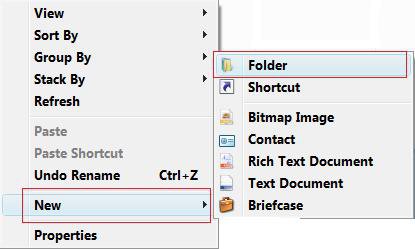
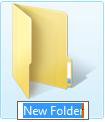
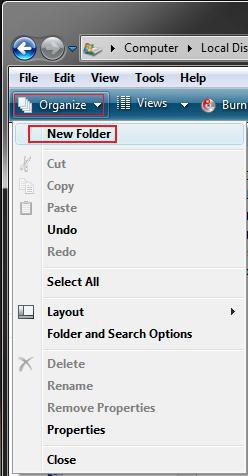
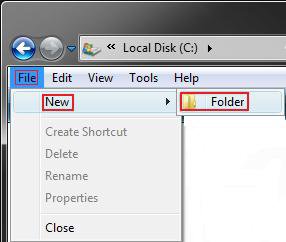
How to Fix the New Folder Context Menu Item in Vista
Old 05-18-2008  
Brink's Avatar
Brink
Administrator


  Brink is online now

Re: New Folder

I'm stumped to Osirus. The REG file restores the entry in the registry for Folder in the New menu.

The only other thing that I know to do is to reinstall.
Be sure to backup anything you do not want to lose first though.

Shawn
Old 05-19-2008  
woeisme
Newbie


  woeisme is offline

Re: New Folder

I have just joined this forum and I don't know if I have the same problem. I have tried the fix, but it does not work for me. After updating vista I am unable to create a folder in explorer or on the desktop. I get the menu by right clicking, but when I click on new it is telling me that it is empty. Any help and suggestions are welcome.
I am using vista Home Premium 32bit.
Old 05-19-2008  
osirus
Newbie


  osirus is offline

Re: New Folder

I'm still having the same problem, Doesn't make since to me. I'm also useing vista home premium 32bit.
Old 05-19-2008  
woeisme
Newbie


  woeisme is offline

Re: New Folder

I contacted MS email support and hope to hear within 24 hours. I hope they can point me in the right direction. I can't do a restore to pre SP1 where I know for sure the system as working as it should. I had to do other updates before installing SP1.
Old 05-20-2008  
woeisme
Newbie


  woeisme is offline

Re: New Folder

No Reinstall needed.

Here is the answer I got from Microsoft,
This behavior may occur if one of the following factors is true:

1. Incorrect Group Policy

2. Corrupted user account.

Delete All Group Policy Registry keys


1. Click "Start", type "regedit" in the Startup Search Bar, right click it and choose run as administrator.

2. Locate the following key:


[HKEY_LOCAL_MACHINE\Software\Policies\Microsoft]


Right click on "Microsoft", click "Export"; please name the file as "RegBackup" (without quotation marks) and then save it to the Desktop as a backup.


Note: In case we need to undo the modification, we can double click this RegBackup.reg file to restore the registry key.


3. Highlight Microsoft and click "Delete".

4. Please follow the same steps to delete the following keys:


Note: Please also backup the registry key before deleting them. Use the different backup name so that we can backup them all.


[HKEY_CURRENT_USER\Software\Policies\Microsoft]

[HKEY_CURRENT_USER\Software\Microsoft\Windows\CurrentVersion\Group Policy]

[HKEY_CURRENT_USER\Software\Microsoft\Windows\CurrentVersion\Policies]

This did not do it, but the create new user account did. All the options for "New" in the context menu are there.

Step 2.Create a new user account
====================
1. Click Start Menu, and then click Control Panel.

2. Click switch to a Classic View in left panel.

3. Double-click User Accounts.

4. Click Change another use account.

5. Click Create a new account, and type the name.

6. Choose account type as Computer administrator.

7. Click Create Account.

8. Log off and log on with the new account.
Old 05-20-2008  
Brink's Avatar
Brink
Administrator


  Brink is online now

Re: New Folder

Woeisme,

Thank you for sharing the results from Microsoft. It's nice to know that just creating a new user account and deleting the old one can solve this problem without a reinstall.

Shawn
Old 05-22-2008  
liolia
Newbie


  liolia is offline

Re: New Folder

hello shawn.i tryed step by step ,but then i tryed to run registry fixer,it opened in notpad with symbols
Old 05-22-2008  
Brink's Avatar
Brink
Administrator


  Brink is online now

Re: New Folder

Hi Liolia,

It sounds like you associated Notepad to the REG file extension instead of Regedit (Registry Editor) probably by using Open With. This tutorial will show you how to change the REG file extension back to being associated with the program Regedit. If you need to browse to the file in the tutorial instructions, it is located here C:\Windows\regedit.exe . You can use either Method One or Two.

Default Programs

Afterwards, run the REG file again to fix your original problem.

Hope this helps,
Shawn
Old 05-22-2008  
woeisme
Newbie


  woeisme is offline

Re: New Folder

Shawn,
You need transfer your old user profile to the new account you just created. That is if the previous step worked! Then you can delete the old one!

Transfer user profile
===============
The steps below are how to transfer the old user profile to the new one:


1. Click the Start menu, and click Computer.


2. Click the Organize button on the left top corner and choose Folder Options.


3. Under View tab, check the "Show hidden files and folders" box and click OK to save settings.


4. Navigate to the C:\Users\(old user name) folder.


Note: I assume that Windows Vista is installed on the C: partition. If Windows Vista is installed on the D: partition, the Users folder should be located in the D:\Users\(old user name) folder. Also the "old user name" refers to the user name of your old account. For example, if the user name of your old account is "Bill", the folder should be C:\Users\Bill.


5. Copy all files and folders in the C:\Users\(old user name) folder to the C:\Users\(new user name) folder.


Note: To copy all files, we can press Ctrl+A, and then Ctrl+C in the C:\Users\(old user name) folder. After that, navigate to the C:\Users\(new user name) folder, click Ctrl+V.
Old 05-22-2008  
Brink's Avatar
Brink
Administrator


  Brink is online now

Re: New Folder

Woeisme,

Now all you have to do is hope that the old user profile was not corrupted and that copying it over to the new one does not corrupt it.

Thank you for sharing your results,
Shawn
Comment

Tags
context menu, file & folder settings, folder, new

Tutorial Tools
Display Modes


Similar Threads
Tutorial Tutorial Starter Category Comments Last Post
What is the difference between My Account>Drafts Folder & Storage Folders>Draft Folder? JethroUK© Live Mail 1 06-25-2008 01:26 PM
Problem deleting vista RC windows folder and program files folder Rob Holmes Vista account administration 0 08-08-2007 02:42 PM
Explorer crashes when trying to open a folder on a shared folder on a Win 2003 server TheMackenzie Vista networking & sharing 3 05-17-2007 06:39 AM
Can't create a new file or folder with in a shared folder on a Windows XP machine. Basic Vista networking questions Nate Goulet Vista installation & setup 4 04-18-2007 04:20 AM
Re: Copying CD files to folder, then copy folder to another hard drive, explorer hangs zoner@cox.nospam.net Vista file management 0 03-31-2007 12:07 PM


Vistax64.com is an independent web site and has not been authorized,
sponsored, or otherwise approved by Microsoft Corporation.
"Windows Vista", the Start Orb, and related materials are trademarks of Microsoft Corp.
© Designer Media 2005-2008
Tutorial powered by GARS 2.1.8m ©2005-2006

1 2 3 4 5 6 7 8 9 10 11 12 13 14 15 16 17 18 19 20 21 22 23 24 25 26 27 28 29 30 31 32 33 34 35 36 37 38 39 40 41 42 43 44 45 46 47 48 49 50