How to See the Date and Time on the Taskbar in Vista
 Information
This will show you how set the Taskbar so you can see both the time and date instead of just the default time.
 Note
NoteYes, you could just hover your mouse pointer over the time, or click on the time, and the date will pop up. Except, maybe you would like to have the Date and Time to always show on the taskbar instead.
EXAMPLE: Default Time Display

EXAMPLE: Hover Mouse Pointer Over Time Display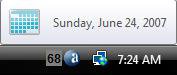
EXAMPLE: Click on Time to see Date and Time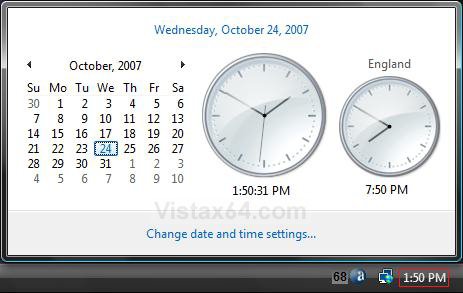
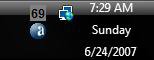
EXAMPLE: Date and Time Always Showing DisplayNOTE: This is what is exained how to do in the steps below.
Here's How:
1. Right click on the taskbar.
2. Click to uncheck Lock the Taskbar. (See screenshot below)
NOTE: If Lock the Taskbar is grayed out, then see: How to Enable or Disable Lock the Taskbar in Vista
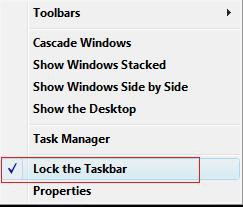
3. Move your mouse pointer on the line between the taskbar and your desktop until it turns into a double arrow. (See area boxed in red in screenshot below)

4. When it turns to a double arrow, hold your left mouse button down and drag the taskbar up one more level and then release your left mouse button.
NOTE: Sometimes, you may need to go up to a 3rd level depending on how you have your date format set to see it all.
5. Repeat steps 1 and 2, but click to check Lock the Taskbar back instead.
That's it,Shawn
Related Tutorials
- How to Set the Clock to Military 24 Hour Time in Vista
- How to Use Internet Time Synchronization in Windows
- How to Change the Internet Time Synchronization Update Interval in Windows
- How to Add Additional Time Zone Clocks in Vista
- How to Add or Remove a Toolbar to the Taskbar in Vista
- How to Change the Quick Launch Icon Size in Vista
- How to Change the Date and Time in Vista
- How to Change the Time Zone in Vista
- How to Turn Open Window Thumbnail Previews On or Off for the Taskbar in Vista
- How to Use Quick Launch in Vista
- How to Hide or Show a Notification Icon in Vista
- How to Show or Hide All Notification Area System Tray Icons in Vista
- How to Turn Group Similar Taskbar Buttons On or Off in Vista
- How to Lock or Unlock the Taskbar in Vista
- How to Enable or Disable Taskbar Toolbars in Vista
- How to Enable or Disable the Vista Taskbar Context Menus
- How to Change the Date Format in Vista
- How to Enable or Disable Lock the Taskbar in Vista
- How to Show or Hide Folder Full Path in the Vista Taskbar Buttons
- How to Enable or Disable Taskbar Always on Top in Vista
- How to Turn Taskbar Auto-hide On or Off in Vista
Attachments
Last edited by a moderator: