Windows Vista Forums

Registry Cleaner program slow
  1. #1
    <!-- google_ad_section_start -->Registry Cleaner program slow<!-- google_ad_section_end -->

    Registry Cleaner program slow
    How to Fix a Slow Scan in a Registry Cleaner Program in 64 bit Vista
    Published by Brink is offline
    24 Jun 2007
    Registry Cleaner program slow

    How to Fix a Slow Scan in a Registry Cleaner Program in 64 bit Vista

    information   Information
    If you have the 64 bit Vista and the Software scan option for your registry cleaning program is extremely slow and generating large incomprehensible results, then this will show you how to fix this problem.
    Tip   Tip
    When the registry has a second Wow6432Node key entry that is a blank duplicate, it can cause this problem for the software option in the regitry cleaning program. The second Wow6432Node key entry should not be in the registry.
    Note   Note
    You should check for a update for your registry cleaning program to see if they found a solution to make their program work with this problem. The free program Wise Registry Cleaner has this problem resolved.
    warning   Warning
    To be safe, you should never just let a registry cleaner delete the scan results without always double checking to make sure it is a valid registry entry to remove.

    As a precaution you should create a system restore point and note the time and date for a backup of the registry. To restore the registry, just do a System Restore using the restore point with the date of the one you created.
    Note   Note
    CREDIT TO: BOWEN and bugfree at this link.
    (BOWEN is a member of our Vistax64.com Forum as well)


    Here's How:
    1. Open the Start Menu.

    2. In the white line (Start Search) area, type regedit and press Enter.

    3. Click on Continue in the UAC prompt.

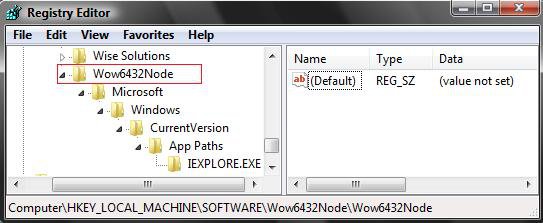
    4. In regedit, go to this key: (See screenshot below)
    HKEY_LOCAL_MACHINE\SOFTWARE\Wow6432Node\Wow6432Node
    5. In the left pane, right click on Wow6432Node and Delete.
    WARNING: Make sure you only delete this second Wow6432Node, or you will trash your system. If you deleted the first one, then do a System Restore using a restore point dated before doing this.
    reg.jpg
    6. Click on Yes to the confirmation pop-up. (See screenshot below)

    confirm.jpg
    7. Close regedit.
    NOTE: Your registry cleaning program should now scan properly again for the Software option.
    That's it's
    Shawn


    Published by


    Brink's Avatar
    Administrator

    Join Date: Apr 2007
    Location: Texas, USA
    Posts: 30,530
    Array

    Tutorial Tools


    Applies to

    All Vista Versions
    64 Bit

  2. #1


    Newbie
    Join Date : Aug 2007
    Posts : 3
    Vista 64bit
    Local Time: 04:58 AM

    Re: Registry Cleaner program slow

    Not working here ! There are some keys that you can't remove, even in Safe Mode.
    What's funny is that this key (WOW6432NODE) didn't exist before. After making some update ( Vista 64-bit here ), it suddenly shows up !
    Searching registry before ( with Registry Workshop ) took few minutes ( approx. 160.000 keys ), now there are 22 ( !?? ) instances of WOW6432NODE key and more than 1.000.000 keys in search. Crazy, isn't it ?


      My System SpecsSystem Spec

  3. #2
    coolchris's Avatar

    NoNonsense

    Join Date : Sep 2007
    Barnsley, UK
    Posts : 278
    Vista Ultimate 32/Windows 7 Dual Boot
    Local Time: 07:58 AM
    uk uk yorkshire


    Re: Registry Cleaner program slow

    YES. That did the trick. Many Thanks. Been wondering about all these WoW entries..

      My System SpecsSystem Spec

  4. #3
    Brink's Avatar

    Administrator


    Join Date : Apr 2007
    Texas, USA
    Posts : 30,530
    64-bit Vista Ultimate SP2, Windows 7 Ultimate SP1, Windows 8 Enterprise
    Local Time: 01:58 AM
    usa us texas

      Thread Starter

    Re: Registry Cleaner program slow

    Hi CoolChris,

    Glad to hear that it helped you. Thank you for the feedback.

    Shawn

      My System SpecsSystem Spec

  5. #4
    Brink's Avatar

    Administrator


    Join Date : Apr 2007
    Texas, USA
    Posts : 30,530
    64-bit Vista Ultimate SP2, Windows 7 Ultimate SP1, Windows 8 Enterprise
    Local Time: 01:58 AM
    usa us texas

      Thread Starter

    Re: Registry Cleaner program slow

    Quote Originally Posted by rilopes View Post
    Not working here ! There are some keys that you can't remove, even in Safe Mode.
    What's funny is that this key (WOW6432NODE) didn't exist before. After making some update ( Vista 64-bit here ), it suddenly shows up !
    Searching registry before ( with Registry Workshop ) took few minutes ( approx. 160.000 keys ), now there are 22 ( !?? ) instances of WOW6432NODE key and more than 1.000.000 keys in search. Crazy, isn't it ?
    Hi Rilopes,

    Welcome to the forum.

    I had that problem with the multiple WOW6432NODE key entries. Deleting only the second entry fixed the problem for me, and got rid of the other keys since they were subkeys of the second entry. I do not know why it would not let you delete the second one. All the keys for it have blank values. You can try to take ownership of that key first, then delete it. This tutorial will show you how. See method two step 3.

    How to Take Ownership of a Item in Vista

    If you still cannot get it to work, the free program Wise Registry Cleaner has updated their program to work fine with this problem.

    http://www.wisecleaner.com/download.html

    Or, you can just uncheck the Software scan option.

    Hope this helps,
    Shawn

      My System SpecsSystem Spec

  6. #5


    Newbie
    Join Date : Aug 2007
    Posts : 3
    Vista 64bit
    Local Time: 04:58 AM


    Re: Registry Cleaner program slow

    Hi Brink, your links helped a lot ! I'm just wondering , as our fellows above, what the hell are those WOW6432NODE's for...I'm pretty sure that those keys showed up after some update - probably WINDOWS6.0-KB939653-X64.MSU.
    Microsoft could just assume Vista is crap...

    Thank you !

      My System SpecsSystem Spec

  7. #6
    Brink's Avatar

    Administrator


    Join Date : Apr 2007
    Texas, USA
    Posts : 30,530
    64-bit Vista Ultimate SP2, Windows 7 Ultimate SP1, Windows 8 Enterprise
    Local Time: 01:58 AM
    usa us texas

      Thread Starter

    Re: Registry Cleaner program slow

    Your welcome Rilopes,

    LOL, I'm not sure which Update caused the problem. I haven't had the problem again though. So it must have been a one time screw-up.

    You can look around in the first WOW6432NODE key and all it's subkeys to see what all is in it. It is a lot. Mostly settings and stuff for the installed programs that are needed by Vista.

    Shawn

      My System SpecsSystem Spec

  8. #7


    Newbie
    Join Date : Jun 2008
    Posts : 5
    Vista Home Premium 64bit
    Local Time: 11:58 PM


    Re: Registry Cleaner program slow

    Hi,

    Thanks for the tip. My second "Wow6432Node" was not empty of keys - there were eight or so - but the keys themselves were empty (i.e., no data or values fields). These sub-subkeys did not match the subkeys for the parent Wow6432Node, and it puzzles me as to why two different registry cleaners (Eusing and PC-Tools) seemed to loop endlessly over the parent Wow6432Node - the names of the subkeys were clearly that of the parent.

    At any rate, deleting the 2nd key also worked for me.

      My System SpecsSystem Spec

  9. #8
    Brink's Avatar

    Administrator


    Join Date : Apr 2007
    Texas, USA
    Posts : 30,530
    64-bit Vista Ultimate SP2, Windows 7 Ultimate SP1, Windows 8 Enterprise
    Local Time: 01:58 AM
    usa us texas

      Thread Starter

    Re: Registry Cleaner program slow

    Your welcome Cniggeler, and welcome to Vista Forums.

    Something about having the second WOW6432NODE key just causes this looping problem.

    Glad to hear it it working for you now.

    Shawn

      My System SpecsSystem Spec

  10. #9


    Newbie
    Join Date : Jun 2008
    Baguio City
    Posts : 4
    Vista Ultimate x64
    Local Time: 02:58 PM
    philippines


    Re: Registry Cleaner program slow

    Thanks Brink, works perfectly with Registry Mechanic 7.0

      My System SpecsSystem Spec

Page 1 of 2 12 LastLast
Registry Cleaner program slow problems?

Similar Threads
Tutorial Tutorial Starter Category Comments Last Post
Wise Registry Cleaner vs AusLogics Registry Defrag vs CCLeaner? Coderedpl Vista performance & maintenance 7 29 Sep 2008
Recommended Registry Cleaner Program? ilgenfritz82 Software 4 10 Jul 2008
How to Uninstall Registry Cleaner Trial Program SBTaylor Vista performance & maintenance 2 12 Jan 2008
Registry Cleaner Sierra General Discussion 1 16 Aug 2007
Vista x64 Defrag program and registry cleaner rapierau Vista performance & maintenance 0 13 Aug 2006