
How to Set Vista for the CPU L2 Cache Memory Size
 Information
The SecondLevelDataCache records the size of the processor cache, also known as the secondary or L2 cache. If the value of this entry is 0, Vista will attempt to retrieve the L2 cache size from the Hardware Abstraction Layer (HAL) for the platform. If Vista fails for some reason to retrieve the L2 cache size from HAL, then it uses a default CPU L2 cache size of only 256 KB. If the default value of the SecondLevelDataCache value is not 0, Vista will use the value (amount of memory) you set instead of 0 (for 256 KB) as the L2 cache size of. This value is designed as a secondary source of cache size information for Vista when the HAL cannot detect the L2 cache from the CPU.
 Note
NoteThis sets the SecondLevelDataCache inside the registry.
From Microsoft KB183063:
From Microsoft KB183063:
Microsoft KB183063 said:This is not related to the hardware; it is only useful for computers with direct-mapped L2 caches. Pentium II and later processors do not have direct-mapped L2 caches. SecondLevelDataCache can increase performance by approximately 2 percent in certain cases for older computers with ample CPU L2 memory (more than 64 MB) by scattering physical pages better in the address space so there are not so many L2 cache collisions. Setting SecondLevelDataCache to 256 KB rather than 2 MB (when the CPU has a 2 MB L2 cache) would probably have about a 0.4 percent performance penalty.
 Warning
Only set the value to what your processor actually has for the L2 cache size. Do not use a larger size than it actually has.
 STEP ONE
NOTE: This will show you how to see what the L2 cache size is for your CPU as it is reported to Vista by HAL. This value will be used in STEP TWO below to set the SecondLevelDataCache value for this as a backup in case HAL rarely could not detect the L2 cache from the CPU.
1. Generate a System Health Report.
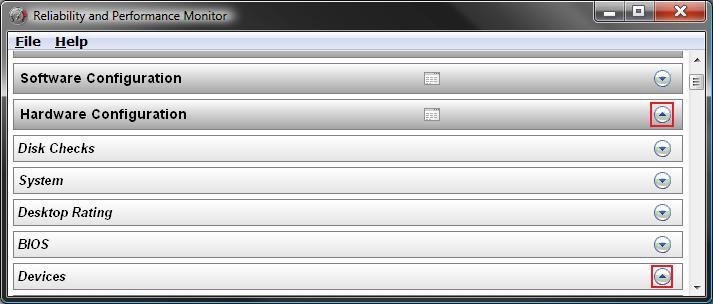
2. Click on the Hardware Configuration arrow on the far right to expand it. (See screenshot below step 3)
3. Click on the Devices arrow on the far right to expand it. (See screenshot below)
4. Under Devices, scroll down to Motherboard Classes. (See screenshot below step 5)
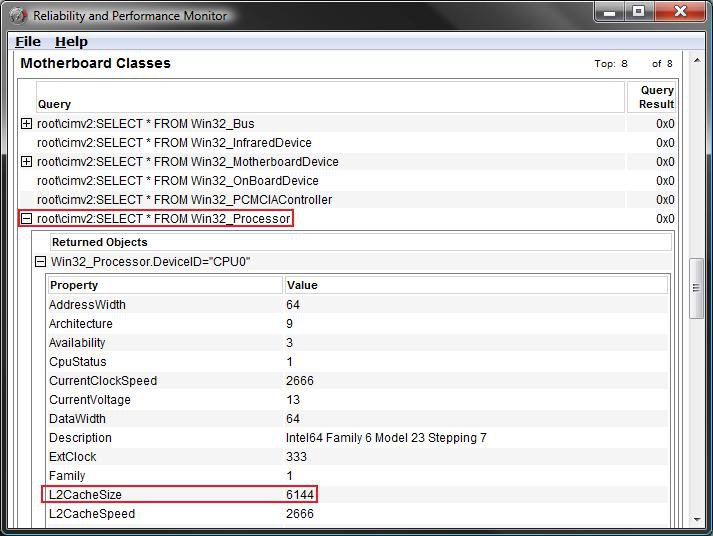
A) Click on the + sign to expand
root\cimv2:SELECT * FROM Win32_Processor.
B) Click on the + sign to expand
Win32_Processor.DeviceID="CPU0".
5. In that list, you will see L2CacheSize and the value beside it for it's size to use it in step 6 in STEP TWO below.
NOTE: For this example you will see 6144 to be used for my CPU's 2x6144 (12MB) L2 size. Now, here's a kicker. The newer Yorkfield Core 2 Quads CPUs use the entire cache for both cores unlike the older CPUs that do not share. So a 2x6144 (12mb) L2 cache would use 12288 (2x6144) instead despite what is reported in Vista for HAL.
STEP TWO NOTE: This will set the SecondLevelDataCache value in the registry, from the value gotten in STEP ONE, as a backup in case HAL rarely could not detect the L2 cache from the CPU and prevent having only a default L2 cache size of 256 KB used as L2 cache size instead by Vista.
1. Open the Start Menu.
2. In the white line (Start Search) area, type regedit and press Enter.
3. Click on Continue in the UAC prompt.
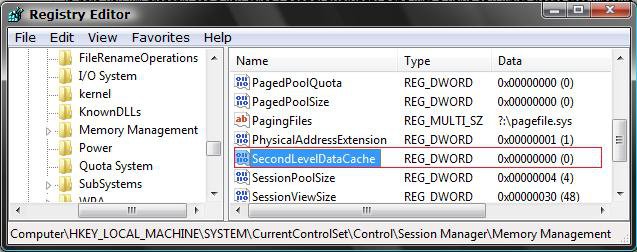
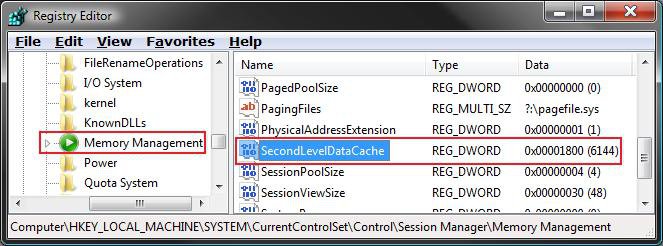
4. In regedit, go to: (See screenshot below)
Code:
HKEY_LOCAL_MACHINE\SYSTEM\CurrentControlSet\Control\Session Manager\Memory Management5. In the right pane, right click SecondLevelDataCache and click on Modify.
6. Dot Decimal, and type in the value in bold (see table below) for your CPU L2 size from STEP ONE above. (See screenshot below table)
NOTE: I have a CPU with a 2x6144 (12MB) L2 cache size, so I would use 6144 (Dec) or 1800 (Hex) since it is 2x. See STEP ONE above for how to get the L2 size for your CPU. Now, here's a kicker. The newer Yorkfield Core 2 Quads CPUs use the entire cache for both cores unlike the older CPUs that do not share. So a 2x6144 (12mb) L2 cache would use 122488 (Decimal) or 3000 (hex) instead despite what is reported in Vista for HAL.
Decimal Value | Hexadecimal Value |
256 KB | 100 (hex) |
512 KB | 200 (hex) |
1024 KB (1MB) | 400 (hex) |
2048 KB (2MB) | 800 (hex) |
3072 KB (3MB) | c00 (hex) |
4096 KB (4MB) | 1000 (hex) |
6144 KB (6MB) | 1800 (hex) |
8192 KB (8MB) | 2000 (hex) |
12288 KB (12MB) | 3000 (hex) |
16384 KB (16MB) | 4000 (hex) |
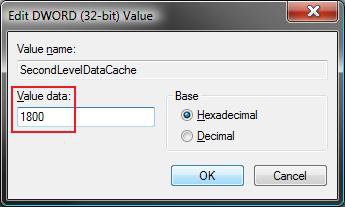
7. Click on OK to apply.
8. Your registry will look like this below for a 2x6144 (12MB) L2 cache memory size.
NOTE: See STEP ONE above to find out your CPU L2 cache size.
9. Close regedit.
10. Restart the computer to apply the change.
That's it,Shawn
Attachments
Last edited by a moderator:


