
How to Change the System Restore Disk Space Usage Amount in Vista
 Information
By default Vista allocates 15% of your selected hard drive volume to storing System Restore points after installation. If System Restore is turned on much later, it may only allocate a minimum of 30% of the available free space instead. When the allocated space fills up with restore points, System Restore will delete the older restore points to make room for the new ones. System Restore needs at least 300 MB allocated to it to run, and will not run on a hard drive smaller than 1 GB. In the Vista Business and Ultimate versions, this area is also where backup copies of deleted or changed files are stored and made available through the Previous Versions feature (Shadow Copy). For more information about the Vssadmin command, see: Microsoft Technet: Vssadmin
 Note
NoteSystem Restore needs to be turned on to be able to change it's storage size. To turn on System Restore and select what drives Vista is to create restore points for, see: How to Turn System Restore On or Off in Vista
 Warning
- If you shrink the available storage space for a selected drive, Vista will kick out the system restore points and backups on a first-in, first-out basis. The oldest restore point will be deleted as the new one is saved when out of available max space. This will, of course, leave you with fewer restore options.
- If you dual boot with Windows XP, then everytime you start in XP the System Restore Points and all except the most recent Complete PC Backup files in Vista get deleted. For how, see: How to Stop System Restore Points from being Deleted in Vista when Dual Booting with XP
 Tip
TipIf you just want to free up some space, then you can run Disk Cleanup instead.
 STEP ONE
1. Open a elevated command prompt.
2. If prompted by UAC, click on Continue.
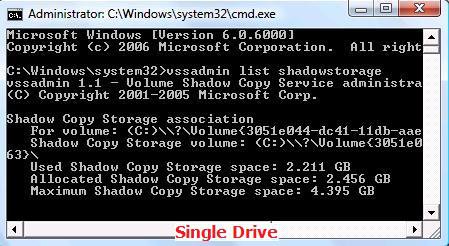
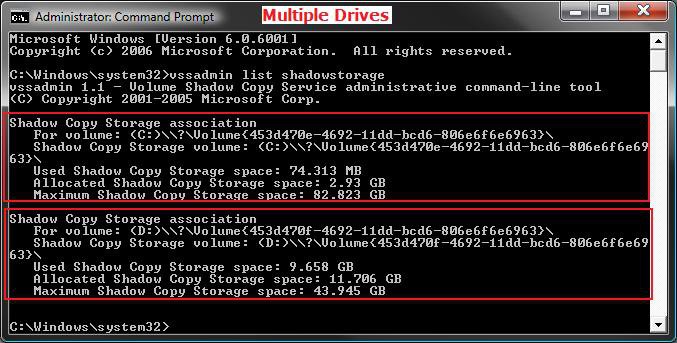
3. In the elevated command prompt, type vssadmin list shadowstorage and press Enter. (See screenshots below)
NOTE: This will give your the details on the Used, Allocated, and Maximum spaces of Shadow Copies for the available disks that you selected to have restore points created for in step 6 here: How to Turn System Restore On or Off in Vista. The left screenshot is for just one drive selected, and the right screenshot is for two drives (C & D ) selected.
Result | Description |
Used | This is the amount currently used on the hard disk. |
Allocated | This is the amount that it has reserved from the hard disk at this time. |
Maximum | This is the maximum amount it will allocate and use from the hard disk. |
STEP TWO NOTE: If you disable or enable System Restore for a selected drive, the original default values will be set back and the restore points will be deleted. For how, see: How to Disable or Enable System Restore in Vista.
1. In same elevated command prompt window from above, type for EX:
WARNING: If you change the MAX size to a smaller size than the current Used size shown in METHOD ONE above, then the older restore points will be deleted to adjust to the new size. Nothing will happen to the restore points if you make the MAX size larger than the current Used size shown in METHOD ONE above.
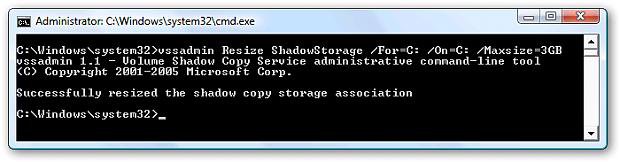
A) For the listed C: drive, type the command below and press Enter.
Code:
vssadmin Resize ShadowStorage /For=C: /On=C: /Maxsize=[B][COLOR=red]3GB[/COLOR][/B]B) For the listed D: drive, type the command below and press Enter.
Code:
vssadmin Resize ShadowStorage /For=D: /On=D: /Maxsize=[B][COLOR=red]3GB[/COLOR][/B]
NoteSee the screenshots below step 5 in OPTION ONE above under the Shadow Copy Storage association line for each drive listed.
Command | Description |
/For= | The For volume: listed. (Ex: C or D above) |
/On= | The Shadow Copy Storage volume: listed. (Ex: C or D above) |
/Maxsize= | What you want to limit the maximum storage size of Shadow Copies (restore points) to. For example, # + GB or MB (Ex: 3GB or 3MB) This must be 1MB or larger. |
2. You will get a Successfully resized the shadow copy storage association message.
3. If not, repeat step 1.
4. If yes, then check with STEP ONE above to confirm the change for the selected drive.
5. Close the elevated command prompt when done.
That's it,
Shawn
[digg].[/digg]
Related Tutorials
- How to Create a System Restore Shortcut in Vista
- How to Create a Create System Restore Point Shortcut in Vista
- How to Create a System Restore Point in Vista
- How to Undo the Last System Restore in Vista
- How to Do a System Restore in Vista
- How to Turn System Restore On or Off in Vista
- How to Use Disk Cleanup in Vista
- How to Restore Previous Versions of a File and Folder in Vista
- How to Stop System Restore Points from being Deleted in Vista when Dual Booting with XP
- How to Change the Automatic System Restore Point Settings in Vista Task Scheduler
- How to Enable or Disable Create Vista System Restore Point when New Device Driver is Installed
- How to Enable or Disable Create Vista System Restore Point when a Application is Installed
Attachments

Last edited by a moderator:


 \\?\Volume{9707de3c-9d94-11dc-bb54-806e6f6e6963}\


