
How to Hide or Show a Notification Icon in Vista
 Information
This will show you how to change each of the system tray icons in the notification area to be set as Hide all the time, Hide when inactive, or Show all the time.
Here's How:
1. Right click on a empty area of the Taskbar.
2. Click on Properties.
3. Click on the Navigation Area tab. (See screenshot below)
4. To Show All Icons on the Traybar
A) Uncheck Hide inactive icons and click Apply.
B) Go to step 9.
5. To Hide Inactive Icons on the Traybar
A) Check Hide inactive icons and click Apply.
6. To Hide or Show Only Selected Icons
A) Do step 5 first.
B) Click on the Customize button.
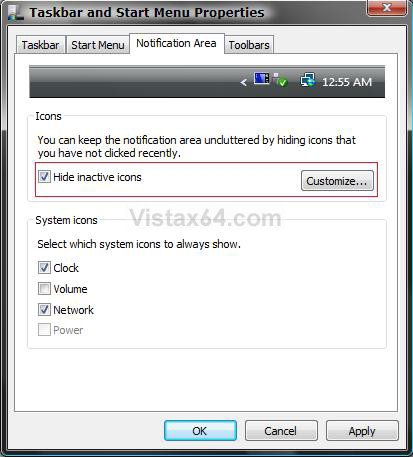
C) Click on a icon Item to highlight it. (See screenshot below step 9)
D) Click the drop down box next to the icon item and choose the option you want.
E) Click on Apply.
7. To Restore the Default Settings
NOTE: This will set them all back to Hide when inactive.
A) Click on the Default settings button. (See screenshot below step 9)
B) Go to step 9.
8. To Reset and Clean the Icon list
A) For how, see: How to Reset the Notification Area Icons Cache in Windows 7 and Vista
9. Click on OK to apply.
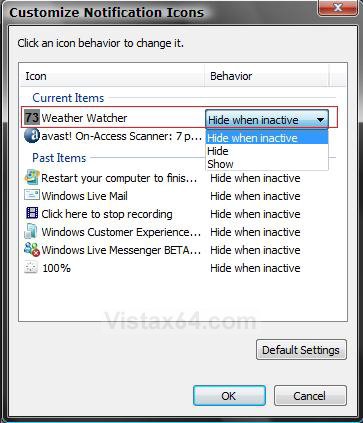
10. Click on OK. (See screenshot below step 6B)
That's it,Shawn
Related Tutorials
- How to Change How Long a Notification Dialog Box Will Stay Open in Vista
- How to Reset the Notification Area Icons Cache in Windows 7 and Vista
- How to Enable or Disable the Notification Area System Icons in Vista
- How to Add or Remove a Toolbar on the Taskbar in Vista
- How to Show or Hide All Notification Area System Tray Icons in Vista
- How to Turn Group Similar Taskbar Buttons On or Off in Vista
- How to See the Date and Time on the Taskbar in Vista
- How to Lock or Unlock the Taskbar in Vista
- How to Enable or Disable Taskbar Toolbars in Vista
- How to Show or Hide Folder Full Path in the Vista Taskbar Buttons
- How to Enable or Disable Taskbar Always on Top in Vista
- How to Turn Taskbar Auto-hide On or Off in Vista
Attachments
Last edited by a moderator: