
How to Elevate All Administrator Accounts UAC Privilege Level
 Information
This will show you how to change all administrator account's UAC Privilege Level to keep UAC on and not prompt an admnistrator, have UAC ask administrator for password, or the default of asking an Administrator to Continue for permission. UAC will still be on and work as usual for the Standard and Guests account types. For more information, see:
 Note
NoteThis will still leave Protected Mode: ON in Internet Explorer to.
 Tip
TipTo Have UAC Progam Exceptions to not have UAC ask for your permission on certain programs in Vista only, then you can use the Norton UAC Tool for this. This program will not work in Window 7.
 Warning
This can only be done while logged on to an administrator account.
 OPTION ONE
1. To Elevate Administrators Privilege Level for no Prompting by UAC
NOTE: When you elevate the administrator accounts privilege level, the Security Center in Vista will give you an alert warning notification in the notification area of the taskbar until you undo this. To turn this alert off, see: How to Disable or Enable the Security Center Alert Warning Notification in Vista.
A) Click on the download button below to download the file below.
Elevate_Administrator_Priviledge.reg

B) Go to step 4.
2. To Have UAC Prompt Administrators for a Password
NOTE: This will act just like it does in a Standard account by UAC asking you for the administrator's password before continuing.
A) Click on the download button below to download the file below.
Administrator_UAC_Require_Password.reg
B) Go to step 4.
3. To Have UAC Prompt Administrators for a Continue or Yes
NOTE: This is the default setting for UAC asking the administrator to click on Continue (Vista) or Yes (Windows 7) to give permission.
A) Click on the download button below to download the file below.
Restore_Default_Settings.reg
4. Click on Save, and save the .reg file to the Desktop.
5. Right click on the downloaded .reg file and click on Merge.
6. Click on Run, Continue (UAC-Vista) or Yes (UAC-Windows 7), Yes, and then OK when prompted.
7. Log off and log on, or restart the computer to apply the changes.
8. When done, you can delete the downloaded .reg file if you like.
OPTION TWO NOTE: This method is only available for the Vista Business, Ultimate, and Enterprise editions.
1. Open the Local Security Policy editor.
2. In the left pane, click on Local Policies. (See screenshot below step 5)
3. Click on Security Options.
4. In the right pane, double click on User Account Control: Behavior of the elevation prompt for administrators in Admin Approval Mode.
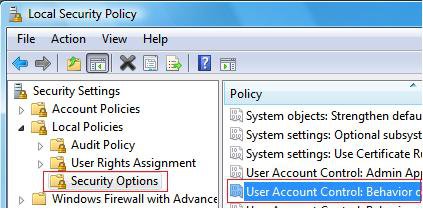
5. To Elevate Administrators Privilege Level for no Prompting by UAC
NOTE: When you elevate the administrator accounts privilege level, the Security Center in Vista will give you an alert warning notification in the notification area of the taskbar until you undo this. To turn this alert off, see: How to Disable or Enable the Security Center Alert Warning Notification in Vista
A) Click on the drop down arrow and change the setting to Elevate without prompting. (See screenshot below step 8)
B) Go to step 8.
6. To Have UAC Prompt Administrators for a Password
NOTE: This will act just like it does in a Standard account by UAC asking you for the administrator's password before continuing.
A) Click on the drop down arrow and change the setting to Prompt for credentials. (See screenshot below step 8)
B) Go to step 8.
7. To Have UAC Prompt Administrators for a Continue or Yes
NOTE: This is the default setting for UAC asking the administrator to click on Continue (Vista) or Yes (Windows 7) to give permission.
A) Click on the drop down arrow and change the setting to Prompt for consent. (See screenshot below step 8)
8. Click on OK to apply.
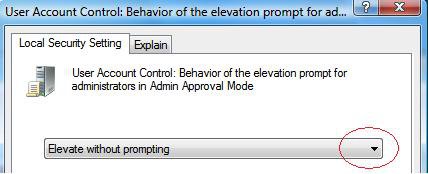
9. Close the Local Security Policy window. Your Done.
OPTION THREE 1. Open the Start Menu.
2. In the white line (Start Search) area, type regedit and press Enter.
3. If prompted by UAC, then click on the Continue (Vista) or Yes (Windows 7).
4. In regedit, go to: (See screenshot below)
HKEY_LOCAL_MACHINE\SOFTWARE\Microsoft\Windows\CurrentVersion\Policies\System
5. In the right pane, right click on ConsentPromptBehaviorAdmin and click on Modify.
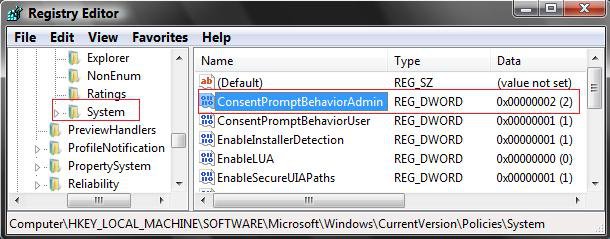
6. To Elevate Administrators Privilege Level for no Prompting by UAC
NOTE: When you elevate the administrator accounts privilege level, the Security Center in Vista will give you an alert warning notification in the notification area of the taskbar until you undo this. To turn this alert off, see: How to Disable or Enable the Security Center Alert Warning Notification in Vista.
A) Type 0 (Number) and click on OK. (See screenshot below step 8)
B) Go to step 9.
7. To Have UAC Prompt Administrators for a Password
NOTE: This will act just like it does in a Standard account by UAC asking you for the administrator's password before continuing.
A) Type 1 and click on OK. (See screenshot below step 8)
B) Go to step 9.
8. To Have UAC Prompt Administrators for a Continue or Yes
NOTE: This is the default setting for UAC asking the administrator to click on Continue (Vista) or Yes (Windows 7) to give permission.
A) Type 2 and click on OK.
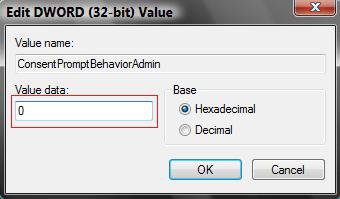
9. Close regedit.
10. Log off and log on, or restart the computer to apply the changes.
That's it,Shawn
Related Tutorials
- How to Change Behavior of User Account Control (UAC) Prompt for Standard Users
- How to Create a Elevated Program Shortcut without a UAC Prompt
- How to Turn UAC On or Off in Vista
- How to Enable or Disable the Real Built-in Administrator Account in Vista
- How to Take Ownership of a Item in Vista
- How to Disable or Enable the Security Center Alert Warning Notification in Vista
- How to Turn Windows Defender On or Off
- How to Enable or Disable the User Account Control (UAC) Blacking Out of Screen in Vista
- How to Change a User Account Type in Vista
- Bypass UAC for Standard Users
- How to Require Users to Press CTRL+ALT+DEL to Approve UAC Elevation
Attachments

Last edited:


