Vista Forums
Vista Forums Home Join Vista Forums Donate Vista Tutorials Tags

Welcome to Vista Forums we are your forum to discuss Windows Vista x64 and x86 systems. Whether you need help or just want to post an idea you have on Vista, this is the forum for you.
Register at Vista forums...the world biggest Windows Vista resource Join Vista Forums Now

Go Back   Vista Forums > Vista Forums > Tutorials

Vista Tutorial Categories Network & Internet Tutorials File & Folder Settings Tutorials Taskbar & Start Menu Tutorials Performance & Maintenance Tutorials General Tips Tutorials Programs & Features Tutorials Context Menu Tutorials Shortcut Tutorials Security & System Tools Tutorials Parental Controls Tutorials User Account Tutorials Hardware & Drivers Tutorials Appearance & Personalization Tutorials Backup & Restore Tutorials Music, Photo, Video and Media Tutorials Power Management Tutorials

Windows Borders - Change Size

Update your Vista Drivers Update Your Drivers Now!!
Poll: Did this Tutorial help and work for you?
Poll Options
Did this Tutorial help and work for you?

Comment
 
Tutorial Tools Display Modes
<!-- google_ad_section_start -->Windows Borders - Change Size<!-- google_ad_section_end -->
Windows Borders - Change Size
How to Change the Size of Window Borders in Vista
Published by Brink
07-29-2007

How to Change the Size of Window Borders in Vista

Information
  This will show you how to change the thickness of all of the window borders to what you want them to be in Vista.
RELATED LINKS:

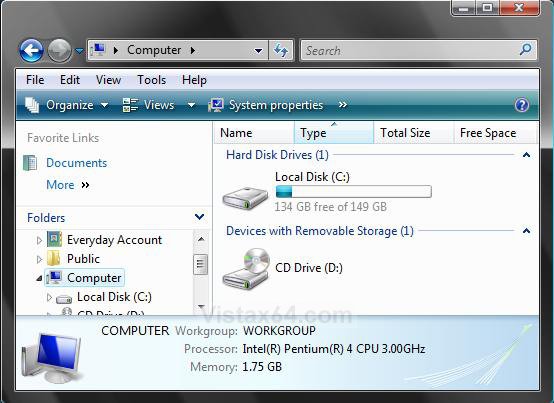
EXAMPLE: Default window borders size (4)
Name:  Default.jpg
Views: 817
Size:  105.2 KB
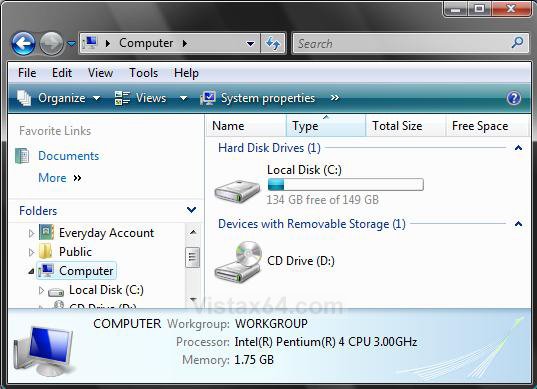
EXAMPLE: Thicker window borders size
Name:  Thicker.jpg
Views: 808
Size:  108.5 KB

Here's How:
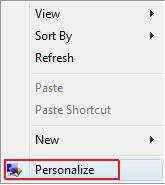
1. Right click on a empty area of your desktop and click Personalize. (See screenshot below)

Name:  Right_Click.jpg
Views: 918
Size:  5.6 KB

2. Click on Window Color and Appearace. (See screenshot below)

Name:  Personalize.jpg
Views: 916
Size:  4.5 KB

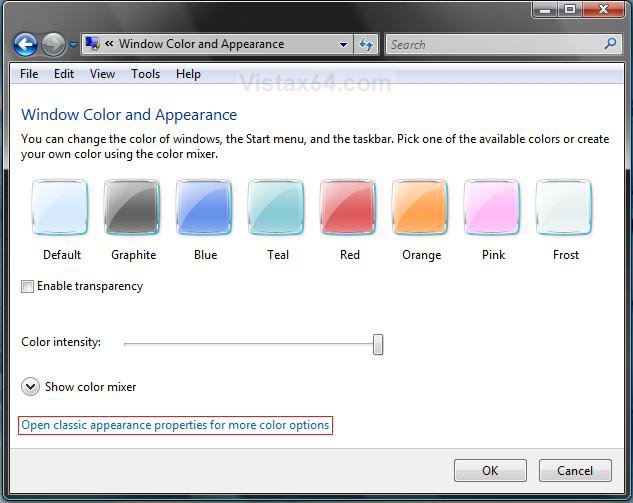
3. Click Open classic appearance properties for more color options. (See screenshot below)
NOTE: If the color scheme Windows Aero or Windows Vista Standard (Vista Home Basic) is not running, then you will not see this screen, but see the screen in step 4 instead. If you would like to change the color scheme to these, then see: How to Change the Color Scheme in Vista
Name:  Open_Classic.jpg
Views: 790
Size:  110.6 KB

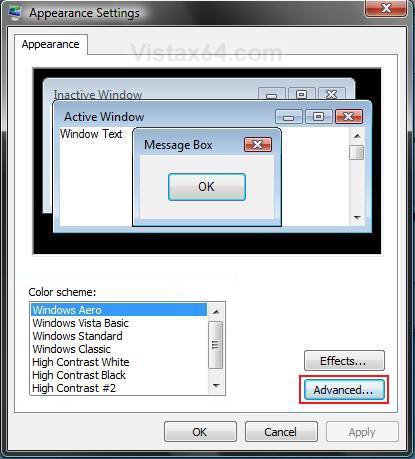
4. Click on the Advanced button. (See screenshot below)
NOTE: The Windows Aero color scheme is not available for the Vista Home Basic edition.
The Vista Home Basic edition will have the Windows Vista Standard color scheme instead.
Name:  Appearance.jpg
Views: 792
Size:  79.6 KB

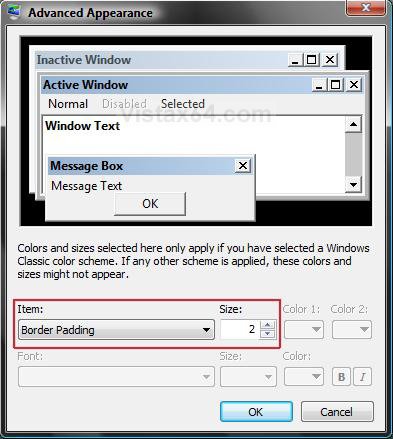
5. Select Border Padding from the Items: drop down list box. (See screenshot below)
NOTE: You can also change the Inactive Window Border and Active Window Border size to if you like.

6. Increase or decrease the number from the Size: box for how thick or thin you want the windows border to be. (See screenshot below)
NOTE: The higher the Size: number is, the thicker the border will be.

7. Click OK.

Name:  Border.jpg
Views: 783
Size:  81.2 KB

8. Click OK to apply the changes. (See screenshot below step 4)
That's it,
Shawn

Published by
Brink's Avatar
Administrator
Join Date: Apr 2007
Location: Texas, USA
Posts: 16,577
Rep Power: 150
Brink has a reputation beyond reputeBrink has a reputation beyond reputeBrink has a reputation beyond reputeBrink has a reputation beyond reputeBrink has a reputation beyond reputeBrink has a reputation beyond reputeBrink has a reputation beyond reputeBrink has a reputation beyond reputeBrink has a reputation beyond reputeBrink has a reputation beyond reputeBrink has a reputation beyond repute

Tutorial Tools
Show Printable Version Show Printable Version
Email this Page Email this Page

Applies to
All Vista Versions
64 Bit & 32 Bit

Old 05-24-2008  
veryunhappy's Avatar
veryunhappy
Member


Join Date: Apr 2008
vista home premium 32 bit
 
Rep Power: 4
veryunhappy is on a distinguished road
  veryunhappy is offline

Re: Windows Borders - Change Size

why

My System SpecsSystem Spec
Old 05-24-2008  
Brink's Avatar
Brink
Administrator


Join Date: Apr 2007
Vista x64 Ultimate SP1
Texas, USA
 
Rep Power: 150
Brink has a reputation beyond reputeBrink has a reputation beyond reputeBrink has a reputation beyond reputeBrink has a reputation beyond reputeBrink has a reputation beyond reputeBrink has a reputation beyond reputeBrink has a reputation beyond reputeBrink has a reputation beyond reputeBrink has a reputation beyond reputeBrink has a reputation beyond reputeBrink has a reputation beyond repute
  Brink is offline

Re: Windows Borders - Change Size

LOL Veryunhappy,

Why do folks like what they like? They just do.

It's just something to customize for whatever reason a person would want to.

Have a great day,
Shawn
My System SpecsSystem Spec
Old 05-25-2008  
veryunhappy's Avatar
veryunhappy
Member


Join Date: Apr 2008
vista home premium 32 bit
 
Rep Power: 4
veryunhappy is on a distinguished road
  veryunhappy is offline

Re: Windows Borders - Change Size

ok...
My System SpecsSystem Spec
Old 3 Weeks Ago  
gsxrmike04's Avatar
gsxrmike04
Junior Member


Join Date: Sep 2008
Vista Ultimate x64
RI
 
Rep Power: 1
gsxrmike04 is on a distinguished road
  gsxrmike04 is offline

Re: Windows Borders - Change Size

i thought it was a cool thanks
My System SpecsSystem Spec
Old 3 Weeks Ago  
Brink's Avatar
Brink
Administrator


Join Date: Apr 2007
Vista x64 Ultimate SP1
Texas, USA
 
Rep Power: 150
Brink has a reputation beyond reputeBrink has a reputation beyond reputeBrink has a reputation beyond reputeBrink has a reputation beyond reputeBrink has a reputation beyond reputeBrink has a reputation beyond reputeBrink has a reputation beyond reputeBrink has a reputation beyond reputeBrink has a reputation beyond reputeBrink has a reputation beyond reputeBrink has a reputation beyond repute
  Brink is offline

Re: Windows Borders - Change Size

Your welcome Mike, and welcome to Vista Forums.

Shawn
My System SpecsSystem Spec
Comment

Tags
apearance & personalize, borders, size, windows

Tutorial Tools
Display Modes


Update your Vista Drivers Update Your Drivers Now!!

Similar Threads
Tutorial Tutorial Starter Category Comments Last Post
How do i change my window borders to graphite Im stuck Vista General 2 03-01-2008 11:44 AM
windows change size while working Ralph Comp Vista performance & maintenance 0 05-24-2007 04:31 PM
Change Windows Photo Gallery Display Size MarkN Vista music pictures video 0 05-22-2007 08:59 PM
Windows change size while working Mike Holmes Vista performance & maintenance 2 05-09-2007 07:33 PM
Transparent Windows - Not Borders???? =?Utf-8?B?TUMgTG9ja3Vwcw==?= Vista General 4 09-12-2006 02:42 AM


Vistax64.com is an independent web site and has not been authorized,
sponsored, or otherwise approved by Microsoft Corporation.
"Windows Vista", the Start Orb, and related materials are trademarks of Microsoft Corp.
© Designer Media 2005-2008
Tutorial powered by GARS 2.1.8m ©2005-2006