Windows Vista Forums
Vista Forums Home Join Vista Forums Windows 7 Forum Vista Tutorials Tags

Welcome to Windows Vista Forums. Our forum is dedicated to helping you find solutions with any problems, errors or issues you are experiencing with Windows Vista. The Vista forum also covers news and updates and has an extensive Vista tutorial section that covers a wide range of tips and tricks.

Go Back   Vista Forums > Vista Forums > Tutorials

Vista Tutorial - Windows Mail Spell Checker Dictionary

Comment
 
LinkBack Tutorial Tools Display Modes
<!-- google_ad_section_start -->Windows Mail Spell Checker Dictionary<!-- google_ad_section_end -->
Windows Mail Spell Checker Dictionary
How to Edit a Word in the Spell Checker Custom Dictionary in Windows Mail
Published by Brink
06-05-2007

How to Edit a Word in the Spell Checker Custom Dictionary in Windows Mail
Information
  The custom dictionary is the secondary dictionary for Windows Mail Spell Checker. It is the dictionary that you customize by adding your own words that you would like Spell Checker to also use while spell checking your message. This can be helpful if you misspelled a word you added to the custom dictionary from Spell Checker and you want to remove or edit the word. You may also want to add a word or add a whole list without having to do it one at a time in the normal way.
NOTE
  The custom dictionary file used by Windows Mail is located at this hidden system file location below. If you have changed the default location of the WinMail stores folder, then the UserDictionary.lex file will be located there instead.

C:\Users\(your username)\AppData\Local\Microsoft\Windows Mail\UserDictionary.lex


Tip
  Windows Mail only has the English (US), French (France), German (Germany), Spanish (International Sort) languages available in it. If you want or need a email program for languages other than these, then you might consider using the free Mozilla Thunderbird instead.
RELATED LINKS:


METHOD ONE:
From Inside Windows Mail
NOTE
  This only allows you to add words one at a time to the custom dictionary from within Windows Mail.
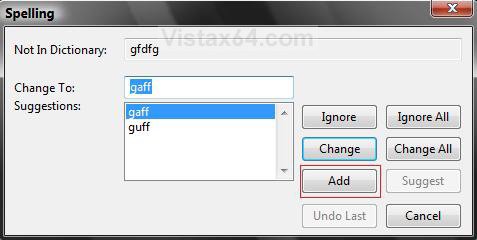
1. While you are running a spell check in Windows Mail, it comes across a word not in it's dictionary. (See screenshot below)
add.jpg
2. If this is the word you want to add to the dictionary, then click the ADD button.

3. It is now added to your custom dictionary.


METHOD TWO:
From Using Notepad
NOTE
  This will allow you to add, delete, or edit words from the custom dictionary.
1. Open Folder Options.
A) Dot Show hidden files and folders in Folder Options.

B) Click on OK, and close Folder Options.
2. Open the Start Menu.

3. In the white line (Start Search) area, type notepad and press Enter.

4. In Notepad, click on File on the menu bar. (See screenshot below)
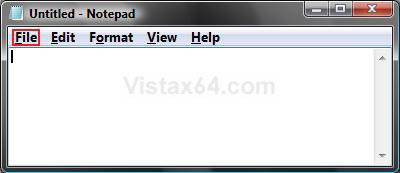
Name:  File.jpg
Views: 3117
Size:  22.7 KB
5. Click on Open. (See screenshot below)

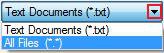
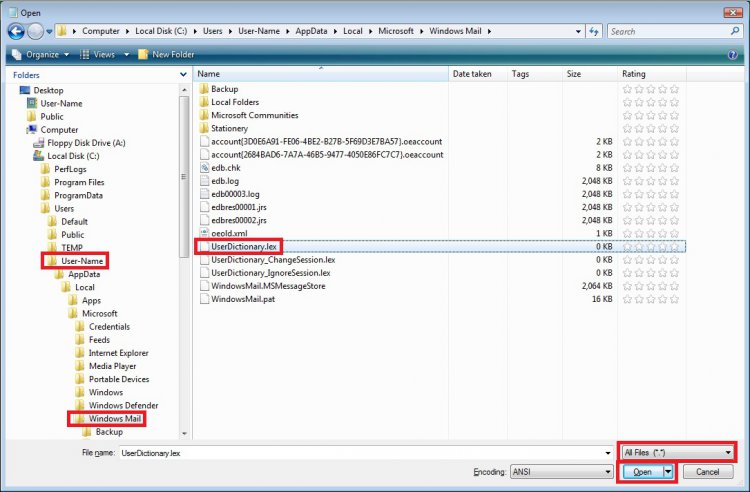
6. Click on the drop down menu arrow to the right of Text Documents (*.txt) and change it to All Files (*.*) instead in the bottom right corner of the Open window.

7. Navigate to this hidden system file:
C:\Users\(your username)\AppData\Local\Microsoft\Windows Mail
A) Click on the UserDictionary.lex file to highlight it, then click on Open.
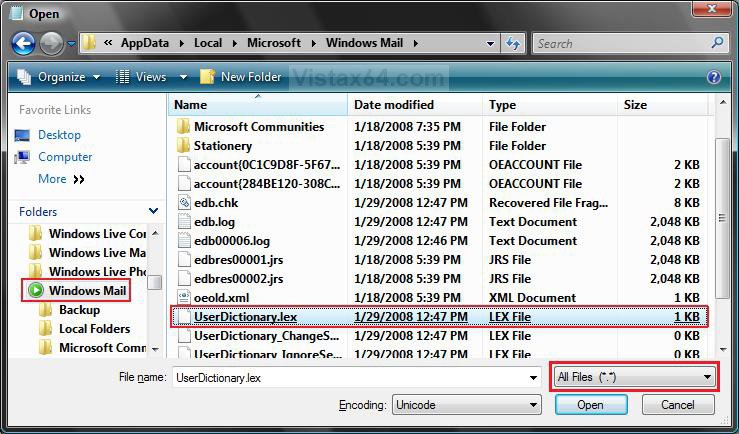
open.jpgName:  Text.jpg
Views: 3086
Size:  4.0 KB
8. This will now open the Userdictionay.lex file inside of Notepad from where you can now add, delete, or edit any word(s) you choose.
(See Example screenshots below)
WARNING: Make sure that there are no blank lines left between the words by your deletions, additions, or edits.
NOTE: If you did not add any words before in Windows Mail or manually here, this will be empty.
BEFORE Example
NOTE: Deleted the one boxed in red below.
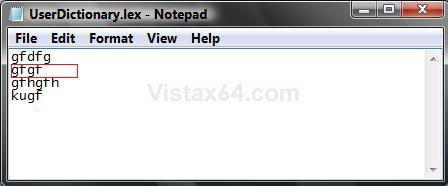
before.jpg

AFTER Example
NOTE: Notice not to leave a blank line inbetween the words.
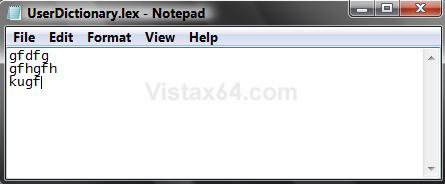
after.jpg
9. When done, click on File in the Notepad menu bar and click on Save.

10. Don't forget to go back and dot Do not show hidden files and folders instead in Folder Options.
That's it,
Shawn

Published by
Brink's Avatar
Administrator

Join Date: Apr 2007
Location: Texas, USA
Posts: 23,763
Rep Power: 150
Brink has a reputation beyond reputeBrink has a reputation beyond reputeBrink has a reputation beyond reputeBrink has a reputation beyond reputeBrink has a reputation beyond reputeBrink has a reputation beyond reputeBrink has a reputation beyond reputeBrink has a reputation beyond reputeBrink has a reputation beyond reputeBrink has a reputation beyond reputeBrink has a reputation beyond repute

Tutorial Tools
Show Printable Version Show Printable Version
Email this Page Email this Page

Applies to
All Vista Versions
64 Bit & 32 Bit

Page copy protected against web site content infringement by Copyscape

Old 10-21-2007  
bottomsjohn
Newbie


Join Date: Oct 2007
vista
 
Rep Power: 13
bottomsjohn is on a distinguished road
  bottomsjohn is offline

Re: Windows Mail Spell Checker Dictionary

I receive the message "Spelling check is complete" when no spell checking has been done at all. It is not a question of the dictionary not knowing a word. I know how to add a word.

I corrected the "language issue' several weeks ago after installing Vista, but now no spell check is done whatsoever. Any help appreciated. John
My System SpecsSystem Spec
Old 10-21-2007  
Brink's Avatar
Brink
Administrator


Join Date: Apr 2007
Vista x64 Ultimate SP2
Texas, USA
 
Rep Power: 150
Brink has a reputation beyond reputeBrink has a reputation beyond reputeBrink has a reputation beyond reputeBrink has a reputation beyond reputeBrink has a reputation beyond reputeBrink has a reputation beyond reputeBrink has a reputation beyond reputeBrink has a reputation beyond reputeBrink has a reputation beyond reputeBrink has a reputation beyond reputeBrink has a reputation beyond repute
  Brink is offline

Re: Windows Mail Spell Checker Dictionary

John,

I understand what you mean now. I do not know why spell checker would tell you completed and did not even run. I would recommend that you switch to Windows Live Mail Beta 2 (WLM) instead. It is a lot more stable and robust than Windows Mail. See the Third section here for details on WLM :

How to Fix Most Problems with Vista's "Windows Mail"

Shawn
My System SpecsSystem Spec
Old 06-13-2008  
krisandwll
Newbie


Join Date: Jun 2008
Vista Home Prem./32 bit
 
Rep Power: 8
krisandwll is on a distinguished road
  krisandwll is offline

Re: Windows Mail Spell Checker Dictionary

Thanx man. This was helpful, clear and easy to understand.
Ciao
My System SpecsSystem Spec
Old 06-13-2008  
Brink's Avatar
Brink
Administrator


Join Date: Apr 2007
Vista x64 Ultimate SP2
Texas, USA
 
Rep Power: 150
Brink has a reputation beyond reputeBrink has a reputation beyond reputeBrink has a reputation beyond reputeBrink has a reputation beyond reputeBrink has a reputation beyond reputeBrink has a reputation beyond reputeBrink has a reputation beyond reputeBrink has a reputation beyond reputeBrink has a reputation beyond reputeBrink has a reputation beyond reputeBrink has a reputation beyond repute
  Brink is offline

Re: Windows Mail Spell Checker Dictionary

Your welcome Ciao, and welcome to Vista Forums.

Shawn
My System SpecsSystem Spec
Old 1 Week Ago  
rjn25
Member


Join Date: Jun 2009
vista home
 
Rep Power: 1
rjn25 is on a distinguished road
  rjn25 is offline

Re: Windows Mail Spell Checker Dictionary

Non of the above was of any help from 7 onwards there is no listing as you state, Please put this in English step by step Please! I need help in changing some spellings!

Last edited by Brink; 1 Week Ago at 04:09 AM.. Reason: Removed unneeded comments
My System SpecsSystem Spec
Old 1 Week Ago  
Brink's Avatar
Brink
Administrator


Join Date: Apr 2007
Vista x64 Ultimate SP2
Texas, USA
 
Rep Power: 150
Brink has a reputation beyond reputeBrink has a reputation beyond reputeBrink has a reputation beyond reputeBrink has a reputation beyond reputeBrink has a reputation beyond reputeBrink has a reputation beyond reputeBrink has a reputation beyond reputeBrink has a reputation beyond reputeBrink has a reputation beyond reputeBrink has a reputation beyond reputeBrink has a reputation beyond repute
  Brink is offline

Re: Windows Mail Spell Checker Dictionary

Hello RJN, and welcome to Vista Forums.

This is in English. In step 7, click on that link to see how to unhide system files so that you can then see that file at that location. Afterwards, you should be able to follow the step by step instructions given to change or add a word in the custom dictionary.

Hope this helps,
Shawn
My System SpecsSystem Spec
Old 1 Week Ago  
rjn25
Member


Join Date: Jun 2009
vista home
 
Rep Power: 1
rjn25 is on a distinguished road
  rjn25 is offline

i click on All files i don't get (*:*) with it and then what do i do? nothing happens do i click on desktop in favorites link computer what? as i said this is not in English for me i am not a techno freak never had this problem with XP only wish my computer had not died! then i would not be having this agro I´m having with vista, anyway thanks for your help

I have also unhiden the files and still no box like you have on this screen at number 7?
My System SpecsSystem Spec
Old 1 Week Ago  
Brink's Avatar
Brink
Administrator


Join Date: Apr 2007
Vista x64 Ultimate SP2
Texas, USA
 
Rep Power: 150
Brink has a reputation beyond reputeBrink has a reputation beyond reputeBrink has a reputation beyond reputeBrink has a reputation beyond reputeBrink has a reputation beyond reputeBrink has a reputation beyond reputeBrink has a reputation beyond reputeBrink has a reputation beyond reputeBrink has a reputation beyond reputeBrink has a reputation beyond reputeBrink has a reputation beyond repute
  Brink is offline

Re: Windows Mail Spell Checker Dictionary

No problem RJN. After selecting All Files (*.*), then select the UserDictionary.lex file if listed there and click on Open.
My System SpecsSystem Spec
Old 1 Week Ago  
rjn25
Member


Join Date: Jun 2009
vista home
 
Rep Power: 1
rjn25 is on a distinguished road
  rjn25 is offline

Re: Windows Mail Spell Checker Dictionary

Look I dont know how to explain this but I do not get All Files (*:*) all I get is
All Files

then this list

wabmig
wabimp.dll
wadfind.dll
wad
OEspamfilter.dll
OESpamfilter.dat
oeimport.dll
msoe.dll
My System SpecsSystem Spec
Comment

Tags
checker, dictionary, mail, programs & features, spell, windows

Tutorial Tools
Display Modes


Similar Threads
Tutorial Tutorial Starter Category Comments Last Post
cannot turn on spell checker in windows mail John Vista mail 7 09-01-2008 02:58 PM
Windows Mail Spell Checker Dictionary- How is it Accessed? Susie-Q Vista mail 5 07-28-2008 07:18 AM
Spell checker for British people and custom dictionary Iain Andrew Donald McIntyre Vista mail 13 07-04-2008 12:41 AM
windows mail spell checker in Portuguese Arturo Rodríguez Vista mail 2 10-09-2007 09:52 AM
Vista Windows Mail Spell Checker lucyg Vista mail 7 07-31-2007 02:39 AM


Vista Forums is an independent web site and has not been authorized,
sponsored, or otherwise approved by Microsoft Corporation.
"Windows Vista", the Start Orb, and related materials are trademarks of Microsoft Corp.
© Designer Media Ltd
Tutorial powered by GARS 2.1.8m ©2005-2006