
How to Restore and Change a Desktop Icon in Vista
 Information
This will show you how to restore or change the Computer, User's Files, Network, Recycle Bin, and Control Panel default Vista desktop icons.
 Note
Note- To change the desktop Control Panel icon, see: How to Change the Desktop Control Panel Icon in Vista
- Sometimes refreshing the desktop will remove or show a icon that has been deleted or added to the desktop. To do so, press F5 or right click on the desktop and click Refresh.
- Sometimes the desktop icon may be not aligned correctly and is offscreen and not seen. You can right on a empty space on the desktop and click on Auto Arrange to realign the desktop icons.
Here's How:
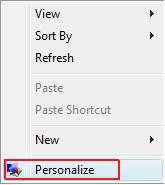
1. Right click on a empty area of the desktop and click on Personalize. (See screenshot below)
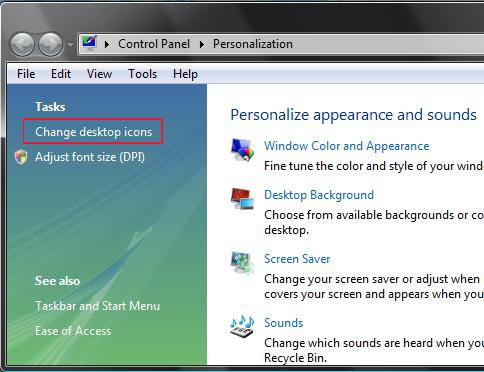
2. Click on Change desktop icons in the upper left corner. (See screenshot below)
3. To Add or Remove a Destop Icon
OPTION ONE:
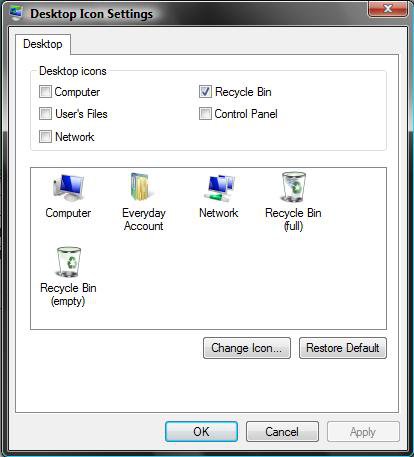
A) Check the Desktop icons in the top section that you want to add to the desktop. (See left screenshot below step 5)
B) Uncheck the Desktop icons in the top section that you want to remove from the desktop.
OPTION TWO:
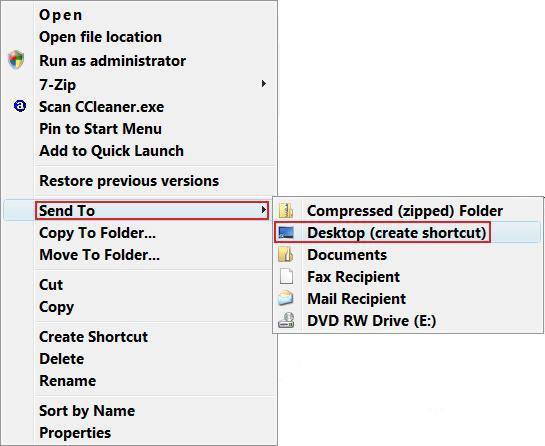
A) Right click on any file or folder.
B) Click on Send To and Desktop (create shortcut). (See Screenshot below)
4. To Change the Icon for a Desktop Icon
NOTE: To change the Control Panel icon, see: How to Change the Desktop Control Panel Icon in Vista
A) Click on a icon to highlight it in the middle section. (See left screenshot below step 5)
B) Click on the Change Icon button.
C) Select the icon you want for the desktop icon and click OK. (See right screenshot below step 5)
NOTE: If you have a icon of your own you want to use instead, then click the Browse button and navigate to the location you saved it to. For the icon to display properly, it needs to be a 256x256 .ico icon file.
5. To Restore the Default Icon for a Desktop Icon
NOTE: If this does not restore the default icon and you already tried manually changing the icon back in step 4, then try rebuilding the icon cache.
A) Click on a icon you want to restore in the middle section to highlight it. (See left screenshot below)
B) Click on the Restore Default button.
NOTE: For some reason, when you use Restore Default on the Recycle Bin, it will sometimes cause the Recycle Bin to not refresh automatically anymore. This will leave the Recycle Bin to always show as full or empty when it is not. If this happens to you, then see: How to Fix the Recycle Bin Icon Not Refreshing When Emptied

6. Click on OK to apply and close window.
That's it,Shawn
Related Tutorials
- How to Change the Size of Desktop Icons in Vista
- How to Create a Fully Functional Internet Explorer Shortcut in Vista
- How to Add or Remove a Desktop Toolbar in Vista
- How to Fix the Recycle Bin Icon Not Refreshing When Emptied
- How to Create a Desktop Internet Shortcut without the E Icon in Vista
- How to Change the Desktop Control Panel Icon in Vista
- How to Rebuild the Icon Cache in Vista
- How to Change the Desktop Icons View Alignment and Sort By Order in Vista
- How to Fix a Corrupted Recycle Bin in Vista
- How to Hide or Show Desktop Icon Text in Vista
- How to Replace Delete in the Recycle Bin Context Menu in Vista
- How to Restore the Recycle Bin back to the Desktop in Vista
- How to Allow or Prevent the Vista Recycle Bin Icon to Display
- How to Create a "Desktop Icon Settings" Shortcut in Vista and Windows 7
Attachments
Last edited by a moderator:


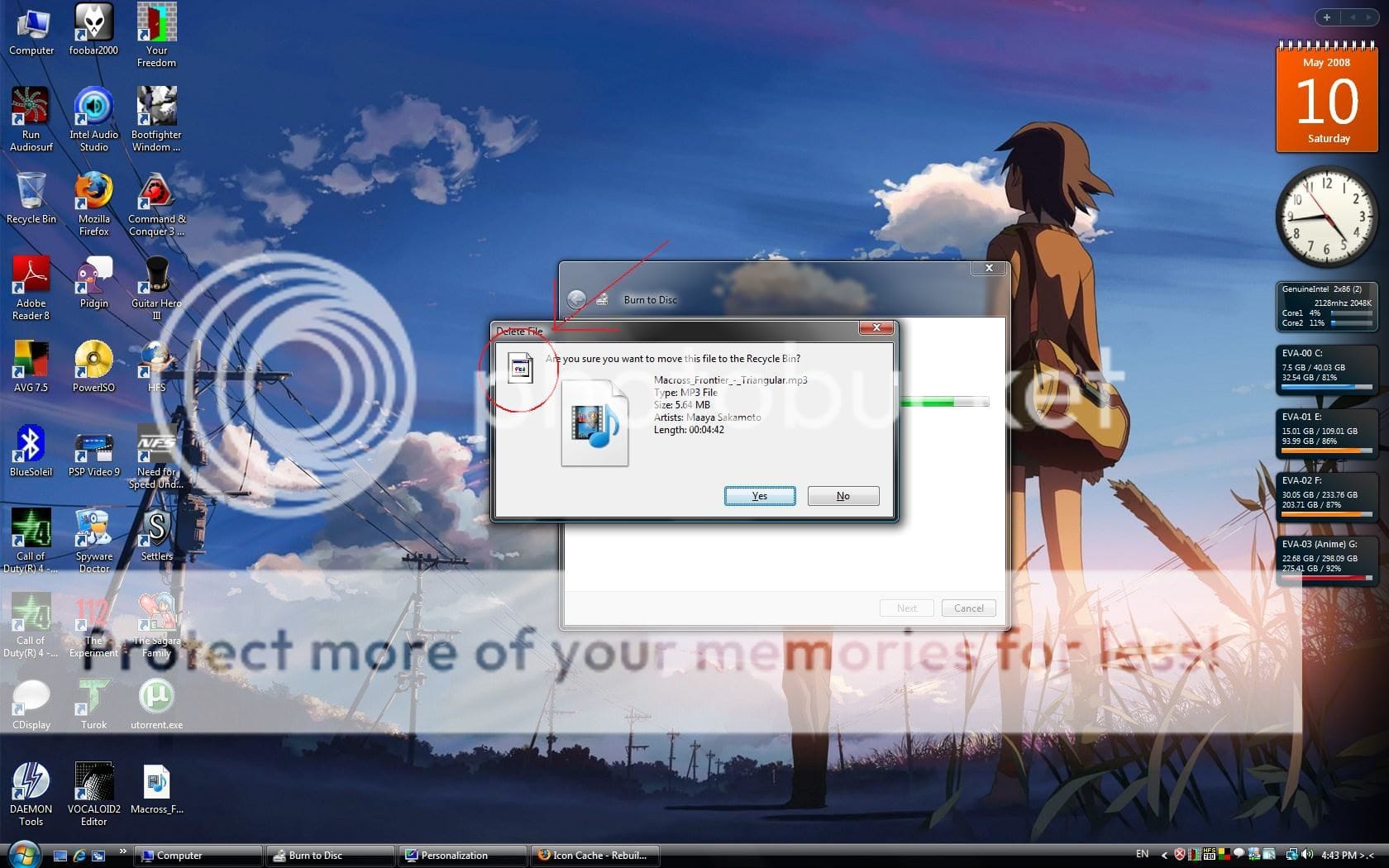


 Any help would be greatly appreciated. Thank in advance.
