![]() |
![]() | ![]() | ![]() | ![]() | ![]() | ![]() | ![]() |
| Welcome to Windows Vista Forums. Our forum is dedicated to helping you find solutions with any problems, errors or issues you are experiencing with Windows Vista. The Vista forum also covers news and updates and has an extensive Windows Vista tutorial section that covers a wide range of tips and tricks. |
| |||||||
![]() |
| |
License Information for Vista | ||||||||||||||||||||||||
| ||||||||||||||||||||||||
| | ||||||||||||||||||||||||
| | |
| Vista Ultimate x64 | Re: License Information for Vista I keep getting permission denied on everything and I'm running the command prompt as Administrator. |
My System Specs![]() |
| | |
| Vista x64 Ultimate SP2, Windows 7 Ultimate x64 | Re: License Information for Vista Strange, I'm not sure why you would be getting denied. What happens when you run these commands from the Start menu while logged on to a administrator account? |
My System Specs![]() |
| | |
| Vista Ultimate x64 | Re: License Information for Vista Same thing happens but, it looks like I'm having a lot of issues right now. I can't access my control panel through start - control panel, I keep getting a pop-up about windows not being genuine, and my software licensing won't start. I have Windows Vista Ultimate so, it's 64 bit. I might just have to do a clean install which I really don't want to do. I thought that the problem could be a program that I installed thats not compatible with vista 64 but, I have no idea which program it could be. I've already uninstalled a couple programs. |
My System Specs![]() |
| | |
| Vista x64 Ultimate SP2, Windows 7 Ultimate x64 | Re: License Information for Vista You might check to see if this is the issue of the C: drive (Vista) not having TrustedInstaller as the owner. TrustedInstaller - Restore as Owner Other than this, I'm not sure what could be causing this problem. If the above does not pan out, you might try a Repair (upgrade) install before having to do a clean reinstall to see if it will work instead. Repair Install For Vista Hope this helps, Shawn |
My System Specs![]() |
| | |
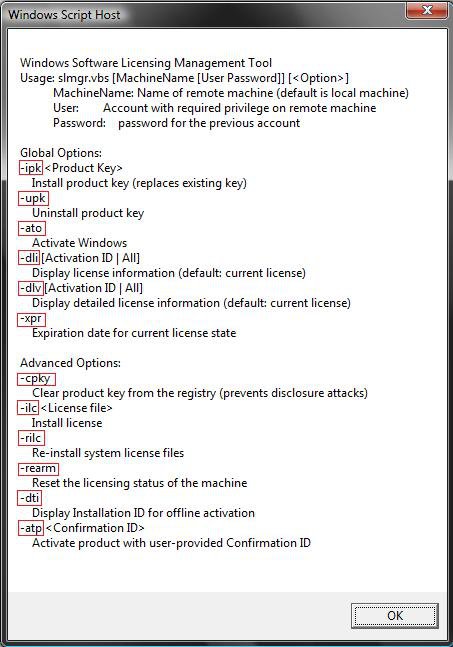
| Mostly Vista Ultimate x64 ... | Hello: The information presented here was very helpful. I was able to re-activate WinVista x64 by running the VB script with the -ato switch. The "notification" both in the form of a pop-up window, as well as that shown overlaid on my desktop, disappear ... that is until I re-boot. When I reboot I receive a notification that my version of Windows is genuine (cannot recall the actual wording) - this happens just prior to my WinVista desktop and icons show. Then I receive a second pop-up message as well as the desktop text overlay which indicate I do not have a valid/genuine version of Windows Vista (?). I have installed Windows Vista from my MSDN subscription, using the key provided, and did not have this problem until recently. I use a program called CCleaner (crap cleaner from ccleaner.com) and thought I may have cleared out some file, but this is only a guess. I cannot believe it would be a result of a type of virus, but would be interested in finding out what is causing this, and appreciate any help and feedback on this! Thanks! John *FYI, using the online verification tool from microsoft.com/genuine also works, temporarily. |
My System Specs![]() |
| | |
| Vista x64 Ultimate SP2, Windows 7 Ultimate x64 | Re: License Information for Vista Hello John, and welcome to Vista Forums. I'm not sure what may be causing your Vista to be invalidated like that, but have you tried the phone activation option yet to see how that may work for you instead? Hope this helps, Shawn |
My System Specs![]() |
![]() |
| Tutorial Tools | |
| |
Similar Threads | ||||
| Tutorial | Category | |||
| is windows vista license cover windows xp license | Vista General | |||
| Microsoft offering replacement XP license for VISTA license? | Vista performance & maintenance | |||
| license manager msg "Failed to open TCP port # in license"How to c | Vista General | |||
| Upgrade License Clean Install vs. Full License | Vista General | |||
| Impossible to write license information in the registry | Vista General | |||