How to Fix the Start Error for Windows Search Service to Enable the Index in Vista
 Information
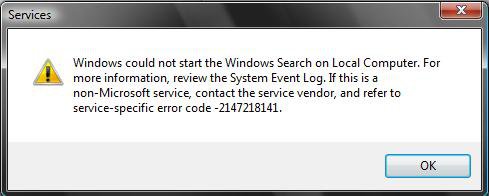
The Indexing Options are grayed out and you cannot get the Windows Search service to start. Follow the steps one by one, and at the end the index should be running again.
 Note
NoteIf the steps below do not help you, then you will need to do either a System Restore to a restore point date before this problem, a Repair install, or Clean install to fix this problem. See the related links below for how to do these.
EXAMPLE: Error Message
EXAMPLE: Index Options grayed out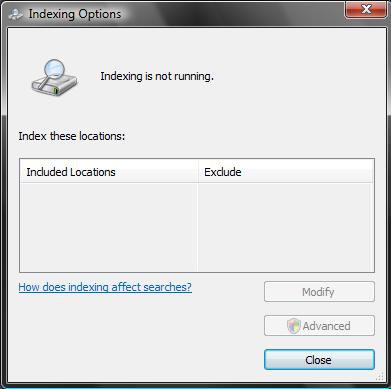
 STEP ONE
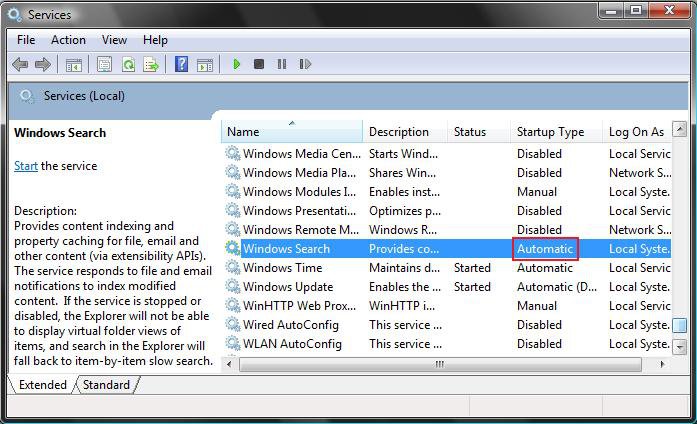
1. Leave Windows Search service set to only Automatic. (See screenshot below step 3)
2. Close Services.
3. Proceed to STEP TWO below.
STEP TWO Option One 1. Click on the download button below to download the file below.
Reset_Index.reg

2. Click on Save, and save the .reg file to the Desktop.
3. Right click on the downloaded .reg file and click on Merge.
4. Click on the Run, Continue (UAC), Yes, and OK when prompted.
5. When done, you can delete the downloaded .reg file if you like.
7. Proceed to STEP THREE below.
Option Two
1. Open the Start Menu, type regedit in the search box and press Enter.
2. If prompted by UAC, then click on Continue.
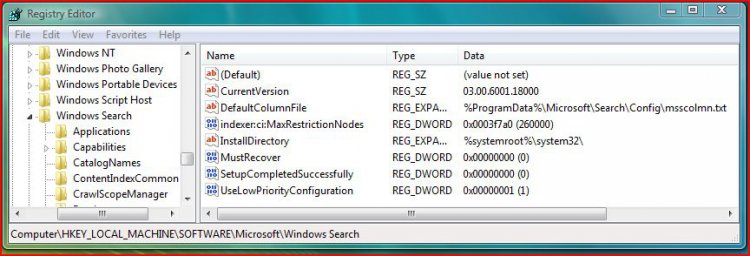
3. In regedit, go to: (See screenshot below step 5)
Code:
HKEY_LOCAL_MACHINE\SOFTWARE\Microsoft\Windows Search
4. In the right pane, right click on SetupCompletedSuccessfully and click on Modify.
NOTE: If SetupCompletedSuccessfully is not there, then in the right pane, right click on a empty area and click on New and DWORD (32 bit) Value. Type SetupCompletedSuccessfully and press Enter.
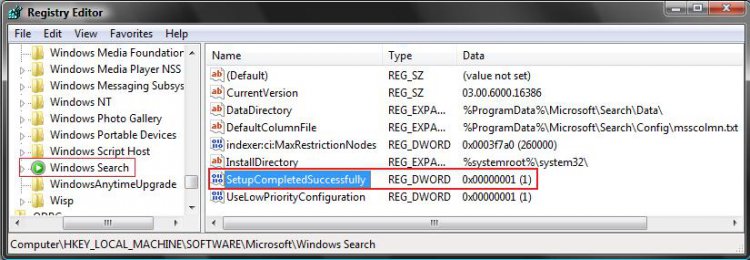
5. Type 0 and click on OK. (See screenshot below)
NOTE: This is the number zero.
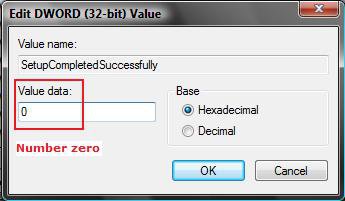
6. Close Regedit
7. Proceed to STEP THREE below.
STEP THREE 1. Open Folder Options.
A) Click on the View tab.
B) Check Show hidden files and folders.
C) Click on OK to apply and close folder options.
2. Go to C:\ProgramData\Microsoft\Search\Data (See screenshots below)
NOTE: You may notice that one or more of these folders (Applications, Config, Temp) may be missing from your window.
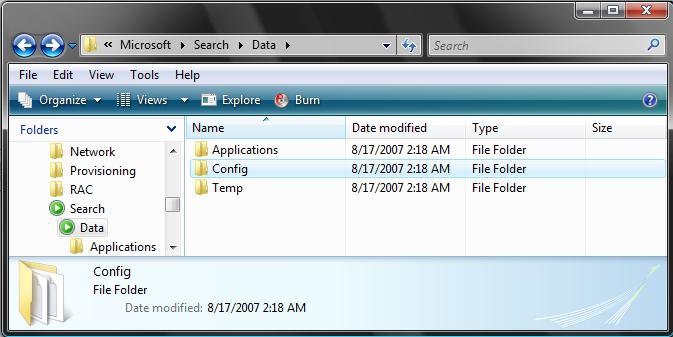
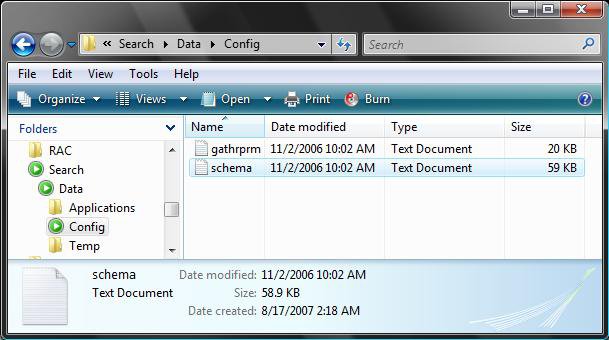
3. If the C:\ProgramData\Microsoft\Search\Data\Applications folder is missing, then right click on a empty area and click New and click Folder. (See screenshot above)
NOTE: If the Applications folder is not missing, then continue to step 3F after deleting only it's contents except for the Windows folder in it.
A) Click Continue for Access Denied prompt.
B) Click Continue for UAC prompt.
C) Type Applications and press Enter.
D) Click Continue for Access Denied prompt.
E) Click Continue for UAC prompt.
F) Open the Applications folder. If the Windows folder is missing, then click on New and Folder.
NOTE: If the Windows folder is not missing, then continue to step 4 after deleting only it's contents.
G) Click Continue for Access Denied prompt.
H) Click Continue for UAC prompt.
I) Type Windows and press Enter.
J) Click Continue for Access Denied prompt.
K) Click Continue for UAC prompt.
4. If the C:\ProgramData\Microsoft\Search\Data\Config folder is missing, then right click on a empty area and click New and click Folder. (See screenshot below step 2)
NOTE: If the Config folder is not missing, then continue to step 5 after deleting only it's contents.
A) Click Continue for Access Denied prompt.
B) Click Continue for UAC prompt.
C) Type Config and press Enter.
D) Click Continue for Access Denied prompt.
E) Click Continue for UAC prompt.
5. If the C:\ProgramData\Microsoft\Search\Data\Temp folder is missing, then right click on a empty area and click New and click Folder. (See screenshot below step 2)
NOTE: If the Temp folder is not missing, then continue to step 6 after deleting only it's contents.
A) Click Continue for Access Denied prompt.
B) Click Continue for UAC prompt.
C) Type Temp and press Enter.
D) Click Continue for Access Denied prompt.
E) Click Continue for UAC prompt.
6. Close all windows.
7. Restart the computer.
8. If this still will not work for you afterwards, then you can try a repair install instead.
That's it,Shawn
Related Tutorials
- How to Use the Indexing Options in Vista
- How to Open and Change Search Options in Vista
- How to Enable or Disable Search Index in Vista
- How to Do a Clean Install of Vista with a Upgrade Version
- How to Do a Clean Install with a Full Version of Vista
- How to Perform a Repair Installation for Vista
- How to Do a System Restore in Vista
Attachments

Last edited: